







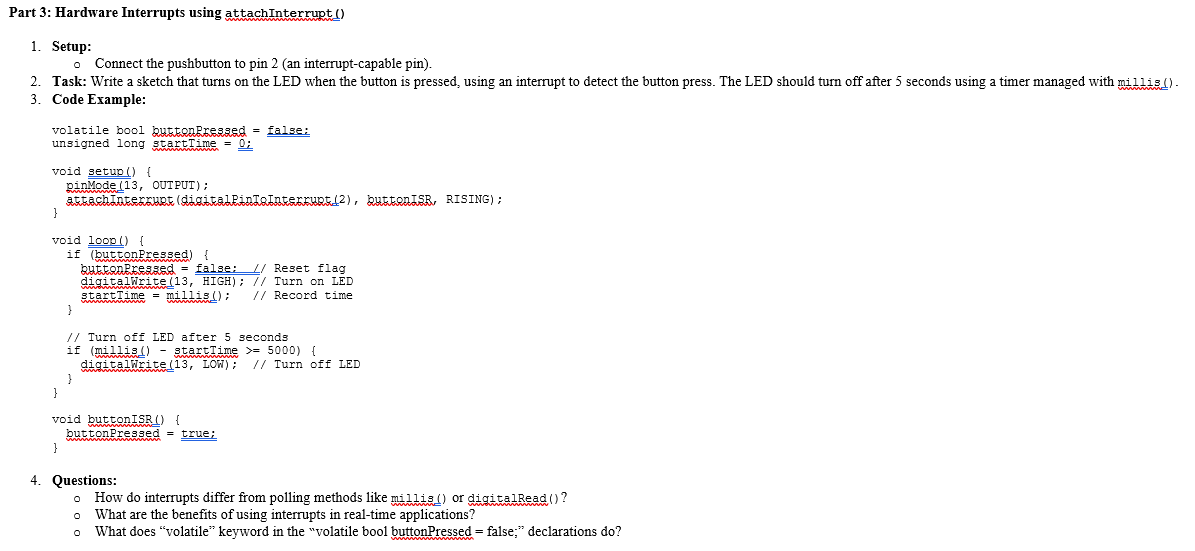
Question: Part 3 : Hardware Interrupts using attachInterrupt ( ) Setup: Connect the pushbutton to pin 2 ( an interrupt - capable pin ) . Task:
Part : Hardware Interrupts using attachInterrupt
Setup:
Connect the pushbutton to pin an interruptcapable pin
Task: Write a sketch that turns on the LED when the button is pressed, using an interrupt to detect the button press. The LED should turn off after seconds using a timer managed with millis
Code Example:
volatile bool buttonRrtasked false:
unsigned long startTime ;
void setup
pinMode OUTPUT;
AttachAterrupt digitalRinTRInterfupt buttonISR, RISING;
void loop
if buttonPressed
buttanRressed false: Reset flag
digitalWrite HIGH; Turn on LED
startTime millis; Record time
Turn off LED after seconds
if millis startTime
digitalWrite LOW; Turn off LED
void buttonISR
buttonPressed true;
Questions:
How do interrupts differ from polling methods like millis or digitalRead
What are the benefits of using interrupts in realtime applications?
What does "volatile" keyword in the "volatile bool buttonPressed false;" declarations do
Step by Step Solution
There are 3 Steps involved in it
1 Expert Approved Answer
Step: 1 Unlock

Question Has Been Solved by an Expert!
Get step-by-step solutions from verified subject matter experts
Step: 2 Unlock
Step: 3 Unlock
 Study Help