







Question: Part 4. Comparing Compounding We'll use the Table format to see how future values change with different compounding periods: COMPOUNDING TABLE: Divisions of a Year
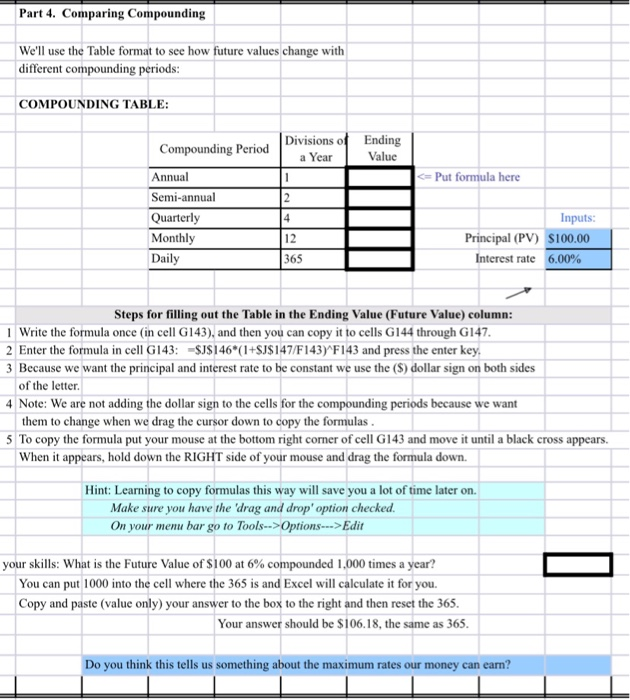
Part 4. Comparing Compounding We'll use the Table format to see how future values change with different compounding periods: COMPOUNDING TABLE: Divisions of a Year Ending Value 1 Put formula here 2 Compounding Period Annual Semi-annual Quarterly Monthly Daily 4 12 365 Inputs: Principal (PV) S100.00 Interest rate 6.00% Steps for filling out the Table in the Ending Value (Future Value) column: 1 Write the formula once (in cell G143), and then you can copy it to cells G144 through G147. 2 Enter the formula in cell G143: =$J$146*(1+$J$147/F143) F143 and press the enter key, 3 Because we want the principal and interest rate to be constant we use the (s) dollar sign on both sides of the letter. 4 Note: We are not adding the dollar sign to the cells for the compounding periods because we want them to change when we drag the cursor down to copy the formulas. 5 To copy the formula put your mouse at the bottom right corner of cell G143 and move it until a black cross appears. When it appears, hold down the RIGHT side of your mouse and drag the formula down. Hint: Learning to copy formulas this way will save you a lot of time later on. Make sure you have the 'drag and drop' option checked. On your menu bar go to Tools-->Options--->Edit your skills: What is the Future Value of $100 at 6% compounded 1,000 times a year? You can put 1000 into the cell where the 365 is and Excel will calculate it for you. Copy and paste (value only) your answer to the box to the right and then reset the 365. Your answer should be $106.18, the same as 365. Do you think this tells us something about the maximum rates our money can earn
Step by Step Solution
There are 3 Steps involved in it

Get step-by-step solutions from verified subject matter experts
 Study Help