







Question: Part II. Create a Database (10 points) 1. Create a Database in Access with the information studied in the module 2. This part has a
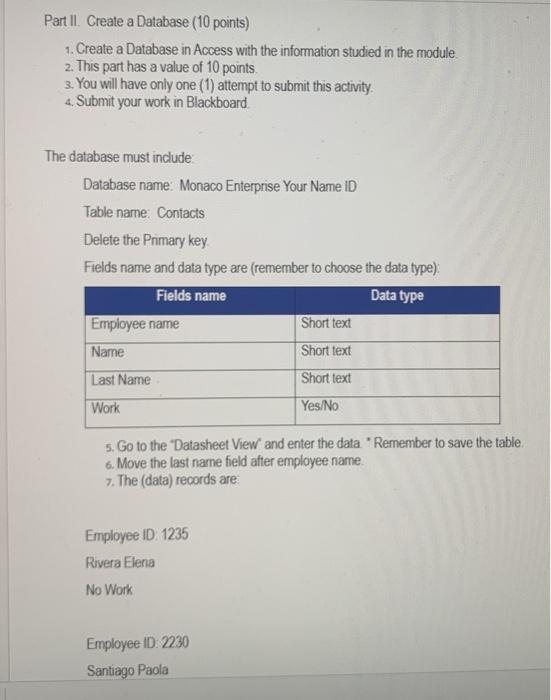
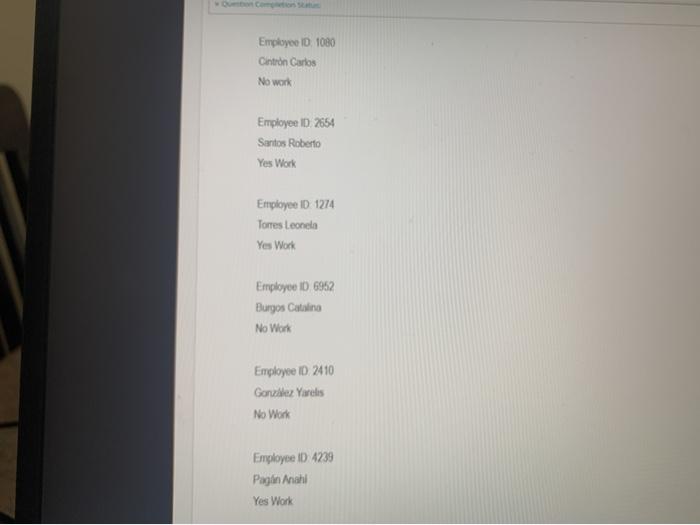
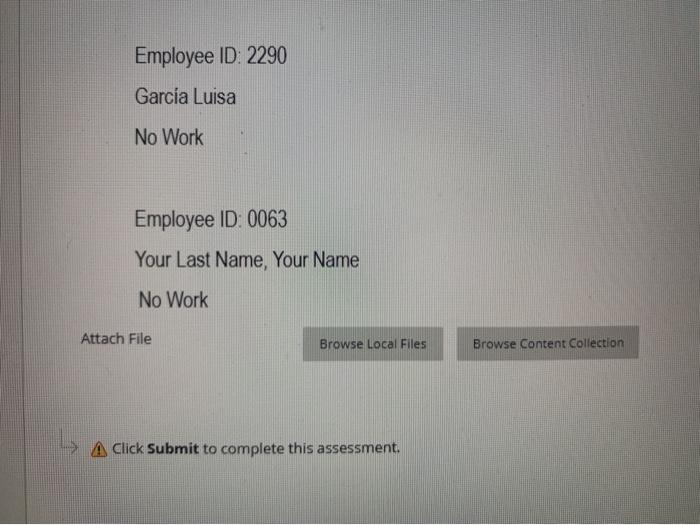
Part II. Create a Database (10 points) 1. Create a Database in Access with the information studied in the module 2. This part has a value of 10 points. 3. You will have only one (1) attempt to submit this activity 4. Submit your work in Blackboard. The database must include Database name: Monaco Enterprise Your Name ID Table name: Contacts Delete the Primary key Fields name and data type are (remember to choose the data type) Fields name Data type Employee name Short text Name Short text Last Name Short text Work Yes/No 5. Go to the 'Datasheet View and enter the data "Remember to save the table. 6. Move the last name field after employee name. 7. The (data) records are Employee ID 1235 Rivera Elena No Work Employee ID: 2230 Santiago Paola Employee ID. 1080 Cintron Carlos No work Employee ID 2654 Santos Roberto Yes Work Employee D 1274 Torres Leonelo Yes Work Employee ID 6952 Burgos Catalina No Work Employee ID 2410 Gonzlez Yarelis No Work Employee ID 4239 Pagin nahi Yes Work Employee ID: 2290 Garca Luisa No Work Employee ID: 0063 Your Last Name, Your Name No Work Attach File Browse Local Files Browse Content Collection A Click Submit to complete this assessment. Part II. Create a Database (10 points) 1. Create a Database in Access with the information studied in the module 2. This part has a value of 10 points. 3. You will have only one (1) attempt to submit this activity 4. Submit your work in Blackboard. The database must include Database name: Monaco Enterprise Your Name ID Table name: Contacts Delete the Primary key Fields name and data type are (remember to choose the data type) Fields name Data type Employee name Short text Name Short text Last Name Short text Work Yes/No 5. Go to the 'Datasheet View and enter the data "Remember to save the table. 6. Move the last name field after employee name. 7. The (data) records are Employee ID 1235 Rivera Elena No Work Employee ID: 2230 Santiago Paola Employee ID. 1080 Cintron Carlos No work Employee ID 2654 Santos Roberto Yes Work Employee D 1274 Torres Leonelo Yes Work Employee ID 6952 Burgos Catalina No Work Employee ID 2410 Gonzlez Yarelis No Work Employee ID 4239 Pagin nahi Yes Work Employee ID: 2290 Garca Luisa No Work Employee ID: 0063 Your Last Name, Your Name No Work Attach File Browse Local Files Browse Content Collection A Click Submit to complete this assessment
Step by Step Solution
There are 3 Steps involved in it

Get step-by-step solutions from verified subject matter experts
 Study Help