







Question: Part one: Examine the attached unnormalized table. Using the MySQL Workbench Data Modeler, construct a diagram that shows the table in 3rd Normal Form. Export
Part one: Examine the attached unnormalized table. Using the MySQL Workbench Data Modeler, construct a diagram that shows the table in 3rd Normal Form. Export your diagram as a single page PDF and post a screenshot
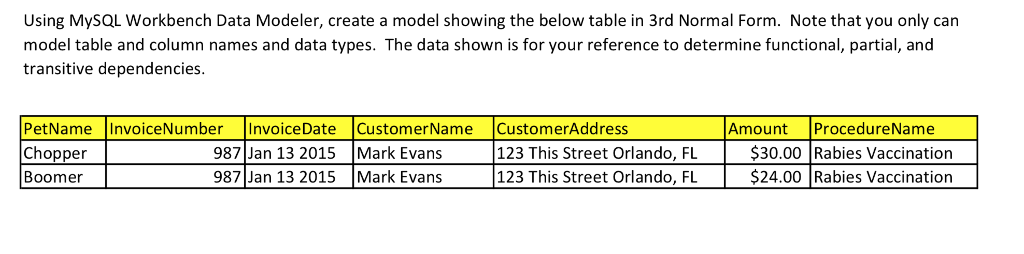
Using MysQL Workbench Data Modeler, create a model showing the below table in 3rd Normal Form. Note that you only can model table and column names and data types. The data shown is for your reference to determine functional, partial, and transitive dependencies. Amount ProcedureName PetName_InvoiceNumberInvoice DateCustomer Name CustomerAddress Chopper Boomer 987 Jan 13 2015 Mark Evans 1 $30.00 Rabies Vaccination 987 Jan 13 2015 Mark Evans 123 This Street Orlando, FL $24.00 Rabies Vaccination 123 This Street Orlando, FlL Using MysQL Workbench Data Modeler, create a model showing the below table in 3rd Normal Form. Note that you only can model table and column names and data types. The data shown is for your reference to determine functional, partial, and transitive dependencies. Amount ProcedureName PetName_InvoiceNumberInvoice DateCustomer Name CustomerAddress Chopper Boomer 987 Jan 13 2015 Mark Evans 1 $30.00 Rabies Vaccination 987 Jan 13 2015 Mark Evans 123 This Street Orlando, FL $24.00 Rabies Vaccination 123 This Street Orlando, FlL
Step by Step Solution
There are 3 Steps involved in it

Get step-by-step solutions from verified subject matter experts
 Study Help