







Question: Part one: Examine the attached unnormalized tables. Using the MySQL Workbench Data Modeler, construct diagrams that shows each table in 3rd Normal Form. Then merge
Part one: Examine the attached unnormalized tables. Using the MySQL Workbench Data Modeler, construct diagrams that shows each table in 3rd Normal Form. Then merge the resulting diagrams into a single diagram that will satisfy both tables. Export your diagrams as a single page PDF with a file name of Normalization Project Table 1.pdf, Normalization Project Table 2.pdf and Normalization Project Merged.pdf. Attach the three files in the submission area.
Part two: In the submission area, choose Write Submission and provide a summary of the steps you took to achieve 3rd Normal form. Include your rationale for new table creation, key selection and grouping of attributes.
Please help! Thanks!!
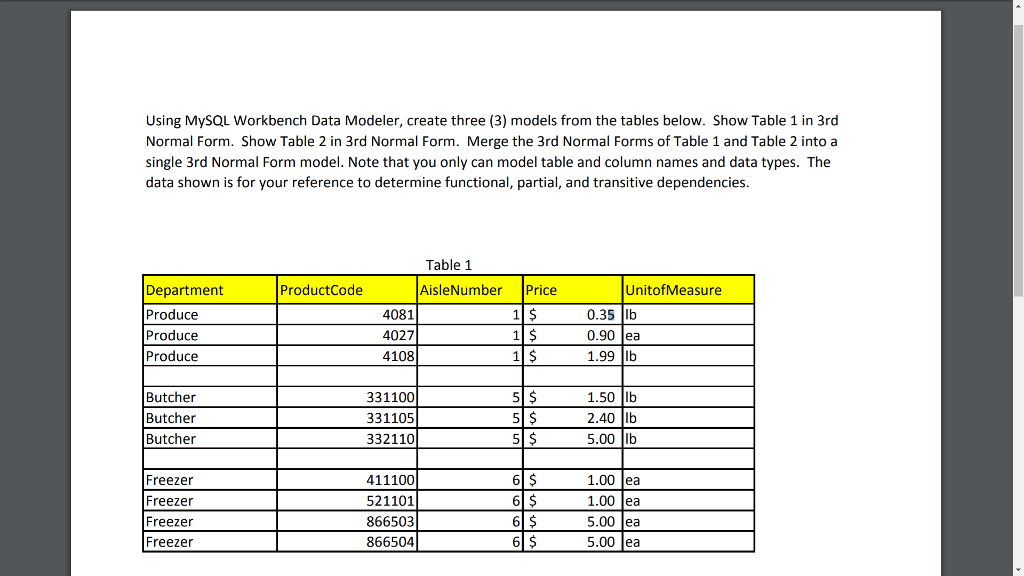
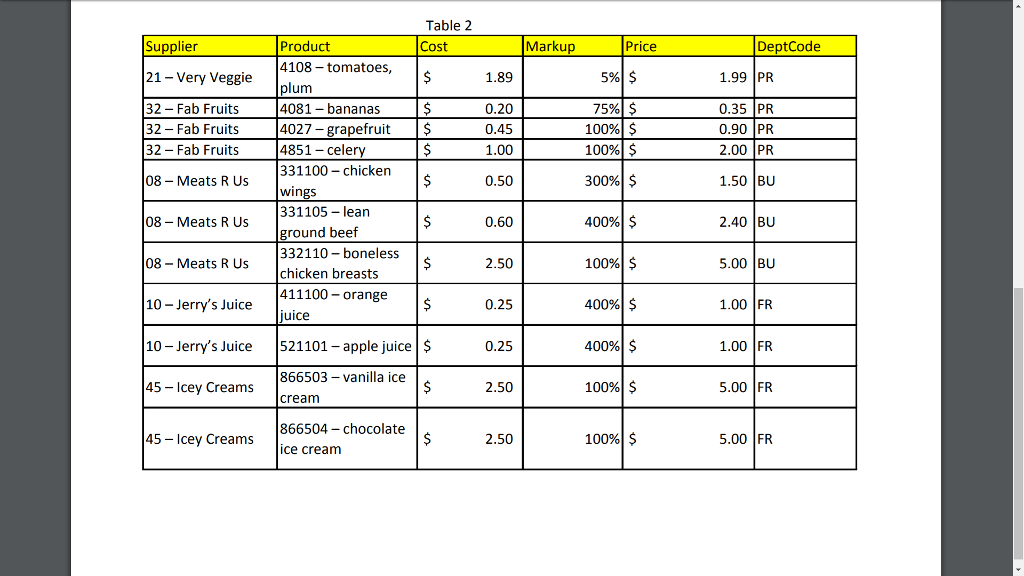
Using MySQL Workbench Data Modeler, create three (3) models from the tables below. Show Table 1 in 3rd Normal Form. Show Table 2 in 3rd Normal Form. Merge the 3rd Normal Forms of Table 1 and Table 2 into a single 3rd Normal Form model. Note that you only can model table and column names and data types. The data shown is for your reference to determine functional, partial, and transitive dependencies. Table 1 ProductCode AisleNumber Price UnitofMeasure Department Produce Produce Produce 4081 4027 4108 0.35 b 0.90 ea 1.99 Ib Butcher Butcher Butcher 331100 331105 332110 1.50 lb 2.40 lb 5.00 Ib Freezer Freezer Freezer Free?er 411100 521101 866503 866504 6 1.00 ea 1.00 ea 5.00 ea 5.00 ea
Step by Step Solution
There are 3 Steps involved in it

Get step-by-step solutions from verified subject matter experts
 Study Help