







Question: Part-1 Create new database, table and populate table from CSV file. For this lab you will work from the MySQL command line to create and
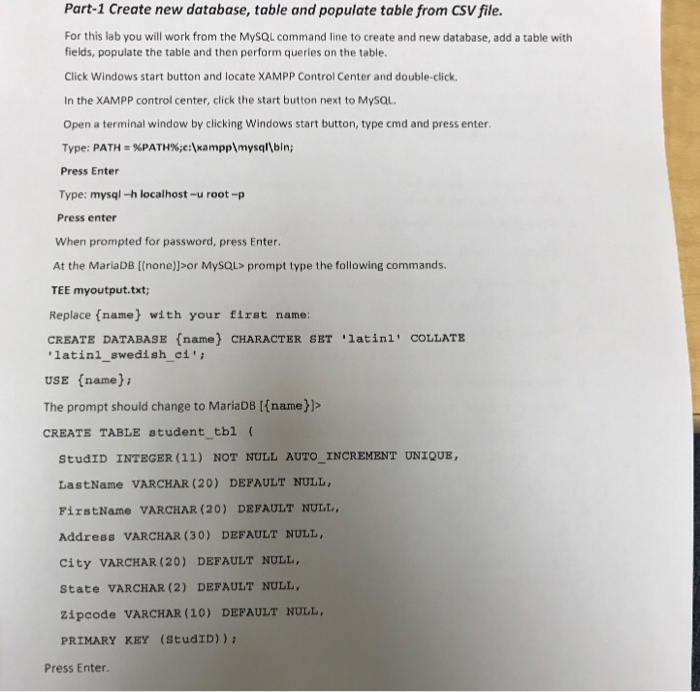
Part-1 Create new database, table and populate table from CSV file. For this lab you will work from the MySQL command line to create and new database, add a table with fields, populate the table and then perform queries on the table. Click Windows start button and locate XAMPP Control Center and double-click In the XAMPP control center, click the start button next to MySQL Open a terminal window by clicking Windows start button, type cmd and press enter Type: PATH-%PATH%;c:\xampp\mysql\bin; Press Enter Type: mysql-h localhost-u root-p Press enter When prompted for password, press Enter At the MariaDB [(none)sor MySQL> prompt type the following commands TEE myoutput.txt; Replace (name) with your first name: CREATE DATABASE (name) CHARACTER SET latinl' COLLATE latinl_swedish ci'i USE (name) The prompt should change to MariaDB Ifname)]> CREATE TABLE student tbl ( StudID INTEGER (11) NOT NULL AUTO INCREMENT UNIQUE LastName VARCHAR (20) DEPAULT NULL FirstName VARCHAR (20) DEFAULT NULL Address VARCHAR (30) DEFAULT NULL, city VARCHAR (20) DEFAULT NULL State VARCHAR (2) DEPAULT NULL zipcode VARCHAR (10) DEFAULT NLL PRIMARY KEY (StudID)) Press Enter. Part-1 Create new database, table and populate table from CSV file. For this lab you will work from the MySQL command line to create and new database, add a table with fields, populate the table and then perform queries on the table. Click Windows start button and locate XAMPP Control Center and double-click In the XAMPP control center, click the start button next to MySQL Open a terminal window by clicking Windows start button, type cmd and press enter Type: PATH-%PATH%;c:\xampp\mysql\bin; Press Enter Type: mysql-h localhost-u root-p Press enter When prompted for password, press Enter At the MariaDB [(none)sor MySQL> prompt type the following commands TEE myoutput.txt; Replace (name) with your first name: CREATE DATABASE (name) CHARACTER SET latinl' COLLATE latinl_swedish ci'i USE (name) The prompt should change to MariaDB Ifname)]> CREATE TABLE student tbl ( StudID INTEGER (11) NOT NULL AUTO INCREMENT UNIQUE LastName VARCHAR (20) DEPAULT NULL FirstName VARCHAR (20) DEFAULT NULL Address VARCHAR (30) DEFAULT NULL, city VARCHAR (20) DEFAULT NULL State VARCHAR (2) DEPAULT NULL zipcode VARCHAR (10) DEFAULT NLL PRIMARY KEY (StudID)) Press Enter
Step by Step Solution
There are 3 Steps involved in it

Get step-by-step solutions from verified subject matter experts
 Study Help