







Question: Perform the following steps in C++ Sets a variable equal to 5555.5555555 display it with no formatting display it with the width set to 10
Perform the following steps in C++
Sets a variable equal to 5555.5555555 display it with no formatting display it with the width set to 10 display it with the precision set to 4 and no decimal point forced display it with the precision set to 4 and decimal point forced display it with the width set to 10, precision set to 4, decimal point forced, and leading x's
Set the same variable equal to 30 display it in decimal value display it in octal value display it in hex value
Do the following with the variable typecast to an int in each case
display it in decimal value display it in octal value display it in hex value
Have a pause
The command prompt should look exactly like the following
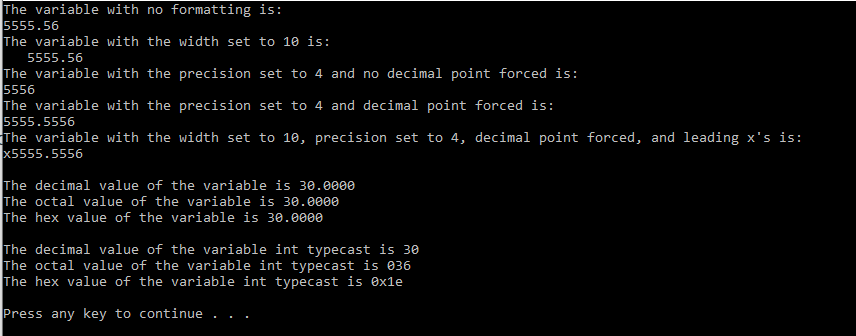
The variable with no formatting is: 5555.56 The variable with the width set to 10 is: 5555.56 The variable with the precision set to 4 and no decimal point forced is: 5556 The variable with the precision set to 4 and decimal point forced is: 5555.5556 The variable with the width set to 1e, precision set to 4, decimal point forced, and leading x's is: x5555.5556 The decimal value of the variable is 30.0000 The octal value of the variable is 30.0000 The hex value of the variable is 30.0000 The decimal value of the variable int typecast is 30 The octal value of the variable int typecast is 236 The hex value of the variable int typecast is exle Press any key to continue
Step by Step Solution
There are 3 Steps involved in it

Get step-by-step solutions from verified subject matter experts
 Study Help