







Question: php mysql question 1) if a records delete checkbox is not checked, but the Note was updated, you should update the Note column of the
php mysql question
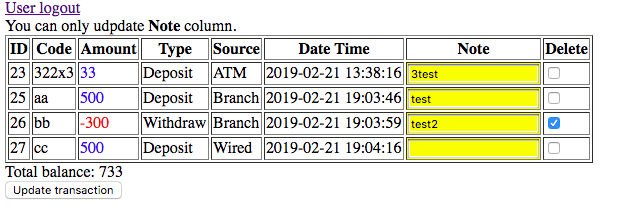

1) if a records delete checkbox is not checked, but the Note was updated, you should update the Note column of the corresponding record in your Money_xxxx table. A message The Note for code xxxx has been updated in the database. should be displayed for each updated record.
2)Display a message indicating the # of deleted records and the # of updated records.
I created tables but I don't know how can I check if that table is checked deleted checkbox and updated notes.
User logout You can only udpdate Note column. ID Code Amount TypeSourceDate Time Note Delete 23 322x3 33 Deposit ATM 2019-02-21 13:38:16 25 aa 500 Deposit Branch 2019-02-21 19:03:46 test 26 bb 300 Withdraw Branch 2019-02-21 19:03:59 test2 T/ : 500 Wirti Total balance: 733 Update transaction Deposit Wired 2019-02-21 19:04:16 User logout Successfully delete transaction code: DELETE from Money2 demo where id-23 successfully update transaction code: UPDATE Money2-demo set note-testtest' where id=25 and note-testtest' Finish deleting 1 records and updating 1 transactions User logout You can only udpdate Note column. ID Code Amount TypeSourceDate Time Note Delete 23 322x3 33 Deposit ATM 2019-02-21 13:38:16 25 aa 500 Deposit Branch 2019-02-21 19:03:46 test 26 bb 300 Withdraw Branch 2019-02-21 19:03:59 test2 T/ : 500 Wirti Total balance: 733 Update transaction Deposit Wired 2019-02-21 19:04:16 User logout Successfully delete transaction code: DELETE from Money2 demo where id-23 successfully update transaction code: UPDATE Money2-demo set note-testtest' where id=25 and note-testtest' Finish deleting 1 records and updating 1 transactions
Step by Step Solution
There are 3 Steps involved in it

Get step-by-step solutions from verified subject matter experts
 Study Help