







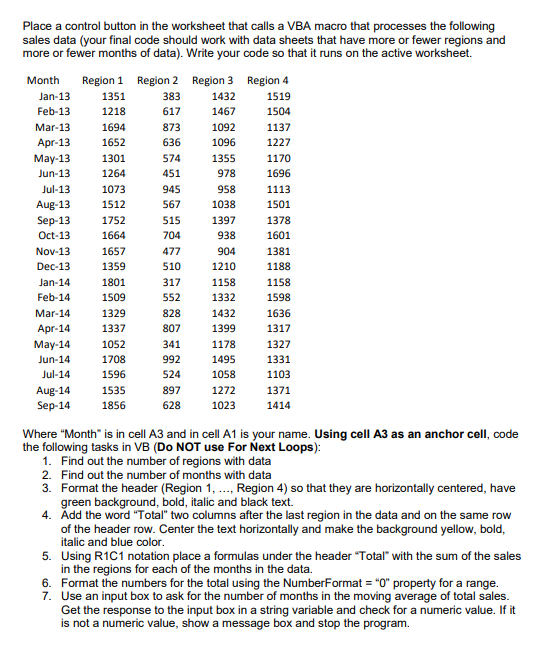
Question: Place a control button in the worksheet that calls a VBA macro that processes the following sales data ( your final code should work with
Place a control button in the worksheet that calls a VBA macro that processes the following
sales data your final code should work with data sheets that have more or fewer regions and
more or fewer months of data Write your code so that it runs on the active worksheet.
Where "Month" is in cell A and in cell A is your name. Using cell A as an anchor cell, code
the following tasks in VB Do NOT use For Next Loops:
Find out the number of regions with data
Find out the number of months with data
Format the header Region Region so that they are horizontally centered, have
green background, bold, italic and black text.
Add the word "Total" two columns after the last region in the data and on the same row
of the header row. Center the text horizontally and make the background yellow, bold,
italic and blue color.
Using RC notation place a formulas under the header "Total" with the sum of the sales
in the regions for each of the months in the data.
Format the numbers for the total using the NumberFormat property for a range.
Use an input box to ask for the number of months in the moving average of total sales.
Get the response to the input box in a string variable and check for a numeric value. If it
is not a numeric value, show a message box and stop the program.
Step by Step Solution
There are 3 Steps involved in it
1 Expert Approved Answer
Step: 1 Unlock

Question Has Been Solved by an Expert!
Get step-by-step solutions from verified subject matter experts
Step: 2 Unlock
Step: 3 Unlock
 Study Help