







Question: Planning the network addressing scheme Before cabling and connecting your network devices, you will need to plan your addressing scheme to make sure you have
Planning the network addressing scheme
Before cabling and connecting your network devices, you will need to plan your addressing scheme to make sure you have enough addresses available for each device on the network.
On the wireless router click on the GUI tab. Under the Setup tab, locate the DHCP settings for the router. These have been preconfigured so do not change them.
- i. Populate the following table with the addressing information you have located.
| Router IP address | Subnet mask | Max users | First user address | Last user address | Lease time |
|---|---|---|---|---|---|
| 192.168.100.1 | 255.255.255.0 | 29 | ??? | ??? | 0 |
ii.
From the router IP address and the subnet mask, calculate the network address, the broadcast address, the first usable host address and the last usable host address. Show all your working: failing to do so will limit you to half of the available marks.
Hint: you will find the logical AND will help you calculate these addresses.
iii.
Use the table below to plan the addressing for each device. To do this you will need the following information.
- The wireless router address and subnet mask are preconfigured. Hint: check these are correct.
- The web server will use the last available address of the range.
- The printer will use the second-to-last available address of the range.
- PC0 to PC2 will use the first three available addresses of the range.
- The laptop and the smartphone will be configured for DHCP later, so these addresses will come from the pool.
| Device | Interface | IP address | Subnet mask | Default gateway |
|---|---|---|---|---|
| Wireless router | LAN | 192.168.100.1 | 255.255.255.0 | |
| Web server | Fast Ethernet0 | |||
| Printer | Fast Ethernet0 | |||
| PC0 | Fast Ethernet0 | |||
| PC1 | Fast Ethernet0 | |||
| PC2 | Fast Ethernet0 | |||
| Laptop | Wireless0 | |||
| Smartphone | Wireless0 |
Picture include details of the wireless router
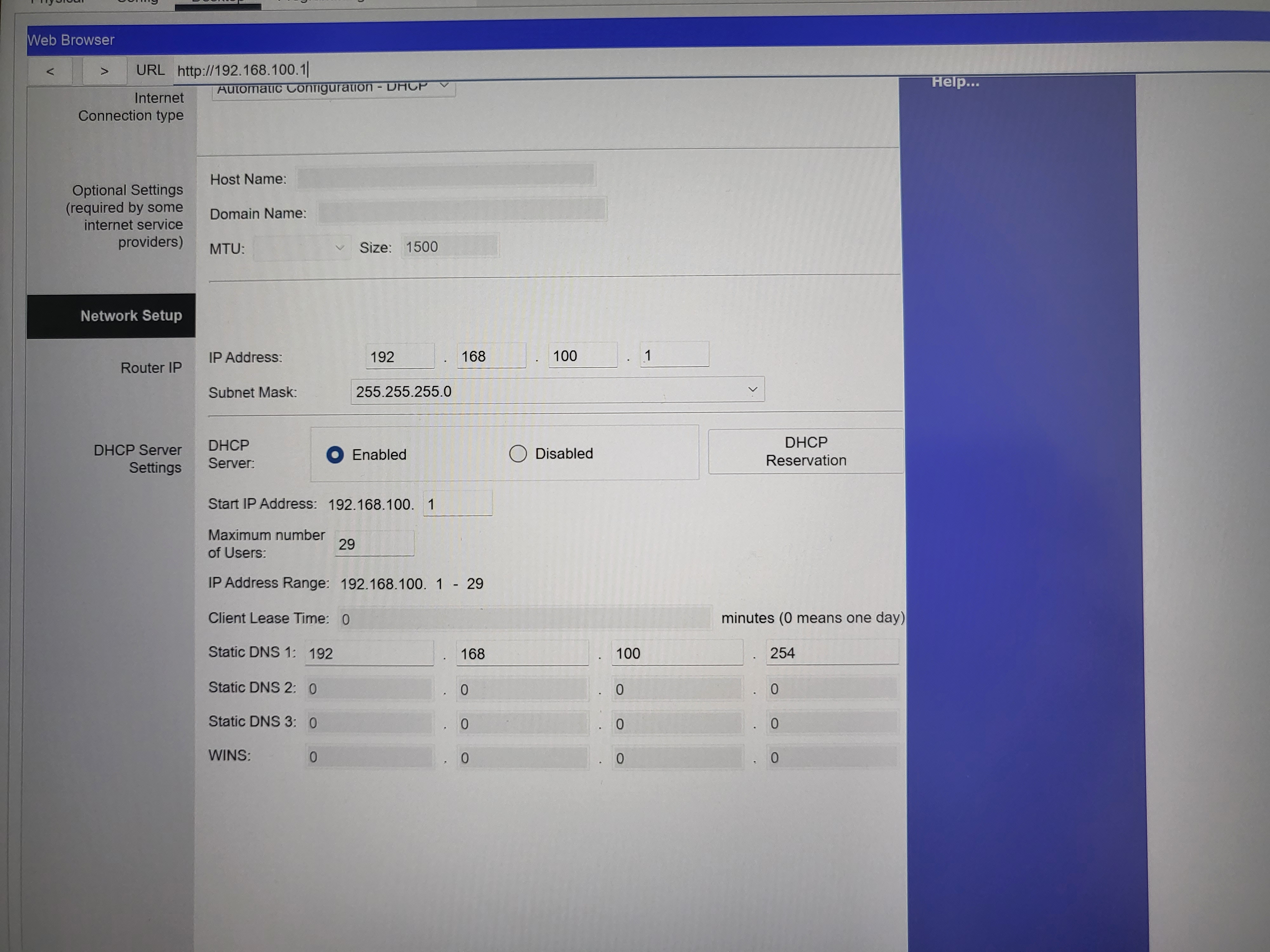
Web Browser URL http://192.168.100.1| Internet Connection type Optional Settings (required by some internet service providers) Network Setup Router IP DHCP Server Settings Automatic Configuration - DHCP Host Name: Domain Name: MTU: IP Address: Subnet Mask: DHCP Server: Start IP Address: 192.168.100. 1 Client Lease Time: 0 Static DNS 1: 192 Static DNS 20 Static DNS 3: 0 WINS: Size: 1500 O Enabled Maximum number of Users: IP Address Range: 192.168.100. 1 - 29 0 192 29 255.255.255.0 168 168 0 0 0 100 Disabled 100 0 0 0 1 DHCP Reservation minutes (0 means one day) . 254 0 0 0 Help...
Step by Step Solution
There are 3 Steps involved in it

Get step-by-step solutions from verified subject matter experts
 Study Help