







Question: Playground Project Plan in Project Software Enter the network you developed in the Playground Project Plan Case Study in Lesson 9 into the ProjectLibre software.
Playground Project Plan in Project Software
Enter the network you developed in the Playground Project Plan Case Study in Lesson 9 into the ProjectLibre software. Please do the following:
- Make sure your network identifies the critical path (highlighted in red).
- Enter at least three resources into your file and assign them to your tasks
this is the Playground Project Plan Case Study in Lesson 9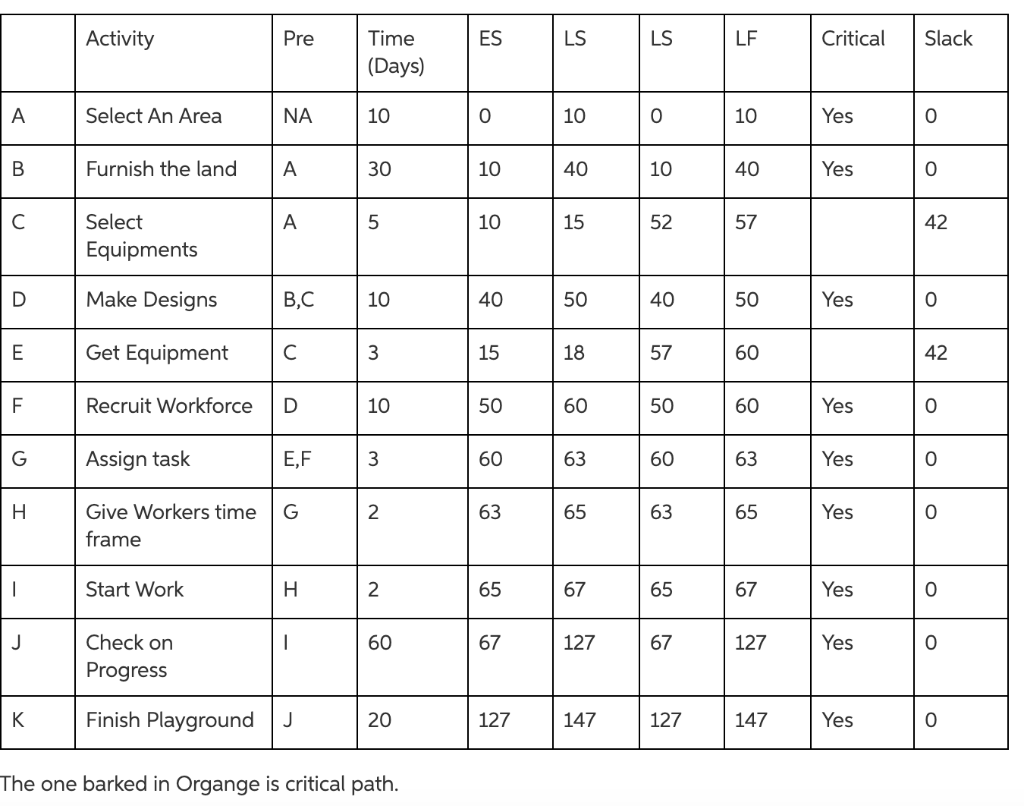
Step by Step Solution
There are 3 Steps involved in it
1 Expert Approved Answer
Step: 1 Unlock

Question Has Been Solved by an Expert!
Get step-by-step solutions from verified subject matter experts
Step: 2 Unlock
Step: 3 Unlock
 Study Help