







Question: Please add javascript files seperately and include html code. The following requirements must be completed: 1. Using JavaScript code covered in lessons 1 thru 12
Please add javascript files seperately and include html code.
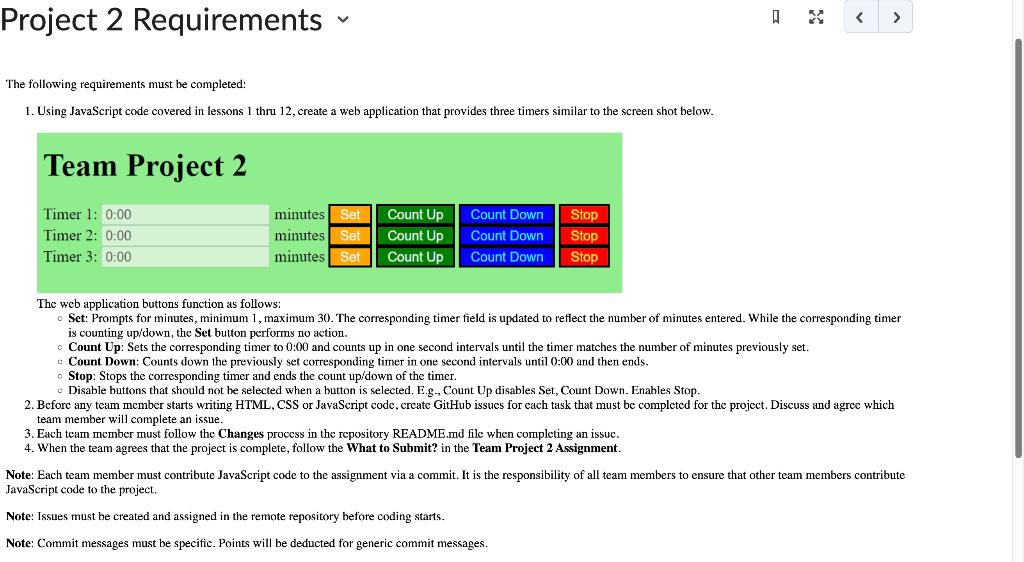
The following requirements must be completed: 1. Using JavaScript code covered in lessons 1 thru 12 , create a web application that provides three timers similar to the screen shot below. The web application buttons function as follows: Set: Prompts for minutes, minimum 1, maximum 30 . The corresponding timer field is updated to reflect the number of minutes entered. While the corresponding timer is counting up/down, the Set button performs no action. - Count Up: Sets the corresponding timer to 0:00 and counts up in one second intervals until the timer matches the number of minutes previously set. : Count Down: Counts down the previously set corresponding timer in one second intervals until 0:00 and then ends. - Stop: Stops the corresponding timer and ends the count up/down of the timer. - Disable buttons that should not be selected when a button is selected. E.g., Count Up disables Set, Count Down. Enables Stop. 2. Before any team member starts writing HTML, CSS or JavaScript code, create GitHub issues for each task that must be completed for the project. Discuss and agree which team member will complete an issue. 3. Each team member must follow the Changes process in the repository README.md file when completing an issuc. 4. When the team agrees that the project is complete, follow the What to Submit? in the Team Project 2 Assignment. Note: Each team member must contribute JavaScript code to the assignment via a commit. It is the responsibility of all team members to ensure that other team members contribute TavaScript code to the project. Note: Issues must be created and assigned in the remote repository before coding starts. Note: Commit messages must be specific. Points will be deducted for generic commit messages
Step by Step Solution
There are 3 Steps involved in it

Get step-by-step solutions from verified subject matter experts
 Study Help