







Question: Please adhere to the instructions and use beginner python techniques for this: The Minnesota flag is just several colored rectangles, one triangle, and a star.
Please adhere to the instructions and use beginner python techniques for this:
The Minnesota flag is just several colored rectangles, one triangle, and a star. Alternatively, it's two sided polygons and a star. It's important to draw things in the right order. A later shape will cover over an earlier one. So you can place the white star and light blue triangle over the blue background.
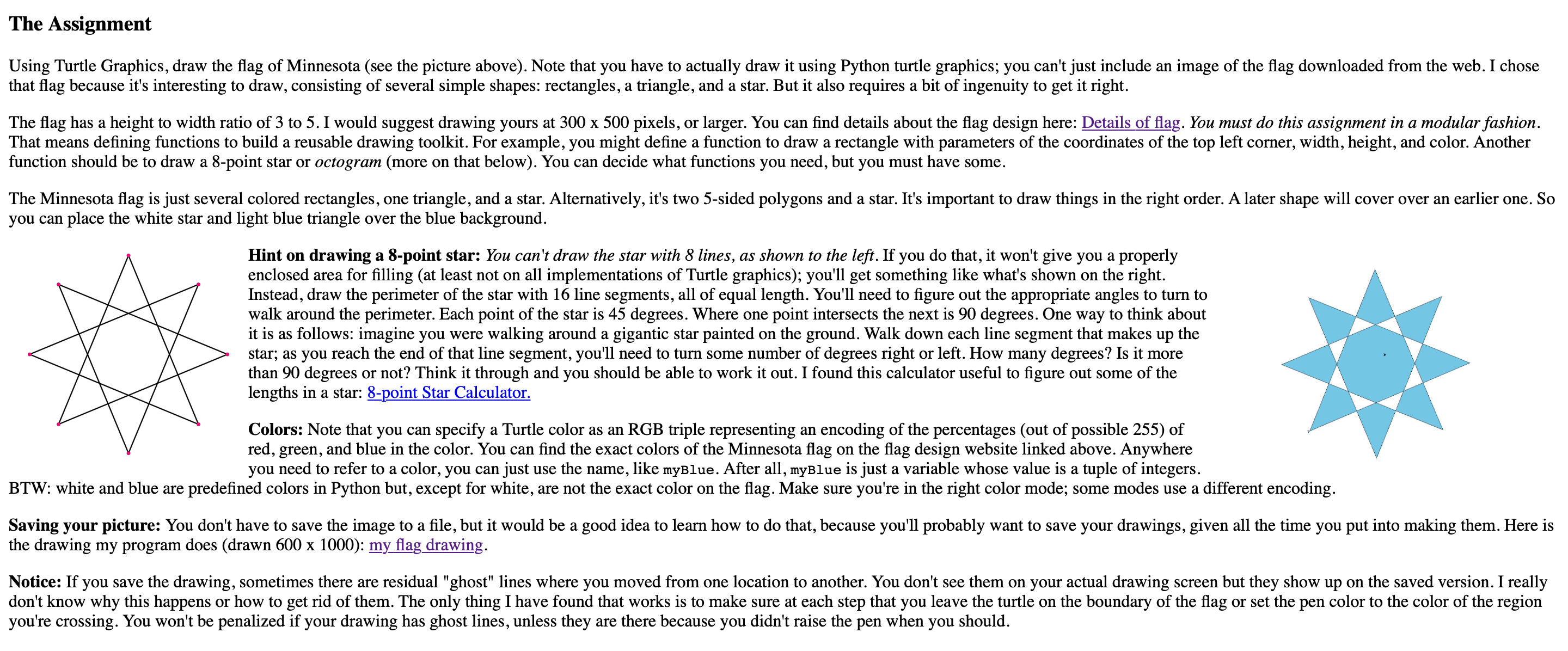
Hint on drawing a point star: You can't draw the star with lines, as shown to the left. If you do that, it won't give you a properly enclosed area for filling at least not on all implementations of Turtle graphics; you'll get something like what's shown on the right. Instead, draw the perimeter of the star with line segments, all of equal length. You'll need to figure out the appropriate angles to turn to walk around the perimeter. Each point of the star is degrees. Where one point intersects the next is degrees. One way to think about it is as follows: imagine you were walking around a gigantic star painted on the ground. Walk down each line segment that makes up the star; as you reach the end of that line segment, you'll need to turn some number of degrees right or left. How many degrees? Is it more than degrees or not? Think it through and you should be able to work it out. I found this calculator useful to figure out some of the lengths in a star: point Star Calculator.
Colors: Note that you can specify a Turtle color as an RGB triple representing an encoding of the percentages out of possible of red, green, and blue in the color. You can find the exact colors of the Minnesota flag on the flag design website linked above. Anywhere you need to refer to a color, you can just use the name, like myBlue. After all, myBlue is just a variable whose value is a tuple of integers.
BTW: white and blue are predefined colors in Python but, except for white, are not the exact color on the flag. Make sure you're in the right color mode; some modes use a different encoding.
Saving your picture: You don't have to save the image to a file, but it would be a good idea to learn how to do that, because you'll probably want to save your drawings, given all the time you put into making them. Here is the drawing my program does drawn times : my flag drawing.
Notice: If you save the drawing, sometimes there are residual "ghost" lines where you moved from one location to another. You don't see them on your actual drawing screen but they show up on the saved version. I really don't know why this happens or how to get rid of them. The only thing I have found that works is to make sure at each step that you leave the turtle on the boundary of the flag or set the pen color to the color of the region you're crossing. You won't be penalized if your drawing has ghost lines, unless they are there because you didn't raise the pen when you should. THE NEW MINNESOTA FLAG
Construction Sheet
Pantone
C: M: Y: K:
R: G: B:
Hex Code: #DD
Pantone White
C: M: Y: K:
R: G: B:
Hex Code: #FFFFFF
Water Blue
Pantone
C: M: Y: K:
R: G: B:
Hex Code: #CEn
The star is a regular octagram with the Schlfli symbol
It is constructed from vertices arranged equally around a circle.
Step by Step Solution
There are 3 Steps involved in it
1 Expert Approved Answer
Step: 1 Unlock

Question Has Been Solved by an Expert!
Get step-by-step solutions from verified subject matter experts
Step: 2 Unlock
Step: 3 Unlock
 Study Help