







Question: Please answer ASAP Q2-Use critical thinking skills to fully explain your troubleshooting steps for the following scenario. Make sure your response is well-written with many
Please answer ASAP
Q2-Use critical thinking skills to fully explain your troubleshooting steps for the following scenario. Make sure your response is well-written with many details explaining why each step is needed.
Scenario: You've been assigned a help desk trouble ticket to connect a new desktop computer to your company's internal network. After locating the office needing the desktop, you notice there is an available Ethernet port on the office wall plate. Next, you plug one end of your Ethernet patch cable into the wall plate and the other end into the desktop computer's NIC. You power on the computer and login as a local administrator. Immediately, you notice the network icon in the taskbar has a 'red X' indicating the device has no network connectivity. From here, you begin your troubleshooting steps.
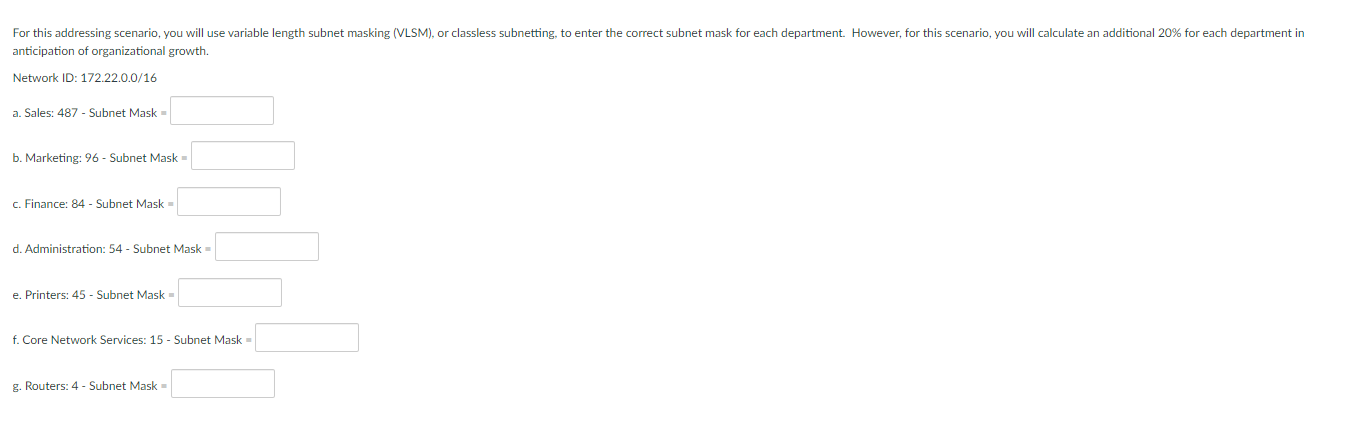
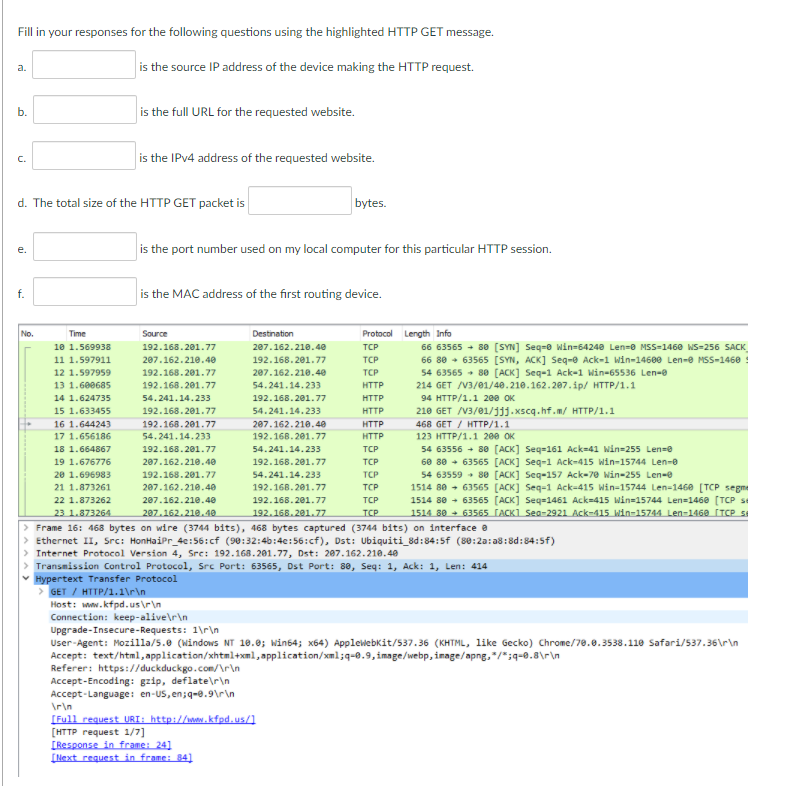
Fill in your responses for the following questions using the highlighted HTTP GET message. a. is the source IP address of the device making the HTTP request. b. is the full URL for the requested website. C. is the IPv4 address of the requested website. d. The total size of the HTTP GET packet is bytes. is the port number used on my local computer for this particular HTTP session. f. is the MAC address of the first routing device. Source No. Time Destination Protocol Length Info 10 1.569938 192.168.201.77 207.162.210.40 TCP 66 63565 + 80 [SYN] Seq-Win-54240 Len=8 MSS=1468 WS-256 SACK 11 1.597911 207.162.210.40 192.168.201.77 TCP 66 80 - 63565 [SYN, ACK] Seq-e Ack-1 Win-14680 Len- MSS-1460 12 1.597959 192.168.201.77 2e7.162.210.40 TCP 54 63565 80 [ACK] Seq-1 Ack-1 Win-65536 Len- 13 1.608685 192.168.201.77 54.241.14.233 HTTP 214 GET /V3/01/40.210.162.207. ip/ HTTP/1.1 14 1.624735 54.241.14.233 192.168.201.77 HTTP 94 HTTP/1.1 200 OK 15 1.633455 192.168.201.77 54.241.14.233 HTTP 210 GET /V3/01/11).xscq.hf.m/ HTTP/1.1 16 1.644243 192.168.201.77 207.162.210.40 HTTP 468 GET/ HTTP/1.1 17 1.656186 54.241.14.233 192.168.201.77 HTTP 123 HTTP/1.1 200 OK 18 1.664867 192.168.281.77 54.241.14.233 TCP 54 63556 + 80 [ACK] Seq=161 Ack-41 Win=255 Lens 19 1.676776 207.162.210.40 192.168.201.77 TCP 60 80 - 63565 [ACK] Seq-1 Ack-415 Win-15744 Len- 20 1.696983 192.168.201.77 54.241.14.233 TCP 54 63559 - 80 [ACK) Seq-157 Ack-70 Win-255 Len- 21 1.873261 207.162.210.40 192.168.201.77 TCP 1514 80 - 63565 [ACK] Seq-1 Ack-415 Win-15744 Len=1460 (TCP segme 22 1.873262 207.162.210.40 192.168.201.77 TCP 1514 88 - 63565 [ACK] Seq=1461 Ack=415 Win=15744 Len=1460 (TCP SI 23 1.873264 207.162.210.10 192.168.201.77 TCP 1514 30 + 63565 TACK1 Sec-2921 Ack-415 Win-15744 Len-146 CTCPS > Frame 16: 468 bytes on wire (3744 bits), 468 bytes captured (3744 bits) on interface a > Ethernet II, Src: HonHaiPr_40:56:cf (90:32:46:40:56:cf), Dst: Ubiquiti_8d:84:5f (89:20:28:8d:84:59) > Internet Protocol Version 4, Src: 192.168.201.77, Dst: 207.162.210.40 > Transmission Control Protocol, Src Port: 63565, Dst Port: 8e, Seq: 1, Ack: 1, Len: 414 Hypertext Transfer Protocol > GET / HTTP/1.1 Host: www.kfpd.us Connection: keep-alive Upgrade-Insecure-Requests: l User-Agent: Mozilla/5.0 (Windows NT 18.0; Win64; X64) Applewebkit/537.36 like Gecko) Chrome/78.0.3538.110 Safari/537.36 Accept: text/html,application/xhtml+xml,application/xml;q=0.9, image/webp, image/png,*/*;q=0.8 Referer: https://duckduckgo.com/ Accept-Encoding: gzip,deflater Accept-Language: en-US, en;q=0.9 [Full request URI: http://www.kfpd.us/ [HTTP request 1/7] [Response in frame: 24] [Next request in frame: 34) For this addressing scenario, you will use variable length subnet masking (VLSM), or classless subnetting, to enter the correct subnet mask for each department. However, for this scenario, you will calculate an additional 20% for each department in anticipation of organizational growth. Network ID: 172.22.0.0/16 a. Sales: 487 - Subnet Mask b. Marketing: 96 - Subnet Mask c. Finance: 84 - Subnet Mask d. Administration: 54 - Subnet Mask e. Printers: 45 - Subnet Mask - f. Core Network Services: 15 - Subnet Mask g. Routers: 4 - Subnet Mask
Step by Step Solution
There are 3 Steps involved in it

Get step-by-step solutions from verified subject matter experts
 Study Help