







Question: Please answer each questions below based on the case study about Toshibas Notebook Computer Assembly Line on the attachment What is the daily capacity of
Please answer each questions below based on the case study about Toshibas Notebook Computer Assembly Line on the attachment
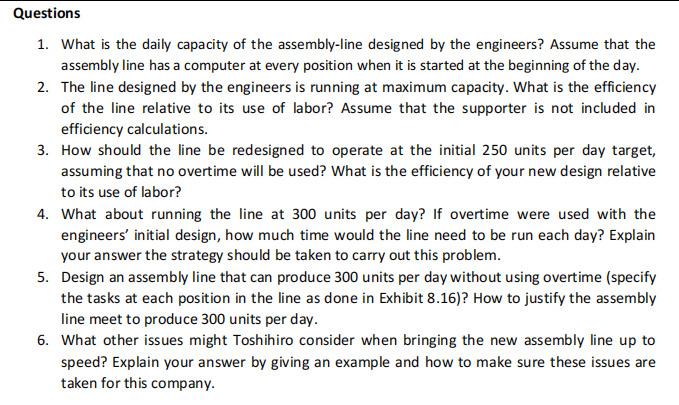
- What is the daily capacity of the assembly-line designed by the engineers? Assume that the assembly line has a computer at every position when it is started at the beginning of the day.
- The line designed by the engineers is running at maximum capacity. What is the efficiency of the line relative to its use of labor? Assume that the supporter is not included in efficiency calculations.
- How should the line be redesigned to operate at the initial 250 units per day target, assuming that no overtime will be used? What is the efficiency of your new design relative to its use of labor?
- What about running the line at 300 units per day? If overtime were used with the engineers initial design, how much time would the line need to be run each day? Explain your answer the strategy should be taken to carry out this problem.
- Design an assembly line that can produce 300 units per day without using overtime (specify the tasks at each position in the line as done in Exhibit 8.16)? How to justify the assembly line meet to produce 300 units per day.
- What other issues might Toshihiro consider when bringing the new assembly line up to speed? Explain your answer by giving an example and how to make sure these issues are taken for this company.
Thank You
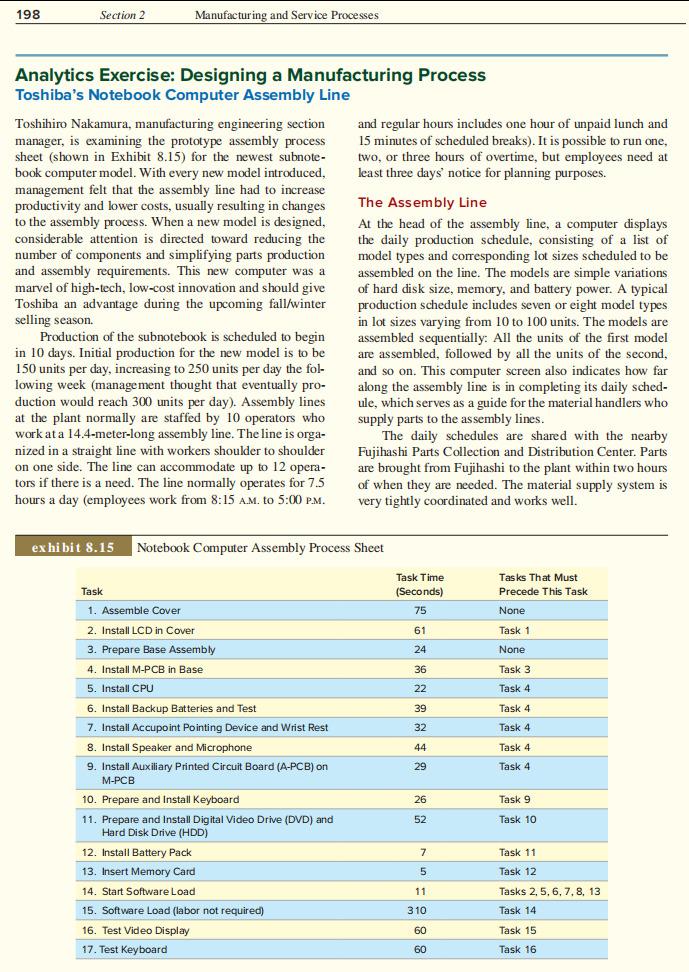
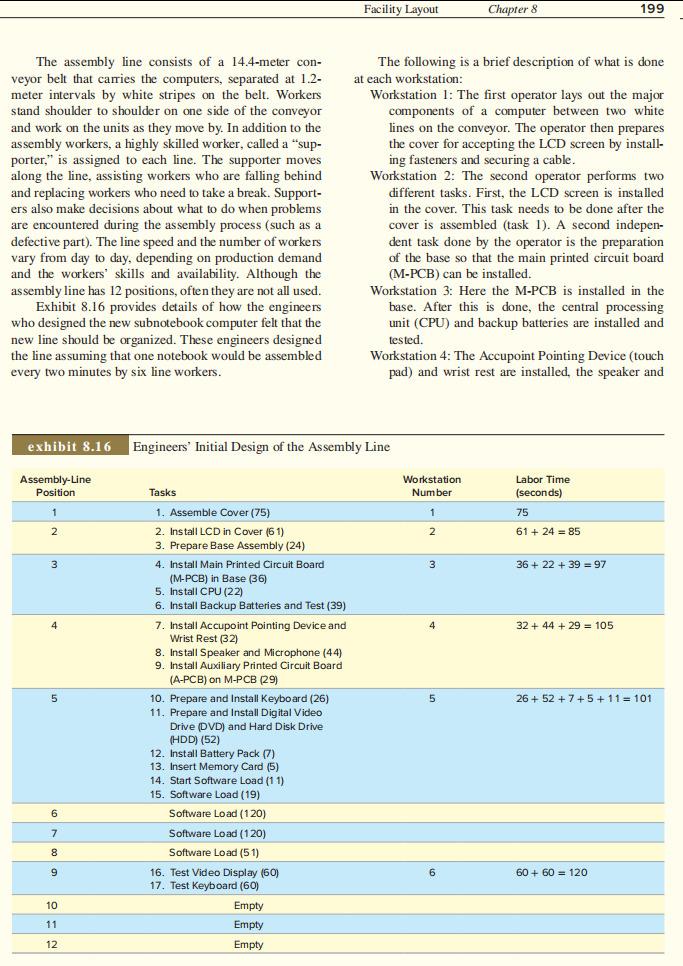
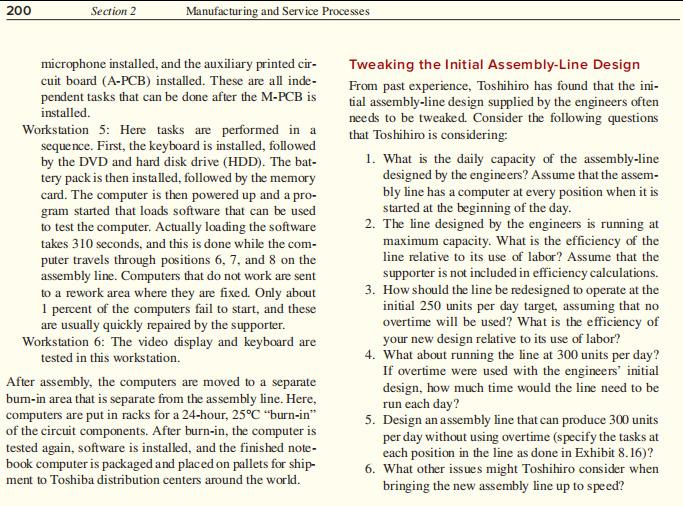
198 Section 2 Manufacturing and Service Processes Analytics Exercise: Designing a Manufacturing Process Toshiba's Notebook Computer Assembly Line Toshihiro Nakamura, manufacturing engineering section and regular hours includes one hour of unpaid lunch and manager, is examining the prototype assembly process 15 minutes of scheduled breaks). It is possible to run one, sheet (shown in Exhibit 8.15) for the newest subnote- two or three hours of overtime, but employees need at book computer model. With every new model introduced, least three days' notice for planning purposes. management felt that the assembly line had to increase productivity and lower costs, usually resulting in changes The Assembly Line to the assembly process. When a new model is designed, At the head of the assembly line, a computer displays considerable attention is directed toward reducing the the daily production schedule, consisting of a list of number of components and simplifying parts production model types and corresponding lot sizes scheduled to be and assembly requirements. This new computer was a assembled on the line. The models are simple variations marvel of Thigh-tech, low-cost innovation and should give of hard disk size, memory, and battery power. A typical Toshiba an advantage during the upcoming fall/winter production schedule includes seven or eight model types selling season. in lot sizes varying from 10 to 100 units. The models are Production of the subnotebook is scheduled to begin assembled sequentially: All the units of the first model in 10 Initial production for the new model is to be are assembled, followed by all the units of the second, 150 units per day, increasing to 250 units per day the fol- and so on. This computer screen also indicates how far lowing week (management thought that eventually pro- along the assembly line is in completing its daily sched- duction would reach 300 units per day). Assembly lines ule, which serves a guide for the material handlers who the plant normally are staffed by 10 operators who supply parts the assembly lines. work at a 14.4-meter-long assembly line. The line is orga- The daily schedules are shared with the nearby nized in a straight line with workers shoulder to shoulder Fujihashi Parts Collection and Distribution Center. Parts on one side. The line can accommodate up to 12 opera- are brought from Fujihashi to the plant within two hours tors if there is a need. The line normally operates for 7.5 of when they are needed. The material supply system is hours a day (employees work from 8:15 A.M. to 5:00 PM very tightly coordinated and works well. at exhibit 8.15 Notebook Computer Assembly Process Sheet Task Time (Seconds) Tasks That Must Precede This Task 75 None 61 Task 1 24 None 36 Task 3 Task 4 22 39 Task 4 Task 4 32 44 Task 4 29 Task 4 Task 1. Assemble Cover 2. Install LCD in Cover 3. Prepare Base Assembly 4. Install M-PCB in Base 5. Install CPU 6. Install Backup Batteries and Test 7. Install Accupoint Pointing Device and Wrist Rest 8. Install Speaker and Microphone 9. Install Auxiliary Printed Circuit Board (A-PCB) on M-PCB 10. Prepare and Install Keyboard 11. Prepare and Install Digital Video Drive (DVD) and Hard Disk Drive (HDD) 12. Install Battery Pack 13. Insert Memory Card 14. Start Software Load 15. Software Load (labor not required) 16. Test Video Display 17. Test Keyboard 26 Task 9 52 Task 10 7 Task 11 Task 12 5 11 Tasks 2, 5, 6, 7, 8, 13 Task 14 310 60 Task 15 60 Task 16 Facility Layout Chapter 8 199 The assembly line consists of a 14.4-meter con- veyor belt that carries the computers, separated at 1.2- meter intervals by white stripes on the belt. Workers stand shoulder to shoulder on one side of the conveyor and work on the units as they move by. In addition to the assembly workers, a highly skilled worker, called a "sup- porter," is assigned to each line. The supporter moves along the line. assisting workers who are falling behin and replacing workers who need to take a break. Support- ers also make decisions about what to do when problems are encountered during the assembly process (such as a defective part). The line speed and the Vary from day to day, dependine number of workers on production demand and the workers' skills and availability. Although the assembly line has 12 positions, often they are not all used. Exhibit 8.16 provides details of how the engineers who designed the new subnotebook computer felt that the new line should be organized. These engineers designed the line assuming that one notebook would be assembled every two minutes by six line workers. The following is a brief description of what is done at each workstation: Workstation 1: The first operator lays out the major components of a computer between two white lines on the conveyor. The operator then prepares the cover for accepting the LCD screen by install- ing fasteners and securing a cable. Workstation 2: The second operator performs two different tasks. First, the LCD screen is installed in the cover. This task needs to be done after the cover is assembled (task 1). A second indepen- dent task done by the operator is the preparation of the base so that the main printed circuit board (M-PCB) can be installed. Workstation 3: Here the M-PCB is installed in the base. After this is done, the central processing unit (CPU) and backup batteries are installed and tested. Workstation 4: The Accupoint Pointing Device (touch pad) and wrist rest are installed, the speaker and exhibit 8.16 Engineers' Initial Design of the Assembly Line Assembly-Line Position Workstation Number Labor Time (seconds) 1 75 2 2 61 + 24 = 85 3 3 36 + 22 + 39 = 97 4 4 32 + 44 + 29 = 105 5 5 26 +52 + 7 +5 + 11 = 101 Tasks 1. Assemble Cover (75) 2. Install LCD in Cover (61) 3. Prepare Base Assembly (24) 4. Install Main Printed Circuit Board (M-PCB) in Base (36) 5. Install CPU (22) 6. Install Backup Batteries and Test (39) 7. Install Accupoint Pointing Device and Wrist Rest (32) 8. Install Speaker and Microphone (44) 9. Install Auxiliary Printed Circuit Board (A-PCB) on M-PCB (29) 10. Prepare and Install Keyboard (26) 11. Prepare and Install Digital Video Drive (DVD) and Hard Disk Drive (HDD) (52) 12. Install Battery Pack (7) 13. Insert Memory Card (5) 14. Start Software Load (11) 15. Software Load (19) Software Load (120) Software Load (120) Software Load (51) 16. Test Video Display (60) 17. Test Keyboard (60) Empty Empty Empty 6 7 8 9 6 60+ 60 = 120 10 11 12 200 Section 2 Manufacturing and Service Processes microphone installed, and the auxiliary printed cir- cuit board (A-PCB) installed. These are all inde- pendent tasks that can be done after the M-PCB is installed. Workstation 5: Here tasks are performed in a sequence. First, the keyboard is installed, followed by the DVD and hard disk drive (HDD). The bat- tery pack is then installed, followed by the memory card. The computer is then powered up and a pro- gram started that loads software that can be used to test the computer. Actually loading the software takes 310 seconds, and this is done while the com- puter travels through positions 6, 7, and 8 on the assembly line. Computers that do not work are sent to a rework area where they are fixed. Only about 1 percent of the computers fail to start, and these are usually quickly repaired by the supporter. Workstation 6: The video display and keyboard are tested in this workstation. After assembly, the computers are moved to a separate bum-in area that is separate from the assembly line. Here, computers are put in racks for a 24-hour, 25C "burn-in" of the circuit components. After burn-in, the computer is tested again, software is installed, and the finished note- book computer is packaged and placed on pallets for ship- ment to Toshiba distribution centers around the world. Tweaking the Initial Assembly-Line Design From past experience, Toshihiro has found that the ini- tial assembly-line design supplied by the engineers often needs to be tweaked. Consider the following questions that Toshihiro is considering: 1. What is the daily capacity of the assembly-line designed by the engineers? Assume that the assem- bly line has a computer at every position when it is started at the beginning of the day. 2. The line designed by the engineers is running at maximum capacity. What is the efficiency of the line relative to its use of labor? Assume that the supporter is not included in efficiency calculations. 3. How should the line be redesigned to operate at the initial 250 units per day target, assuming that no overtime will be used? What is the efficiency of your new design relative to its use of labor? 4. What about running the line at 300 units per day? If overtime were used with the engineers' initial design, how much time would the line need to be run each day? 5. Design an assembly line that can produce 300 units per day without using overtime (specify the tasks at each position in the line as done in Exhibit 8.16)? 6. What other issues might Toshihiro consider when bringing the new assembly line up to speed? Questions 1. What is the daily capacity of the assembly-line designed by the engineers? Assume that the assembly line has a computer at every position when it is started at the beginning of the day. 2. The line designed by the engineers is running at maximum capacity. What is the efficiency of the line relative to its use of labor? Assume that the supporter is not included in efficiency calculations. 3. How should the line be redesigned to operate at the initial 250 units per day target, assuming that no overtime will be used? What is the efficiency of your new design relative to its use of labor? 4. What about running the line at 300 units per day? If overtime were used with the engineers' initial design, how much time would the line need to be run each day? Explain your answer the strategy should be taken to carry out this problem. 5. Design an assembly line that can produce 300 units per day without using overtime (specify the tasks at each position in the line as done in Exhibit 8.16)? How to justify the assembly line meet to produce 300 units per day. 6. What other issues might Toshihiro consider when bringing the new assembly line up to speed? Explain your answer by giving an example and how to make sure these issues are taken for this companyStep by Step Solution
There are 3 Steps involved in it
1 Expert Approved Answer
Step: 1 Unlock

Question Has Been Solved by an Expert!
Get step-by-step solutions from verified subject matter experts
Step: 2 Unlock
Step: 3 Unlock
 Study Help