







Question: Please answer the questions based on the figure below! a. Which pin number is assigned to the input of the system? b. Explain the function
Please answer the questions based on the figure below!
a. Which pin number is assigned to the input of the system?
b. Explain the function of the code on line 9! digitalWrite(inPin, HIGH);
c. What is the voltage value at pin no. 2 if the button is pressed? Explain!
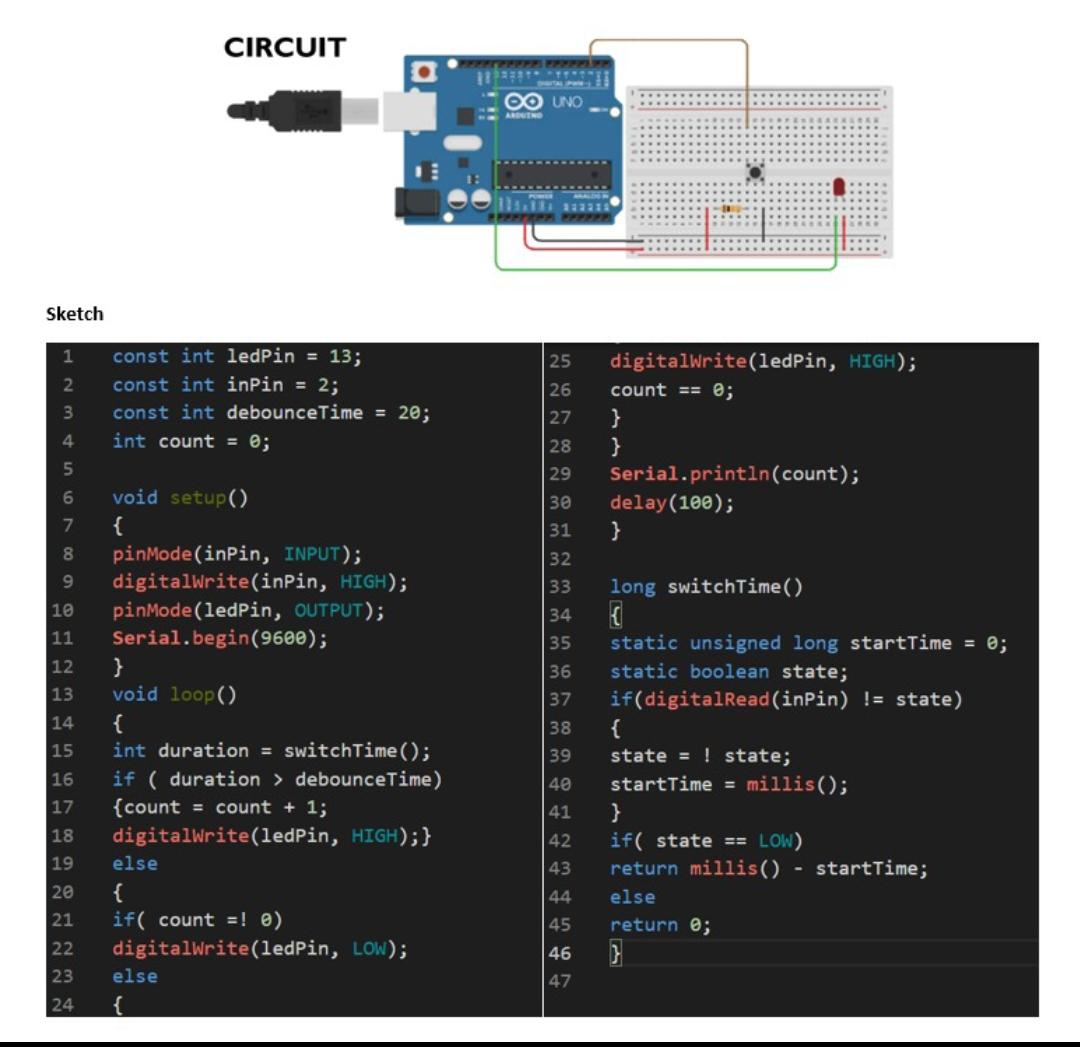
Sketch 1 2 3 4 5 6 7 8 pinMode(inPin, INPUT); 9 digitalWrite(inPin, HIGH); pinMode(ledPin, OUTPUT); 10 11 Serial.begin(9600); 12 13 14 15 16 17 const int ledPin = 13; const int inPin = 2; const int debounceTime = 20; int count = 0; 2222 void setup() { CIRCUIT } void loop() { int duration = switchTime(); 18 19 20 { if (duration > debounceTime) {count = count + 1; digitalWrite(ledPin, HIGH);} else 21 if( count = 0) digitalWrite(ledPin, LOW); 23 else 24 { UNO digitalWrite(ledPin, HIGH); 25 26 count == 0; 27 28 29 30 31 32 33 34 35 36 37 38 39 40 41 42 43 44 45 46 47 } } Serial.println(count); delay(100); } long switchTime() { static unsigned long startTime = 0; static boolean state; if(digitalRead(inPin) != state) { state = state; startTime = millis(); } if( state == LOW) return millis() else return 0; } startTime;
Step by Step Solution
3.46 Rating (159 Votes )
There are 3 Steps involved in it
G b c pin number 2 is the input This renders ... View full answer

Get step-by-step solutions from verified subject matter experts
 Study Help