







Question: Please answer this as a code in Matlab. Thank you! 8) The figure to the right, and the thick red triangle in particular, shows 30
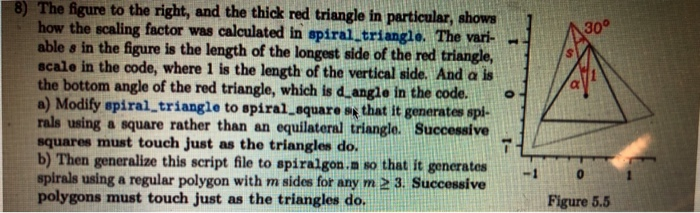
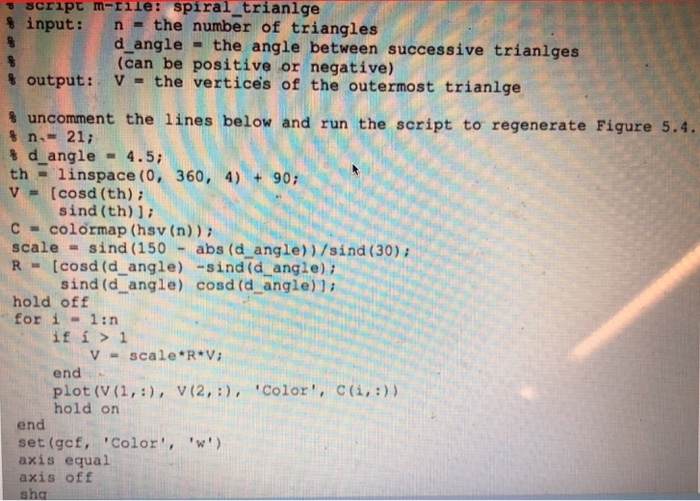
8) The figure to the right, and the thick red triangle in particular, shows 30 how the scaling factor was calculated in spiral triangle. The var able s in the figure is the length of the longest side of the red triangle, scale in the code, where 1 is the length of the vertical side. And a is the bottom angle of the red triangle, which is d angle in the code. a) Modify spiral,triangle to spiral square ss that it generates spi- rals using a square rather than an equilateral triangle. Successive squares must touch just as the triangles do. b) Then generalize this script file to spiralgon.n so that it generates spirals using a regular polygon with m sides for any m 2 3. Successive polygons must touch just as the triangles do. -1 0 Figure 5.5 script m- % input : rile : spiral-trianige n = the number of triangles d angle the angle between successive trianlges (can be positive or negative) % output: V-the ve rt ices of the outermost trianlge uncomment the lines below and run the script to regenerate Figure 5.4. % n.- 21; % d-angle = 4.5; th linspace (0, 360, 4) 90 v= [co sd (th); sind (th) c colormap (hsv (n)) scale sind (150 -abs (d angle))/sind (30) R= [cosd (dangle) -sind (d-angle); sind (d angle) cosd (d angle)l hold off for i-1:n if i >1 Vscale R V end plot (V (1,, V (2,) Color', c(,)) hold on end set (gcf, 'Color',') axis equal axis ofF sha
Step by Step Solution
There are 3 Steps involved in it

Get step-by-step solutions from verified subject matter experts
 Study Help