







Question: PLEASE ANSWER USING MATLAB AND COPY AND PASTE THE SCRIPT (codes) AS THE SOLUTION Please and Thank you! 1. Create a script with the following
 PLEASE ANSWER USING MATLAB AND COPY AND PASTE THE SCRIPT (codes) AS THE SOLUTION
Please and Thank you!
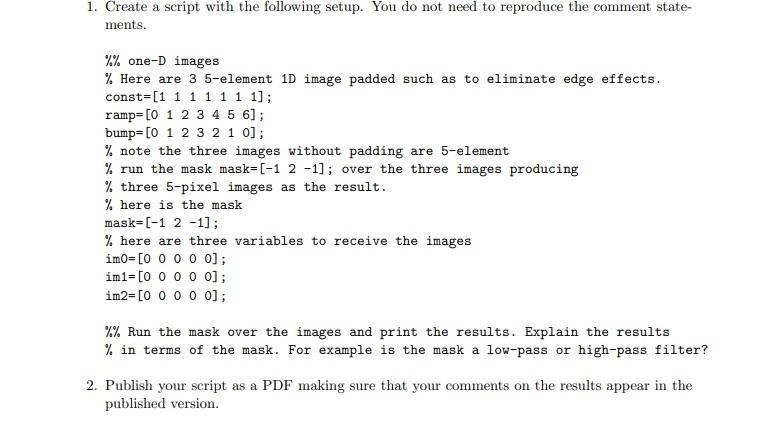
1. Create a script with the following setup. You do not need to reproduce the comment state- ments. %% one-D images % Here are 3 5-element 1D image padded such as to eliminate edge effects. const=[1 1 1 1 1 1 1]; ramp=[0 1 2 3 4 5 6]; bump=[0 1 2 3 2 1 0]; % note the three images without padding are 5-element % run the mask mask=[-1 2 -1]; over the three images producing % three 5-pixel images as the result. % here is the mask mask=(-1 2 -1]; % here are three variables to receive the images imo=[O O O O O]; im1=[O O O O O]; im2=[O O O O O]; %% Run the mask over the images and print the results. Explain the results % in terms of the mask. For example is the mask a low-pass or high-pass filter? 2. Publish your script as a PDF making sure that your comments on the results appear in the published version. 1. Create a script with the following setup. You do not need to reproduce the comment state- ments. %% one-D images % Here are 3 5-element 1D image padded such as to eliminate edge effects. const=[1 1 1 1 1 1 1]; ramp=[0 1 2 3 4 5 6]; bump=[0 1 2 3 2 1 0]; % note the three images without padding are 5-element % run the mask mask=[-1 2 -1]; over the three images producing % three 5-pixel images as the result. % here is the mask mask=(-1 2 -1]; % here are three variables to receive the images imo=[O O O O O]; im1=[O O O O O]; im2=[O O O O O]; %% Run the mask over the images and print the results. Explain the results % in terms of the mask. For example is the mask a low-pass or high-pass filter? 2. Publish your script as a PDF making sure that your comments on the results appear in the published version
Step by Step Solution
There are 3 Steps involved in it

Get step-by-step solutions from verified subject matter experts
 Study Help