







Question: PLEASE ASAP Examining an Echo Request - Open a command window and perform an ipconfig command. Make a note of the default gateway address. -
PLEASE ASAP
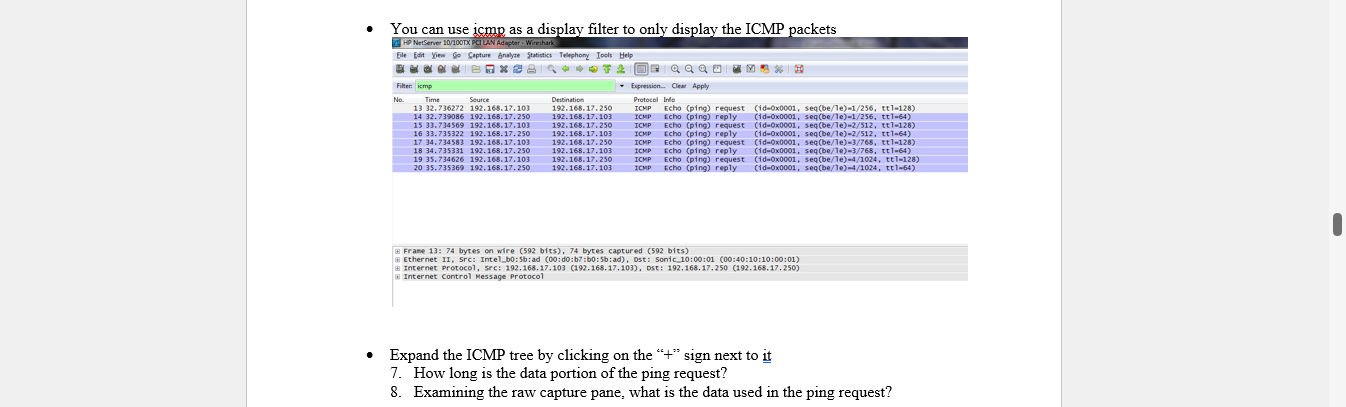
Examining an Echo Request - Open a command window and perform an ipconfig command. Make a note of the default gateway address. - In a command window, type ping ipaddress where ipaddress is the address of the default gateway. Youran nee irmn as a disnlav filter tn nnlv disnlav the ICMP narkete Frane 13: 74 bytes on wire (592 bits), 74 bytes captured (592 bits) (i) Ethernet II, Src: Inte1_b0:5b:ad (00:d0:b7:b0:5b:ad), Ost: Sonic 10:00:01 (00:40:10:10:00:01) Internet protoco1, src: 192,168.17,103 (192.168.17,103), Dst: 192.168.17,250 (192.168.17,250) (i) Internet Control Message Protocol Expand the ICMP tree by clicking on the " +" sign next to it 7. How long is the data portion of the ping request? 8. Examining the raw capture pane, what is the data used in the ping request
Step by Step Solution
There are 3 Steps involved in it

Get step-by-step solutions from verified subject matter experts
 Study Help