







Question: Please build this darft / flutter app. the description is here and pictures of exactly what it should look like are included too. Create a
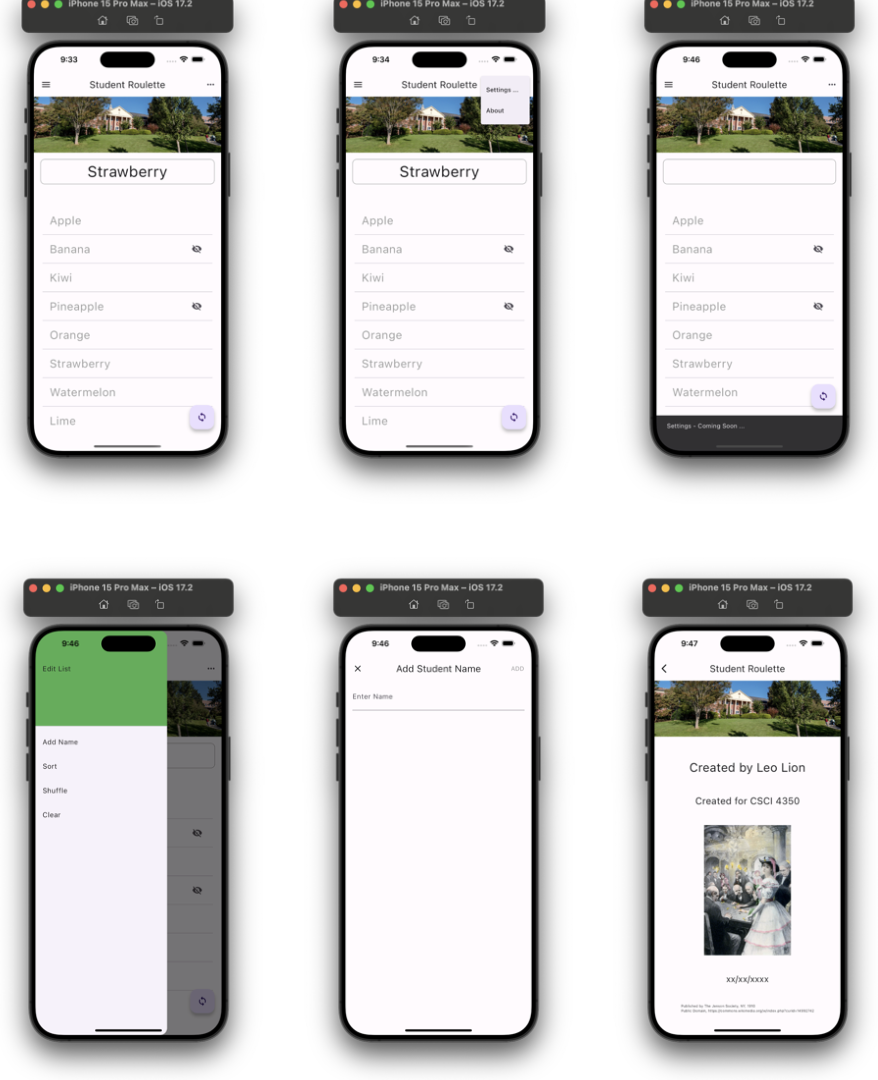
Please build this darftflutter app. the description is here and pictures of exactly what it should look like are included too. Create a flutter application that picks a random student name. Tapping the floating action button will initiate a random
selection and present the result at the top of the screen. Tapping on a list item will toggle its state between hidden and
visible. Hidden items are displayed with the Icons.visibilityoff icon, as illustrated above. Visible items are displayed as text
only, no icon is present. When items are hidden, those items are not available for random selection. Swiping an element to
the left will remove it from the list.
The Settings three dots in upper righthand corner menu should contain options for: Settings and About.
The icon graphic for the FloatingActionButton must be changed from the default setting to use the Icons.sync graphic.
The launcher icon should be redefined to use twentydiegreen.png
The list should be persisted across application restarts. Contain an About screen with the building header graphic, CSCI as text, an image of your choosing, the date you
created the app, and your name. Navigation back to the main screen is provided.
Options menu aka Settings contains: Settings and About. The left side drawer contains options to Add Name,
Sort, Shuffle and Clear the list. All list operations must function properly. Settings... isn't completely operational yet, simply
display a SnackBar noting that 'Settings will be coming soon'.
Selecting Add Name from Settings redirects to another route aka page and allows the user to type a new name,
accept with Add button or cancel with an X or button. The student list is updated accordingly.
x Swiping an element to the left removes it from the underlying list and the ListView.
x The current list of names is persisted upon app shutdown and restored upon app start.
x In the list, display hidden items with the Icons.visibilityoff Icon, visible items without any icon. Toggling a list items
visibility with a tap reverses the hidden setting. Provide an informational message if a user tries to pick a random name
when all names are hidden or the list is empty.
x Launcher icon has been replaced by the Icons.sync graphic.
An image similar to the piedmontcollegebanner.jpg appears at the top of the main app screen, as shown above. Titles
appear as illustrated in the screen shots, above.
Show a list of names using ListView with ListTile widgets. Tapping the FAB results in a new, random item being
displayed. Random selections with the FAB tap will never select a hidden item. Floating Action Button FAB contains
Icons.sync Icon.
x Print random selection results to the logcat console each time the FAB is pressed.
Step by Step Solution
There are 3 Steps involved in it
1 Expert Approved Answer
Step: 1 Unlock

Question Has Been Solved by an Expert!
Get step-by-step solutions from verified subject matter experts
Step: 2 Unlock
Step: 3 Unlock
 Study Help