





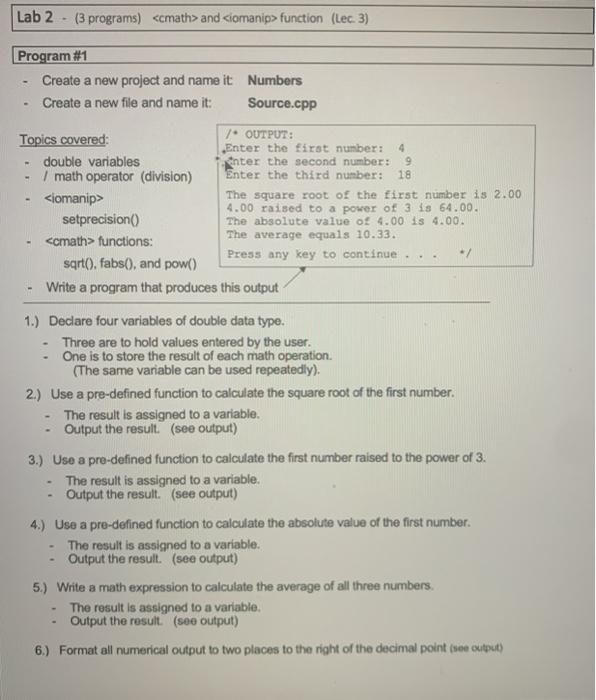
Question: Please code in C++ and show output Lab 2 - (3 programs) and function (Lec. 3) Program #1 Create a new project and name it
Please code in C++ and show output  Please code in C++ and show output Lab 2 - (3
programs) and function (Lec. 3) Program #1 Create a new project and
name it Numbers Create a new file and name it: Source.cpp -
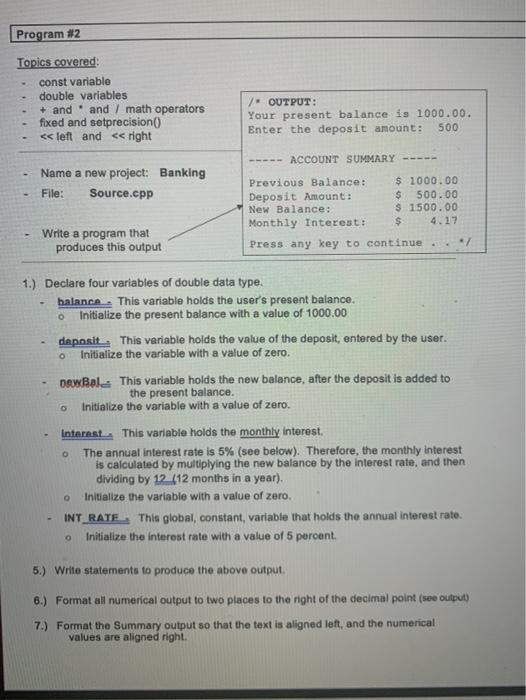
Lab 2 - (3 programs) and function (Lec. 3) Program #1 Create a new project and name it Numbers Create a new file and name it: Source.cpp - 9 18 OUTPUT: Topics covered: Enter the first number: 4 double variables anter the second number: / math operator (division) Enter the third number: The square root of the first number is 2.00 4.00 raised to a power of 3 is 64.00. setprecision() The absolute value of 4.00 is 4.00. functions: The average equals 10.33. Press any key to continue... sarto. fabs(), and pow() Write a program that produces this output 1.) Declare four variables of double data type. Three are to hold values entered by the user. - One is to store the result of each math operation. (The same variable can be used repeatedly). 2.) Use a pre-defined function to calculate the square root of the first number. The result is assigned to a variable. Output the result. (see output) 3.) Use a pre-defined function to calculate the first number raised to the power of 3. The result is assigned to a variable. Output the result. (see output) 4.) Use a pre-defined function to calculate the absolute value of the first number. The result is assigned to a variable. Output the result. (see output) 5.) Write a math expression to calculate the average of all three numbers The result is assigned to a variable. Output the result. (see output) 6.) Format all numerical output to two places to the right of the decimal point (see output) - Program #2 Topics covered const variable double variables + and and / math operators fixed and setprecision

Step by Step Solution

There are 3 Steps involved in it

1 Expert Approved Answer
Step: 1 Unlock blur-text-image
Question Has Been Solved by an Expert!

Get step-by-step solutions from verified subject matter experts

Step: 2 Unlock
Step: 3 Unlock

Students Have Also Explored These Related Databases Questions!