







Question: please code in c or c++. ONLY USE READ, WRITE SYSTEM CALLS ( DO NOT USE PRINTF OR COUT). Please refer to the pictures below
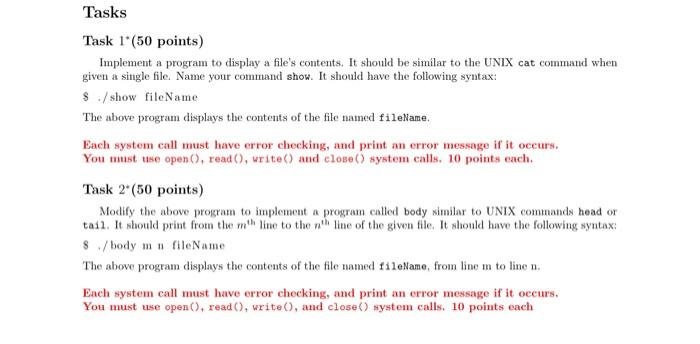
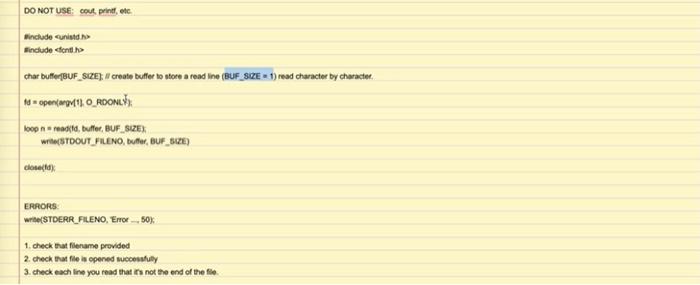
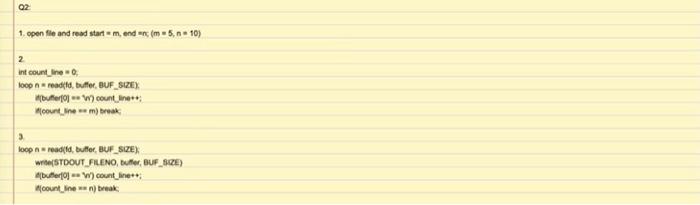
Tasks Task 1 (50 points) Implement a program to display a file's contents. It should be similar to the UNIX cat command when given a single file Name your command show. It should have the following syntax: $ / show fileName The above program displays the contents of the file named fileName. Each system call must have error checking, and print an error message if it occurs. You must use open(), read(), write and close() system calls. 10 points each. Task 2" (50 points) Modify the above program to implement a program called body similar to UNIX commands head or tail. It should print from the the line to the the line of the given file. It should have the following syntax: $/body ma fileName The above program displays the contents of the file named fileName, from line m to line n. Each system call must have error checking, and print an error message if it occurs. You must use open(), read, write(), and close() system calls. 10 points each DO NOT USE: Outprint, etc include unid. include conto char buffer[BUF_SIZE); // create buffer to store a read Ine (BUF_SZE 1) read character by character. 1 openin11 O_RDONLY loop reagi, buffer, BUF_SIZE) write(BTDOUT_FILENO, Butler, BUF_CZE) ERRORS write(STDERR_FILENO, Ene_.50). 1. check that filename provided 2. check the file is opened out 3. check each line you read that is not the end of the file. 02 1. open file and read starte mendim 5.10) 2 int count_line loop n readila, buffer BUF_SIZE Mbuffer10 W) count_line count_newm) break loop readid, buffer BUF_SIZE) W(STDOUT_FILENO, Duffer, BUF_SIZE) Mbufer0W) count_line" countinenteak
Step by Step Solution
There are 3 Steps involved in it

Get step-by-step solutions from verified subject matter experts
 Study Help