







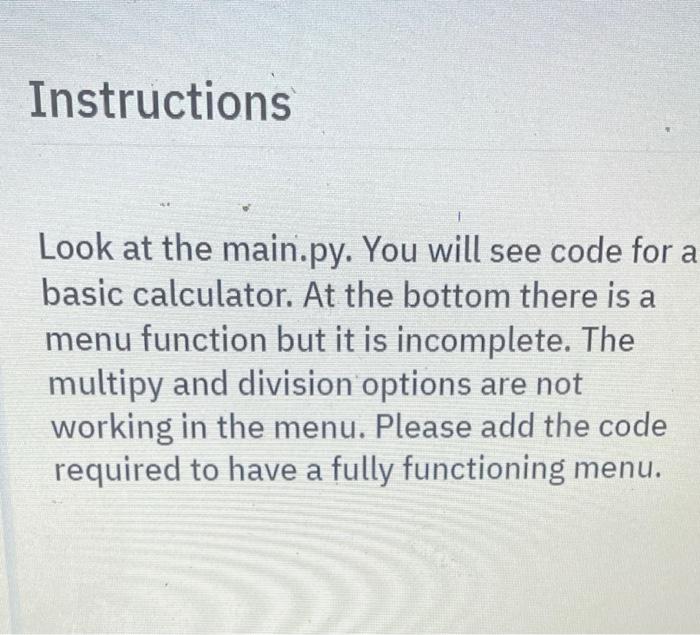
Question: Please Code using python and add the nessecary code needed Instructions Look at the main.py. You will see code for a basic calculator. At the
 Please Code using python and add the nessecary code needed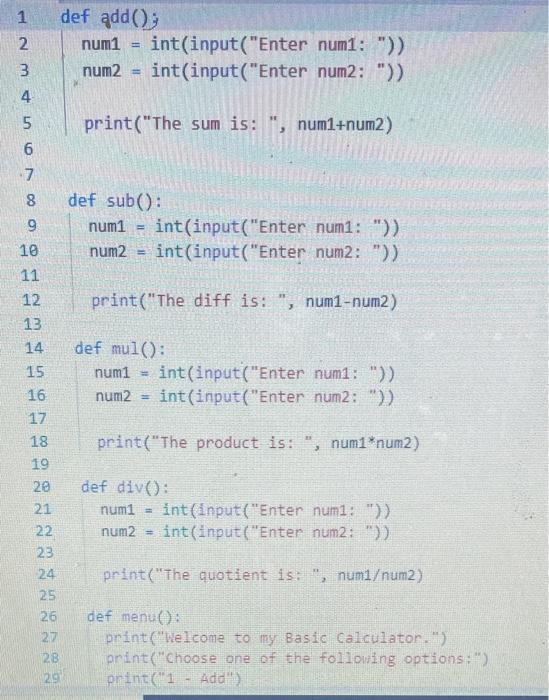
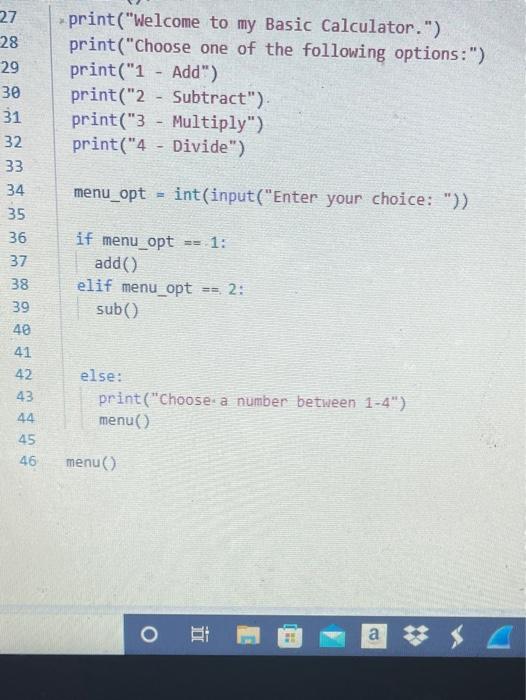
Instructions Look at the main.py. You will see code for a basic calculator. At the bottom there is a menu function but it is incomplete. The multipy and division options are not working in the menu. Please add the code required to have a fully functioning menu. 1 def add(); num1 = int(input("Enter num1: ")) num2 = int(input("Enter num2: ")) N 3 4 in 5 print("The sum is: ", num1+num2) 6 8 co 10 7 def sub(): 9 num1 int(input("Enter numi: ")) num2 int(input("Enter num2: ")) 11 12 print("The diff is: ", num1-num2) 13 14 def mul(): 15 numi int(input("Enter num1: ")) 16 num2 = int(input ("Enter num2: ")) 17 18 print("The product is: ", num1*num2) 19 20 def div(): 21 numi int(input("Enter numi: ")) 22 num2 int(input("Enter num2: ")) 23 24 print("The quotient is: ", numium2) 25 26 def menu 27 print("Welcome to my Basic Calculator.") 28 print("Choose one of the following options:") 20 print("1 Add print("Welcome to my Basic Calculator.") print("Choose one of the following options:") print("1 - Add") print("2 - Subtract") print("3 - Multiply") print("4 - Divide") - menu_opt int(input("Enter your choice: ")) 27 28 29 30 31 32 33 34 35 36 37 38 39 40 41 42 43 44 45 46 if menu_opt == = 1: add() elif menu_opt == 2: sub) else: print("Choose a number between 1-4") menu() menu o Di a
Step by Step Solution
There are 3 Steps involved in it

Get step-by-step solutions from verified subject matter experts
 Study Help