







Question: PLEASE CODE USING PYTHON3! (PLEASE ANSWER BEFORE WEDNESDAY!): Please read this entire post before you answer. Thank you! **IMPORTANT NOTE**: I just posted this same
PLEASE CODE USING PYTHON3! (PLEASE ANSWER BEFORE WEDNESDAY!):
Please read this entire post before you answer. Thank you!
**IMPORTANT NOTE**: I just posted this same question twice already. Both times the question was wrong or incomplete. I say this respectfully, but I don't want to waste another. As a Chegg subscriber I am limited by 20 questions per month and when there are incomplete/incorrect answers I don't get refunded questions, so please only answer if it's correct and complete. I provide all the information. Thank you and hope you could understand. All I ask is that you try your best with the information I provide.
I will comment if it's not correct. I will thumbs up/rate if it's correct. Thank you and hope you could understand!
This question seems like a tall order especially to get it done before 11AM on WED. Once you understand fully, it should be simple if you're an expert.
-
(*Jupyter Notebook* Highly Recommended)
For this multiple part question, you need to edit a file. Be sure to write clear comments on parts you code/edit yourself. The image of the question is attached is also linked. I have linked the files you will need. This question was meant to be done in jupyter notebook (.ipynb), but I made (.py) if you don't use that. Make sure it isn't too advanced either. Make it as simple as possible basically. Just use your better judgment please and thank you!
LINK TO FILES: https://drive.google.com/drive/folders/1Hlx4CGJ9nS1JTTfFSQModgyUNUtLFZQ0?usp=sharing
(Every single file that you will and/or might need is in the link above)

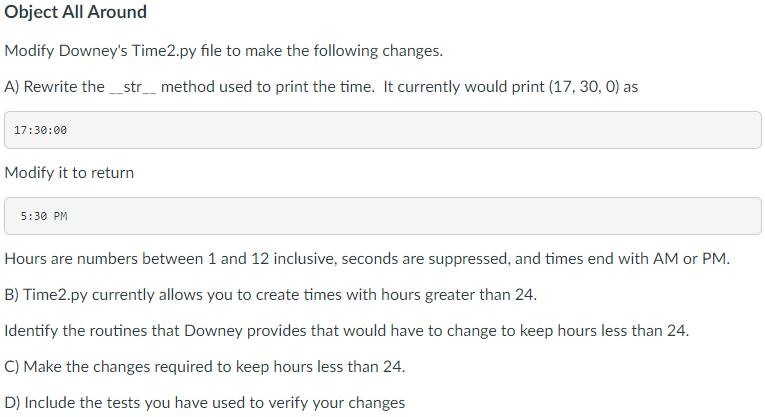
For this task, it is crucial that you manage the time correctly. First off you have to wrap the time. When the hour value is too big it should wrap the time. For example, if the user construct the time, "(25:00:00)" it .should give the output of "1:00 AM". 11:59 at night is PM and 12:00 at night is AM. When the time is given "(24:00:00), it should be changed to "(00:00:00)". This should give the output of "12:00 AM". When the minute value is too big it should wrap around. For example: If I test the time that says "(17:67:00)" it should give me the output of "6:07 PM". Whether the time is constructed as "(00:75:00)", "(1:15:00)", "or "(00:15:00)" it should give the appropriate time accordingly. I recommend testing a bunch of different times to see if it gives you the correct output in the 12-hr format (civilian time). You can edit this file anyway how, but don't make any unnecessary changes. Please comment if you have any further questions and need clarification.
Downey's Time2.py file is in the first link along with the '.ipynb' (Jupyter Notebook) version of it. Just by chance, the 'Time2' file is unavailable in the first link, here are links where you can find it. Both links take you to to the code of the file:
Time2 Links:
https://github.com/AllenDowney/ThinkPython2/blob/master/code/Time2.py
or
http://greenteapress.com/thinkpython2/code/Time2.py
QUESTION BELOW
Step by Step Solution
There are 3 Steps involved in it

Get step-by-step solutions from verified subject matter experts
 Study Help