







Question: Please complete all code as listed.. This is slightly different from previous answers on chegg Task: Avengers, unite! The agents from S.H.I.E.L.D. have asked for
Please complete all code as listed.. This is slightly different from previous answers on chegg
Task: Avengers, unite!
The agents from S.H.I.E.L.D. have asked for a software upgrade to organize Earths greatest heroes - the Avengers. They want to store information about these heroes, and theyve provided a few data files for us to read in. Lets design a basic mobile app around what they want to see.
Getting Started
This will be your first hands-on experience with Android on your own! It will follow the MVC design pattern (as all of our mobile apps this semester). There will be 3 model classes and 1 controller class.
Begin by creating a new Android project in Android Studio, Use API 33 for your Compile Sdk Version.
Create the following:
AvengersController.java - in the lab3.controller package
Person.java - in the lab3.model package
Avenger.java - in the lab 3.model package
Team.java - in the lab3.model package
Your app should also contain:
MainActivity.java - in the lab3 package
activity_main.xml - in the res > layout folder
Your application will read in data from text files placed in the assets directory. Create a new assets folder in your project, and move the sample file (data.csv) into it.
App Design
Your app will show a view similar to the one shown in the attached file AppView1.png when the app is run in the emulator. This view displays SHIELD logo and several buttons. (Note that these components can be hard-coded - they do not need to be dynamically loaded)
This screen will be the MainActivity.java (activity_main.xml).
When the user touches one of the Avengers in this view of the app, information about that person is shown below their image - see attached file AppView1-example1.png for an example where the user chose Iron Man.
You may customize your app however you choose - this includes fonts, images, colors, configuration. You should have at least 4 Avengers, and it must follow the requirements outlined in this lab description.
This app must have the following GUI components:
A label for the app (shown here as S.H.I.E.L.D. Avenger Locator)
A logo for the app (shown here as the SHIELD eagle/logo image provided)
4 or more buttons for Avengers.
The SHIELD logo has been provided, if you choose to use it (or you may optionally find your own image/s). Place this image file in res > drawable.
Making it Work
MainActivity.java will launch when the application is run, and show the activity_main.xml.
MainActivity should create a new AvengersController and connect each button on the GUI with the controller.
AvengersController will implement the View.OnClickListener interface. This will enable the controller to listen for user input from the components on the GUI.
When the user clicks on a button for an Avenger, the AvengersController should load the data from the given file (assets > data.csv) and call upon the Team class to return the location of that requested Avenger. This location will be shown in a Toast to the user.
Notes:
It is possible to implement this app without the AvengersController.java file, however this does not follow MVC and credit will be lost.
There are more Avengers in the provided data.csv file than what are shown in the sample. Feel free to use these or not.
There is additional information about each Avenger in the data file as well - do not change the data file! Read only what you need.
Before moving forward, take a closer look at the data in these files. You can open them as spreadsheets, or you can view the comma-delimited format as a text file by double-clicking it in Android Studio.
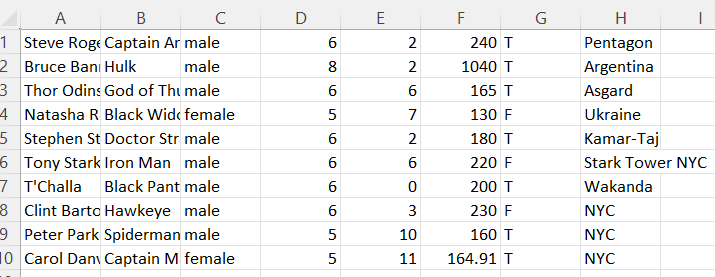
Format for the data.csv file is:
real name,alias,gender,height(ft),height(inches),weight,powers,location
Hint: Our controller may need access to the assets from the context.
The Model
The model of your app will consist of 3 classes: Person, Avenger, and Team. An Avenger is-a Person, and a Team has Avengers. For each class, create class variables, constructors, all getters/setters, toString(), and any methods needed to complete the requirements of the lab.
Person.java
This class will be abstract. A Person will have:
A name (e.g. Tony Stark)
Height and weight
Avenger.java
This class will extend the Person class. An Avenger will have:
An alias (e.g. Iron Man)
A current location (e.g. Stark Tower NYC)
A boolean to indicate if they have powers or special abilities (e.g. for Iron Man, thats a false :)
Team.java
A Team will have:
An ArrayList of Avenger objects
A loadAvengers(..) method which reads in the Avengers info from the data.csv file
A getAvenger(..) method which takes in a String alias of an Avenger and returns the Avenger object.
If your model classes contains more information, that is fine, however if that extension interferes with the requirements of this lab, you may lose credit. (For example, if your Person class includes an age for the person that is fine, however if we cannot instantiate an Avenger without providing an age - not given data in this lab - then credit will be lost as it will not work with the data file format given).
Testing Your App
Use a Pixel 4 Android virtual device (API 33) to test your code. Always test your app thoroughly before submitting, to ensure everything is working properly. This is our first Android app lab, so testing will be a little different than in previous Java labs. Click on GUI components, ensure there are not any error messages in the console, that your app doesnt crash, etc. Reminder: You must export the Android project, including all files & dependencies for the project (this includes images, text files, etc).
example of data.csv is the image below
Step by Step Solution
There are 3 Steps involved in it

Get step-by-step solutions from verified subject matter experts
 Study Help