







Question: Please complete the following steps on excel, and submit excel document when done 1. The upper left area of the worksheet is a Payment Calculator.
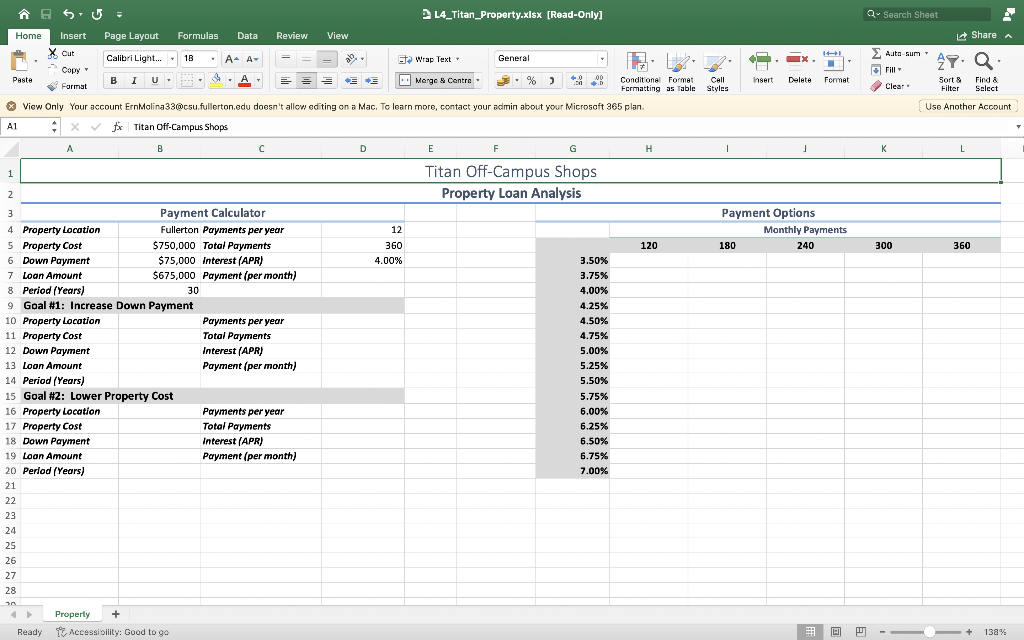
Please complete the following steps on excel, and submit excel document when done
1. The upper left area of the worksheet is a Payment Calculator. Use a function to calculate the monthly payment (D7) using the data provided. 2. In the Payment Calculator, use Goal Seek to keep the payment per month at $3,000 by increasing the down payment. 3. Copy the info from B4:B8 and paste to cells B10:B14. Copy D4:D7 and paste to D10:D13. Note: Remember to use Paste Special and use Values and Number Formats. 4. Reset the value in B6 back to $75,000. 5. Perform a second Goal Seek in the Payment Calculator again keeping the payment per month at $3,000 this time by lowering the property cost. 6. Copy the info from B4:B8 and paste to cells B16:B20. Copy D4:D7 and paste to D16:D19. See note in step 4. 7. Reset the value in B5 back to $750,000. 8. The upper right area of the worksheet will display the Payment Options. Create a two-variable Data Table to show the monthly payment for each of the interest rates by the number of monthly payments. (Note: all values in each cell will be different. If they arent, you can erase the table by highlighting cells H6: L20 and deleting them). 10. Format the numbers in your Data Table so the that top row is Accounting Style with 0 decimal places and the remaining numbers are Comma Style with 0 decimal places.
Home Insert Page Layout Formulas Data Review View 2 L4_Titan_Property-xIsx [Read-Only] Q - Search Sheet Format View Only Your account Ernkolina33@csu.fullerton.edu doesn't allow editing on a Mac. To learn more, contact your admin about your Microsoft 365 plan
Step by Step Solution
There are 3 Steps involved in it

Get step-by-step solutions from verified subject matter experts
 Study Help