







Question: Please complete the following task: - Please work on this project by yourself. - Similarities in solutions will be treated as cheating. If you have
Please complete the following task:
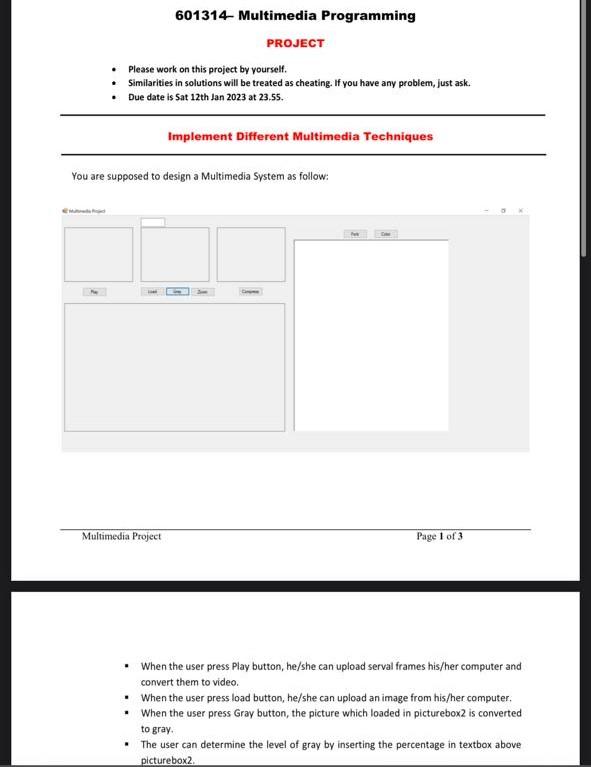
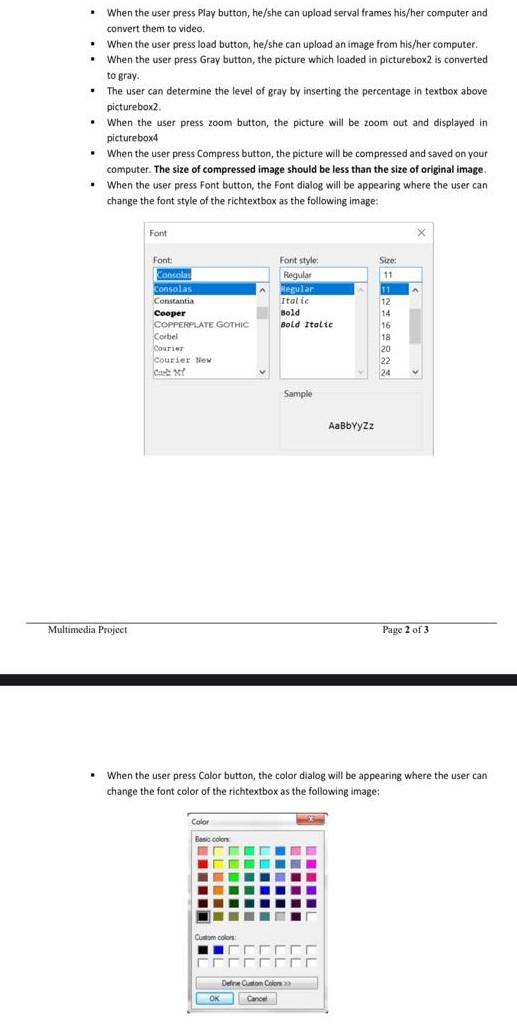
- Please work on this project by yourself. - Similarities in solutions will be treated as cheating. If you have any problem, just ask. - Due date is 5at 12 th Jan 2023 at 23.55. Implement Different Multimedia Techniques You are supposed to design a Multimedia System as follow: Multimedia Project Page 1 of 3 - When the user press Play button, he/she can upload serval frames his/her computer and convert them to video. - When the user press load button, he/she can upload an image from his/her computer, - When the user press Gray button, the picture which loaded in picturebox 2 is converted to gray. - The user can determine the level of gray by inserting the percentage in textbox above picturebox 2 . - When the user press Play button, he/she can upload serval frames his/her computer and convert them to video. - When the user press load button, he/she can upload an image from his/her computer. - When the user press Gray button, the picture which loaded in picturebox 2 is converted to gray. - The user can determine the level of gray by inserting the percentage in textbox above pictureboxa. - When the user press zoom button, the picture will be zoom out and displayed in pictureboxa - When the user press Compress button, the picture will be compressed and saved on your computer. The size of compressed image should be less than the size of original image. - When the user press Font button, the Font dialog will be appearing where the user can change the font style of the richtextbox as the following image: media Project Page 2 of 3 - When the user press Color button, the color dialog will be appearing where the user can change the font color of the richtextbox as the following image
Step by Step Solution
There are 3 Steps involved in it

Get step-by-step solutions from verified subject matter experts
 Study Help