







Question: Please complete the provided Matlab code to implement Histogram equalization. Please use the follow program to test your function. J is output of the histogram
Please complete the provided Matlab code to implement Histogram equalization. Please use the follow program to test your function.
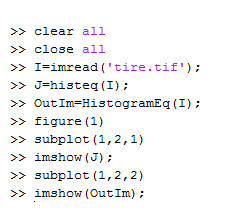
J is output of the histogram equalization function provided by Matlab. Please compare your output and Matlabs output.
function OutIm = HistogramEq(InIm)
HistogramEq Code:
% Input: % InIm - input image % % Output: % OutIm - output image %
%%%%%%%% %%%%%%%%
% get the size of input image; [row, col] = size(InIm); % initalize the histogram array; H = zeros(1,256); % initalize the output image; OutIm = uint8(zeros(row, col));
% Step 1: computer histogram (note the index starts from 1 but gray level starts from 0); for i=1:row for j=1:col % Your code here! end end
% Step 2: compute PDF; PDF= % Your code here!
% Step 3: compute CDF (Hint: use 'cumsum' function, type 'help cumsum' to see help) CDF= % Your code here!
% Step 4: compute transformation T (T=CDF*(L-1) and L=256); T= % Your code here!
% Step 5: generate output image using transformation T; for i=1:row for j=1:col OutIm(i,j)= % Your coder here! end end
>>clear all >>close all >> I=imread ('tire . tif' ); >> J=histeg (1); >> Out 1m=HistogramEg(1); >>figure (1) >>subplot (1,2,1) >>subplot (1,2,2)
Step by Step Solution
There are 3 Steps involved in it

Get step-by-step solutions from verified subject matter experts
 Study Help