







Question: -Please complete using android studio In this assignment you will create a new Android App to allow the user to play Rocks, Paper, Scissors. Your
-Please complete using android studio
In this assignment you will create a new Android App to allow the user to play Rocks, Paper, Scissors.
Your assignment is as follows.
3. Create a layout similar to the screen captures below The Activity should contain two fragments. - The top fragment should contain the game caption, the player selection buttons and the individual game results. - The bottom fragment should contain the cumulative game result counts. 4. The app should do the following: - allow the user to play the game Rock, Paper, Scissors - allow the user to select Rock, Paper or Scissors via Buttons - when the user presses one of the buttons: - - a random choice is made for the phone and the user - - the phone's pick is displayed in a TextView - - the result of the game is displayed TextView - - the game result is sent to the bottom fragment - - the running totals are updated within the bottom fragment. - at any point, the user can reset the running totals by pressing the related button - when the reset button is pressed: - - display a toast message stating that the counts have been reset - - reset all of the counts to 0
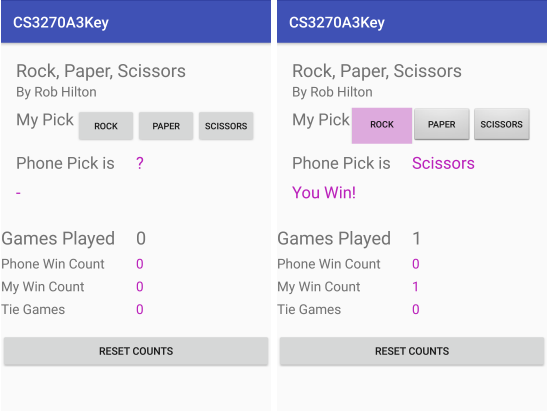
CS3270A3Key Rock, Paper, Scissors By Rob Hilton My Pick Rock PAPER SCISSORS Phone Pick is Games Played Phone Win Count 0 My Win Count Tie Games RESET COUNTS CS3270 3Key Rock, Paper, Scissors By Rob Hilton My Pick Rock PAPER SCISSORS Phone Pick is Scissors You Win! Games Played 1 Phone Win Count 0 My Win Count Tie Games RESET COUNTS CS3270A3Key Rock, Paper, Scissors By Rob Hilton My Pick Rock PAPER SCISSORS Phone Pick is Games Played Phone Win Count 0 My Win Count Tie Games RESET COUNTS CS3270 3Key Rock, Paper, Scissors By Rob Hilton My Pick Rock PAPER SCISSORS Phone Pick is Scissors You Win! Games Played 1 Phone Win Count 0 My Win Count Tie Games RESET COUNTS
Step by Step Solution
There are 3 Steps involved in it

Get step-by-step solutions from verified subject matter experts
 Study Help