







Question: Please continue the following code: import requests from bs4 import BeautifulSoup # Step 1: Download 1,000 most recent questions url = https://stackoverflow.com/questions?page=1&sort=newest response = requests.get(url)
Please continue the following code:
import requests
from bs4 import BeautifulSoup
# Step 1: Download 1,000 most recent questions
url = "https://stackoverflow.com/questions?page=1&sort=newest"
response = requests.get(url)
soup = BeautifulSoup(response.text, "html.parser")
# Find the total number of pages
pages = int(soup.find("div", class_="s-pagination-item s-pagination-next").find_previous_sibling("a").get_text(strip=True))
# Loop over all the pages and extract the information for each question
for i in range(1, pages + 1):
url = f"https://stackoverflow.com/questions?page={i}&sort=newest"
response = requests.get(url)
soup = BeautifulSoup(response.text, "html.parser")
questions = soup.find_all("div", class_="js-post-wrapper")
for question in questions:
# Step 2.1: The title (str) and the ID (str) of the question.
title = question.find("a", class_="js-post-title").get_text(strip=True)
question_id = question.find("a", class_="js-post-title")["href"].split("/")[-1]
# Step 2.2: The name (str), the ID (str), and the reputation score (int) of the original poster.
poster = question.find("div", class_="js-post-meta").find("div").get_text(strip=True)
poster_id = question.find("div", class_="js-post-meta").find("div")["href"].split("/")[-1]
reputation = int(question.find("div", class_="js-post-meta").find("span").get_text(strip=True).replace(",", ""))
# Step 2.3: The time the question was posted (str)
time = question.find("div", class_="js-post-meta").find_all("div")[-1].get_text(strip=True)
# Step 2.4: The question score (int), the number of views (int), the number of answers (int), and whether an answer was accepted (bool).
score = int(question.find("span", class_="js-score").get_text(strip=True))
views = int(question.find("div", class_="js-post-meta").find_all("div")[2].get_text(strip=True).split(" ")[0].replace(",", ""))
answers = int(question.find("div", class_="js-post-meta").find_all("div")[3].get_text(strip=True).split(" ")[0].replace(",", ""))
accepted = question.find("span", class_="js-status").find("span") is not None
# Step 2.5: The question tags (str). A question may have at most five tags.
tags = [tag.get_text(strip=True) for tag in question.find_all("a", class_="js-post-tag")]
#Step 3: Store the data in a suitable data structure.
data = {
"title": title,
"question_id": question_id,
"poster": poster,
"poster_id": poster_id,
"reputation": reputation,
"time": time,
"score": score,
"views": views,
"answers": answers,
"accepted": accepted,
"tags": tags
}
#Step 4: Perform any additional processing or analysis on the data.
#Step 5: Save the data to disk or output it in some other form.
with open(f"stackoverflow_questions_{i}.json", "w") as f:
json.dump(data, f)
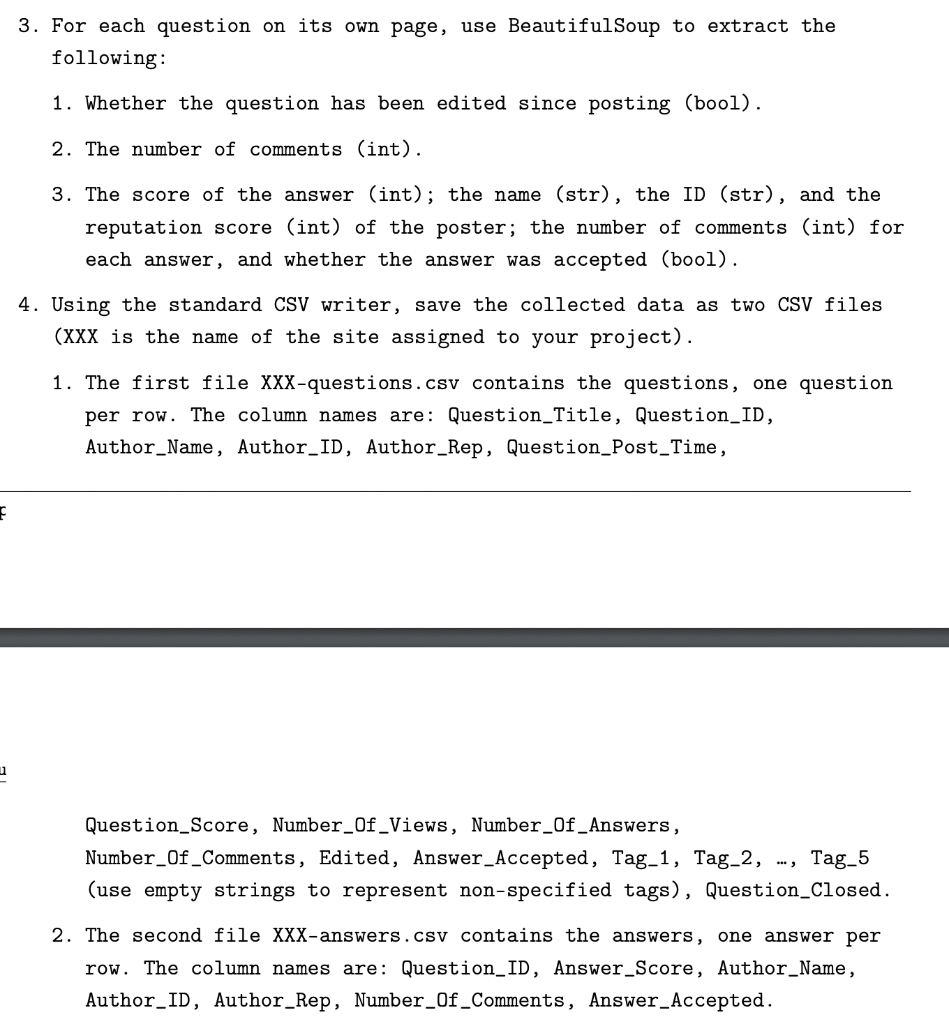
3. For each question on its own page, use BeautifulSoup to extract the following: 1. Whether the question has been edited since posting (bool). 2. The number of comments (int). 3. The score of the answer (int); the name (str), the ID (str), and the reputation score (int) of the poster; the number of comments (int) for each answer, and whether the answer was accepted (bool). 4. Using the standard CSV writer, save the collected data as two CSV files ( XXX is the name of the site assigned to your project). 1. The first file XXX-questions.csv contains the questions, one question per row. The column names are: Question_Title, Question_ID, Author_Name, Author_ID, Author_Rep, Question_Post_Time, Question_Score, Number_Of_Views, Number_Of_Answers, Number_Of_Comments, Edited, Answer_Accepted, Tag_1, Tag_2, ..., Tag_5 (use empty strings to represent non-specified tags), Question_Closed. 2. The second file XXX-answers.csv contains the answers, one answer per row. The column names are: Question_ID, Answer_Score, Author_Name, Author_ID, Author_Rep, Number_Of_Comments, Answer_Accepted
Step by Step Solution
There are 3 Steps involved in it

Get step-by-step solutions from verified subject matter experts
 Study Help