







Question: Please convert the code Python code given below into a code MATLAB can run. I believe MATLAB uses a C / C + + style
Please convert the code Python code given below into a code MATLAB can run. I believe MATLAB uses a CC style of code.
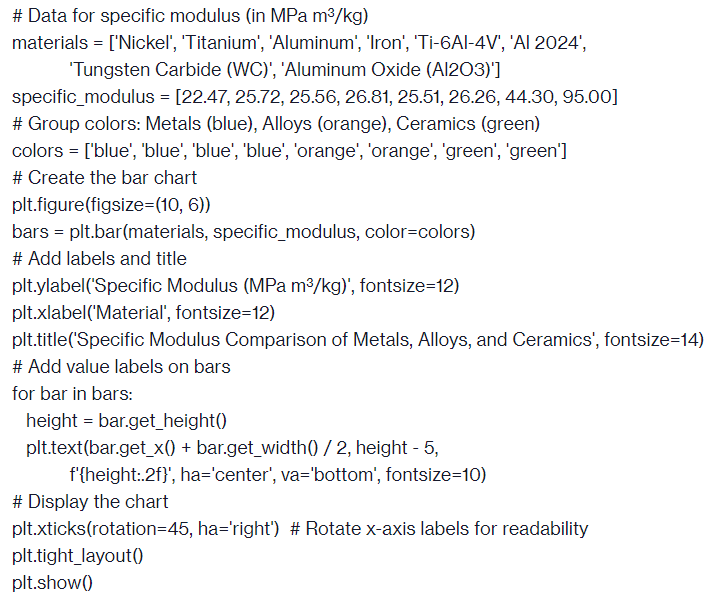
# Data for specific modulus in MPa mkg
materials Nickel 'Titanium', 'Aluminum', 'Iron', TiAlVAl
'Tungsten Carbide WC 'Aluminum Oxide AlO
specificmodulus
# Group colors: Metals blue Alloys orange Ceramics green
colors blue 'blue', 'blue', 'blue', 'orange', 'orange', 'green', 'green'
# Create the bar chart
pltfigurefigsize
bars pltbarmaterials specificmodulus, colorcolors
# Add labels and title
pltylabelSpecific Modulus MPa mkg fontsize
pltxlabelMaterial fontsize
plttitleSpecific Modulus Comparison of Metals, Alloys, and Ceramics', fontsize
# Add value labels on bars
for bar in bars:
height bar.getheight
plttextbargetx bar.getwidth height
fheight:f ha'center', va'bottom', fontsize
# Display the chart
pltxticksrotation ha'right' # Rotate xaxis labels for readability
plttightlayout
pltshow
Step by Step Solution
There are 3 Steps involved in it
1 Expert Approved Answer
Step: 1 Unlock

Question Has Been Solved by an Expert!
Get step-by-step solutions from verified subject matter experts
Step: 2 Unlock
Step: 3 Unlock
 Study Help