



Question: Please copy and paste your answers with screenshots below each question: 1) Create a database called enrollmentDB (Use mysql shell) Answer: 2) Show that the
Please copy and paste your answers with screenshots below each question:
1) Create a database called enrollmentDB (Use mysql shell)
Answer:
2) Show that the enrollmentDB database was created (Use mysql shell)
Answer:
3) Create a table called formTB that has the following fields and structure (Use mysql shell)
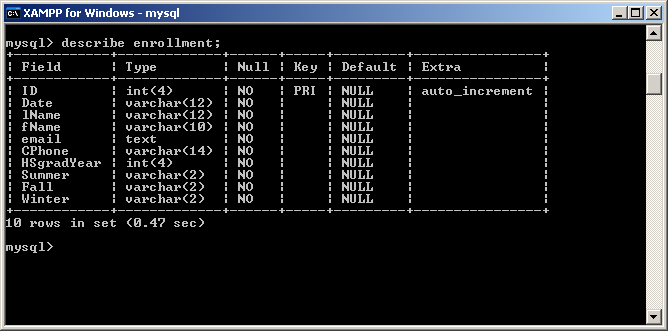
Answer:
4) Display the structure of the table you created in step 3 (Use mysql shell)
Answer:
5) Use the Insert statement to populate the table as follows (Use mysql shell)
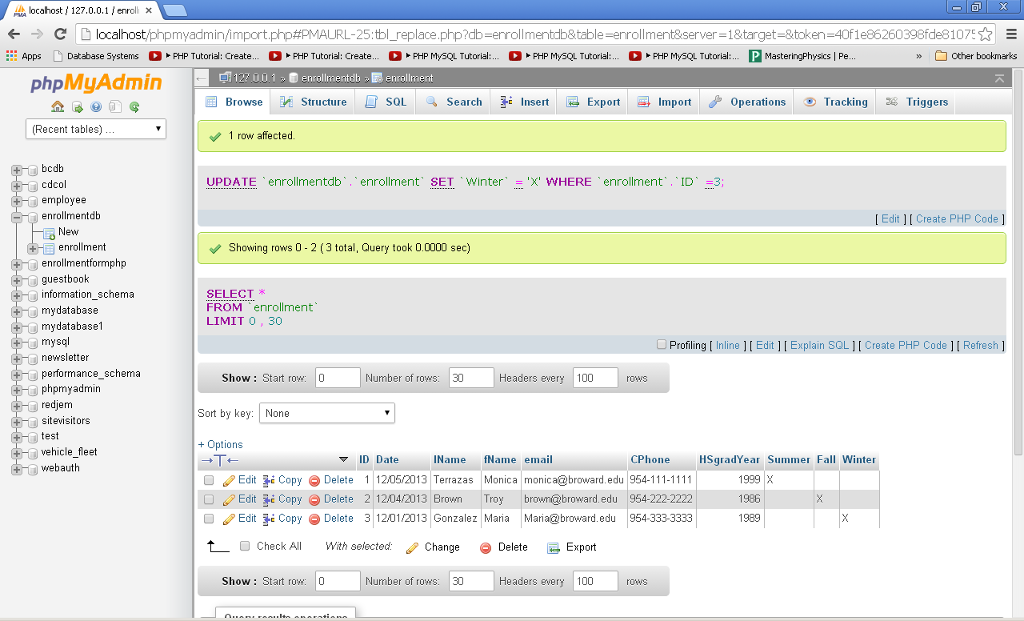
Answer:
6) Use a query to view all the students from the table by last name in ascending order (Use mysql shell)
Answer:
7) Add a new entry to the table with values (Use mysql shell)
Date: (use todays)
lName: (use your last name)
fName: (use your first name)
Cphone: ( use 954-444-4444)
HSgradeYear: (use your own)
Summer: (use Y)
Fall: (leave blank)
Winter: (leave blank)
Answer:
8) Use a query to view only the student you entered in step 7(Use mysql shell)
Answer:
9) Only display a student that graduated in 1986 (Use mysqlshell)
Answer:
10) Use a query to return the number of enrolled students (Use mysql shell)
Answer:
CA XAMPP for Windows - mysql mysql describe enrollment; Field Type i Null Key DefaultExtra ID int4 NO PRINULL NULL NULL NULL NULL NULL NULL NULL NULL NULL auto_increment : varchar(12 I NO : varchar(12 I NO Date fName CPhone | Nane emai.1 NO i varchar14) NO NO : varchar2 | NO : varchar2 | NO : varchar2 | NO text HSgradYear int(4) Summer Fall Winter 1rows in set (0.47 sec) mysql>
Step by Step Solution
There are 3 Steps involved in it

Get step-by-step solutions from verified subject matter experts