







Question: Please create a Class Diagrams for the below system that include 8 classes with appropriate relationships including association, dependency, and inheritance. Project Description: Our primary
Please create a Class Diagrams for the below system that include 8 classes with appropriate relationships including association, dependency, and inheritance.
Project Description:
Our primary actors are users (Student or Mentor). They will create a profile, then select if they are a student or a mentor. They will be able to search and join groups that meet the criteria they set through their profile. For instance, if they are Finance major, they will be put into the Finance major group with other students and mentors. They can send messages in the group chat and talk about schoolwork, university life and have conversation partners. The message system of the app only offer group chat, because the purpose of the app is to connect a group of mentors to other students for help.
The app server, secondary actor, will control the entire system. Also, it will check credentials and match students and mentors to their respective groups.
An Admin, another secondary actor, will keep maintaining the app by looking for bugs and errors. He will also optimize and update the system for new features if we decide to add some.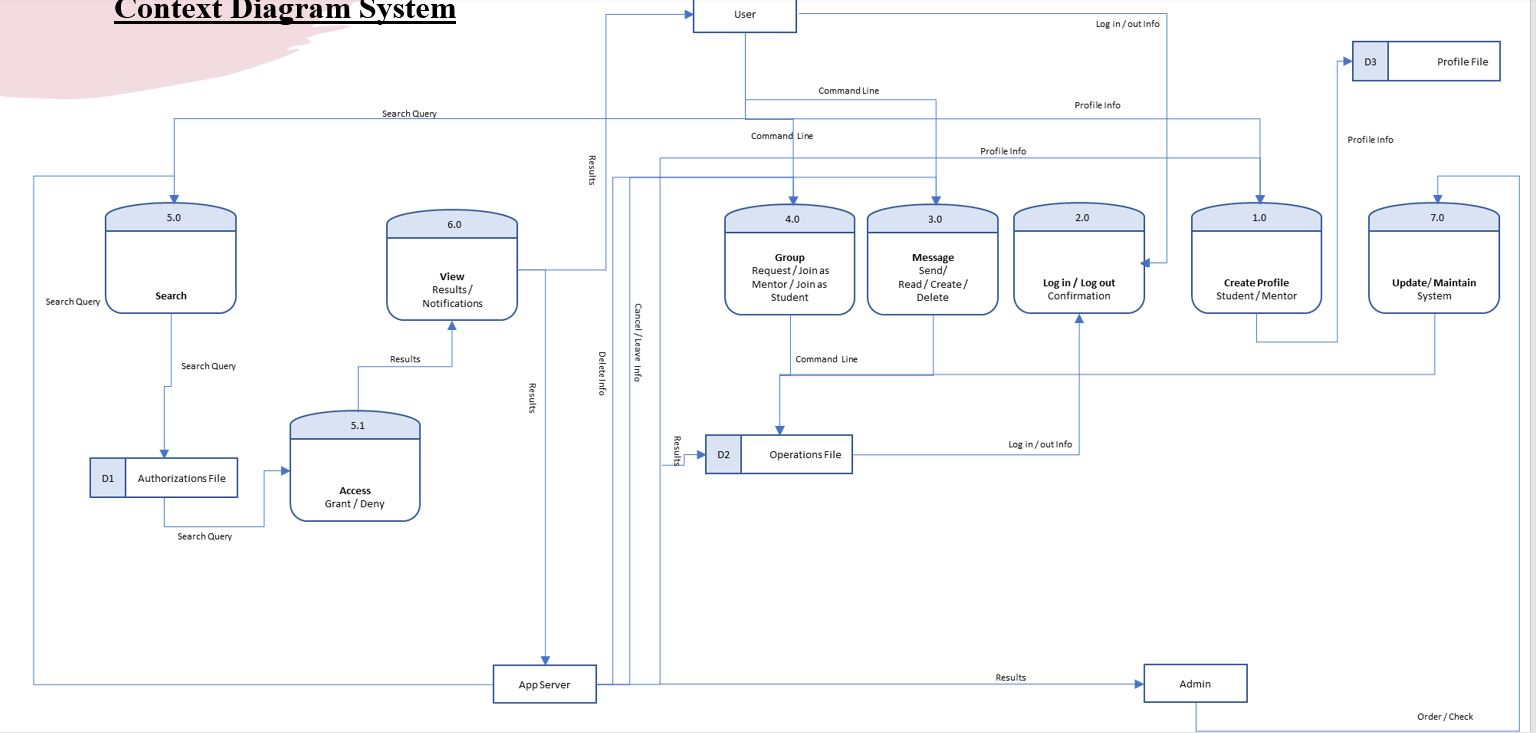
Step by Step Solution
There are 3 Steps involved in it

Get step-by-step solutions from verified subject matter experts
 Study Help