







Question: please create bpmn for this use case Apex Tool Sales & Rentals (ATSR) is a chain of hardware stores that provide a tools/equipment rental service.
please create bpmn for this use case
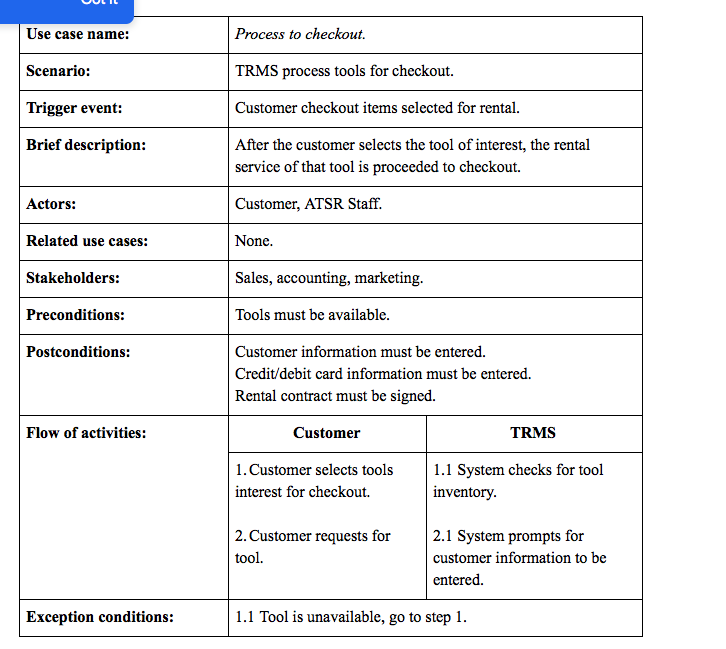
Apex Tool Sales & Rentals (ATSR) is a chain of hardware stores that provide a tools/equipment rental service. Their business model has been focused on providing their rental service to individual customers doing home improvement projects. Each store location has a standalone desktop application, called Tool Rental Management System (TRMS), used by ATSR staff to support the provision and management of the rental service. TRMS has a database of the tool inventory and customer accounts. Typically, a potential customer visits the store to look for a specific tool. After selecting the tool of interest, they proceed to the checkout. Customer information is then entered in TRMS by an ATSR clerk, unless they have used the rental service before, which would in that case have their contact and credit card information already recorded in TRMS. A rental contract is then signed between ATSR and the customer. The contract lists the rented tools, their corresponding hourly rental rates and the start and end dates/times of the rental contract. Customers are charged the tool hourly rental rate for overdue tools kept within a period less than three days after the contract end time. Extra fees are charged for damaged tools at the discretion of the ATSR staff inspecting the conditions of the tools at the times of their return. The extra fees are charged based on a predefined schedule. Part of the rental agreement, a deposit is charged to the customers credit card and will be refunded only if rented tools are returned within three days of the contract end date/time. However, such action can be overturned in favour of an agreed upon monetary penalty applied in accordance to terms agreed upon following negotiations between ATSR and affected customers.
Step by Step Solution
There are 3 Steps involved in it

Get step-by-step solutions from verified subject matter experts
 Study Help