







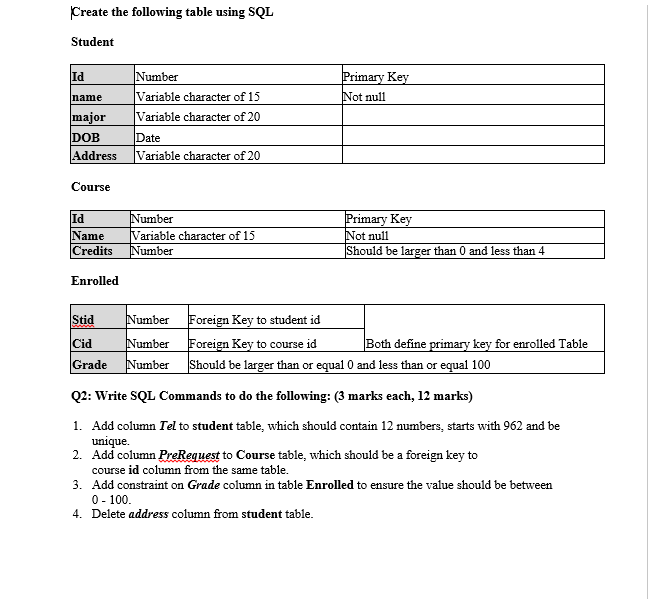
Question: please create/implement the following using SQL statements I have under 30minutes to deliver. Create the following table using SQL Student Id Primary Key Not null
please create/implement the following using SQL statements I have under 30minutes to deliver.
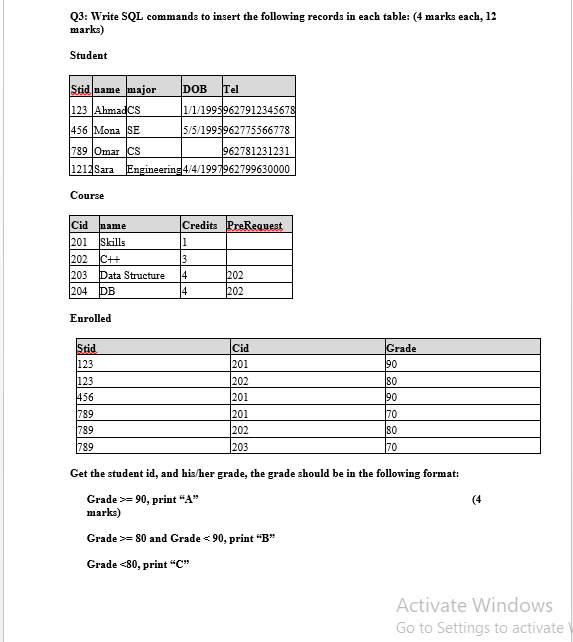
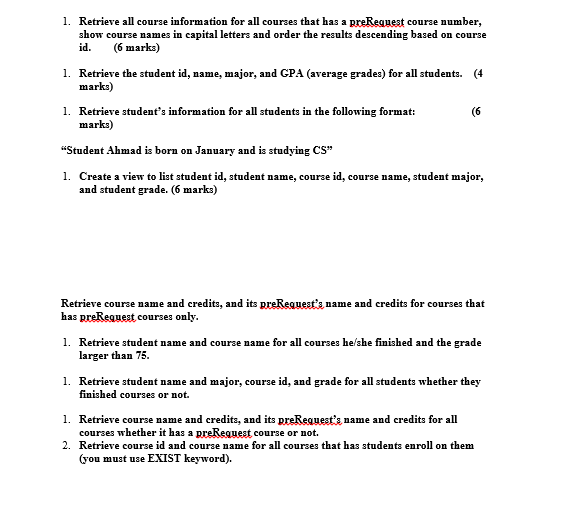
Create the following table using SQL Student Id Primary Key Not null name major DOB Address Number Variable character of 15 Variable character of 20 Date Variable character of 20 Course Id Name Credits Number Variable character of 15 Number Primary Key Not null Should be larger than 0 and less than 4 Enrolled Stid Number Foreign Key to student id Cid Number Foreign Key to course id Both define primary key for enrolled Table Grade Number Should be larger than or equal 0 and less than or equal 100 Q2: Write SQL Commands to do the following: (3 marks each, 12 marks) 1. Add column Tel to student table, which should contain 12 numbers, starts with 962 and be unique. 2. Add column PreRequest to Course table, which should be a foreign key to course id column from the same table. 3. Add constraint on Grade column in table Enrolled to ensure the value should be between 0 - 100. 4. Delete address column from student table. Q3: Write SQL commands to insert the following records in each table: (4 marks each, 12 marks) Student Stid name major DOB Tel 123 Ahmadcs 1/1/199519627912345678 456 Mona SE 5/5/1995962775566778 789 Omar cs 962781231231 1212 Sara Engineering 4/4/1997962799630000 Course Cid name 201 Skills 202 C++ 203 Data Structure 204 DB Credits PreRequest 1 3 14 202 4 202 Enrolled Stid 123 123 456 789 789 789 Cid 201 202 201 Grade 190 80 190 70 80 70 201 202 203 (4 Get the student id, and his/her grade, the grade should be in the following format: Grade >= 90, print "A" marks) Grade >= 80 and Grade
Step by Step Solution
There are 3 Steps involved in it

Get step-by-step solutions from verified subject matter experts
 Study Help