







Question: please disregard the excel question Question 2 -- Royals Baseball 3 7 Instructions 4 You are the parent of a player on a recreational league
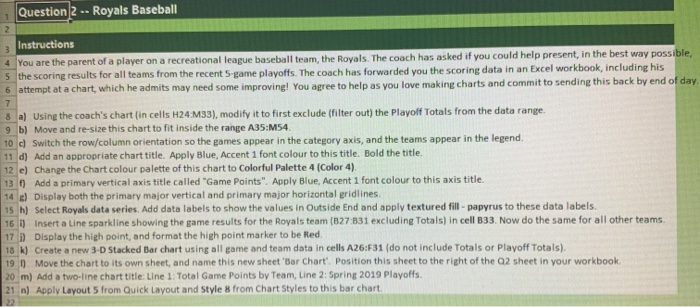
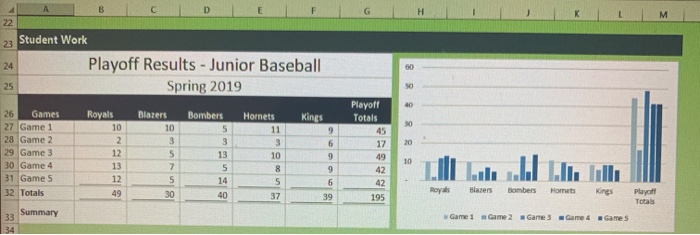
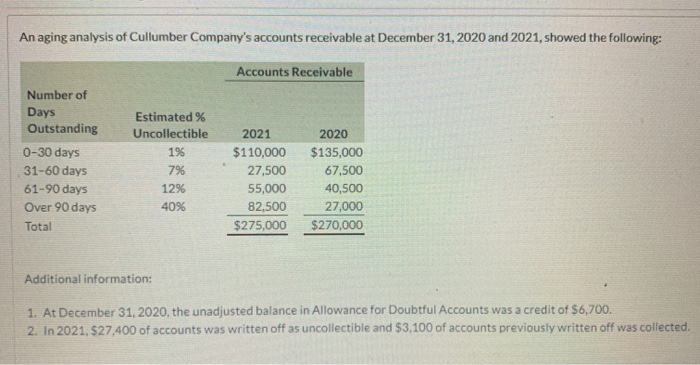
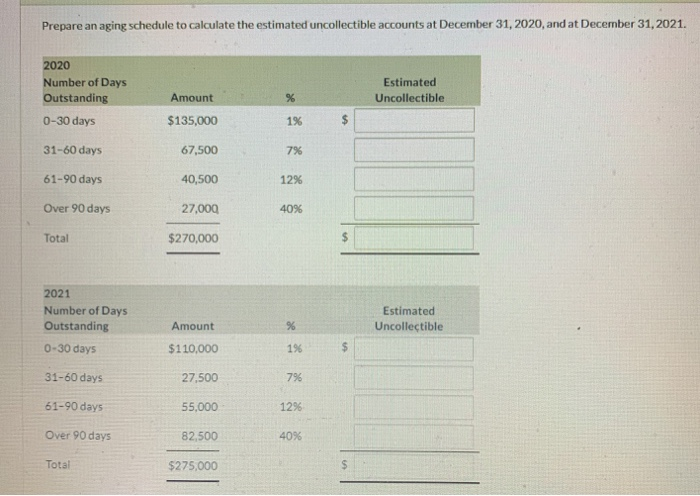
Question 2 -- Royals Baseball 3 7 Instructions 4 You are the parent of a player on a recreational league baseball team, the Royals. The coach has asked if you could help present in the best way possible, 5 the scoring results for all teams from the recent 5 game playoffs. The coach has forwarded you the scoring data in an Excel workbook, including his 6 attempt at a chart, which he admits may need some improving! You agree to help as you love making charts and commit to sending this back by end of day. 8. a) Using the coach's chart (in cells H24:M33), modify it to first exclude (filter out) the Playoff Totals from the data range 9 b) Move and re-size this chart to fit inside the range A35:M54. 10 ) Switch the row/column orientation so the games appear in the category axis, and the teams appear in the legend, 11 d) Add an appropriate chart title. Apply Blue, Accent 1 font colour to this title. Bold the title. 12 e) Change the chart colour palette of this chart to Colorful Palette 4 (Color 4). 13 ) Add a primary vertical axis title called "Game Points". Apply Blue, Accent 1 font colour to this axis title. 14 ) Display both the primary major vertical and primary major horizontal gridlines 15 h) Select Royals data series. Add data labels to show the values in Outside End and apply textured fill-papyrus to these data labels 161) Insert a Line sparkline showing the game results for the Royals team (B27 831 excluding Totals) in cell B33. Now do the same for all other teams. 17 ) Display the high point, and format the high point marker to be Red 18 k) Create a new 3-D Stacked Bar chart using all game and team data in cells A26:F31 (do not include Totals or Playoff Totals). 191) Move the chart to its own sheet, and name this new sheet 'Bar Chart Position this sheet to the right of the 2 sheet in your workbook. 20 m) Add a two-line chart title: Line 1 Total Game Points by Team, Line 2: Spring 2019 Playoffs 21 n) Apply Layout 5 from Quick Layout and style 8 from Chart Styles to this bar chart 22 G H M 22 23 Student Work 24 00 Playoff Results - Junior Baseball Spring 2019 25 0 40 Blazers 10 Kings 30 Bombers 5 3 9 6 3 26 Games 27 Game 1 28 Game 2 29 Game 3 30 Game 4 31 Game 5 32 Totals 20 Playoff Totals 45 17 49 Royals 10 2 12 13 12 49 5 7 Hornets 11 3 10 8 5 37 13 5 14 10 9 un 42 42 30 6 39 Royals Blazers Bombers Home 40 195 Playoff Totals Summary Game 1 Game 2 Game 3 Game 4 Game 5 33 34 An aging analysis of Cullumber Company's accounts receivable at December 31, 2020 and 2021, showed the following: Accounts Receivable Number of Days Outstanding 0-30 days 31-60 days 61-90 days Over 90 days Total Estimated % Uncollectible 196 7% 12% 4096 2021 $110,000 27,500 55,000 82,500 $275,000 2020 $135,000 67,500 40,500 27,000 $270,000 Additional information: 1. At December 31, 2020, the unadjusted balance in Allowance for Doubtful Accounts was a credit of $6,700. 2. In 2021, $27,400 of accounts was written off as uncollectible and $3,100 of accounts previously written off was collected Prepare an aging schedule to calculate the estimated uncollectible accounts at December 31, 2020, and at December 31, 2021. 2020 Number of Days Outstanding Estimated Uncollectible Amount % 0-30 days $135,000 1% 31-60 days 67,500 7% 61-90 days 40,500 12% Over 90 days 27,000 40% Total $270,000 2021 Number of Days Outstanding % Estimated Uncollectible Amount $110,000 0-30 days 196 $ 31-60 days 27,500 796 61-90 days 55,000 1296 Over 90 days 82,500 40% Total $275,000
Step by Step Solution
There are 3 Steps involved in it

Get step-by-step solutions from verified subject matter experts
 Study Help