







Question: Please do all steps and show all steps, thank you. 1. (3 marks) Without changing your working directory, create a subdirectory in your Documents directory
Please do all steps and show all steps, thank you.
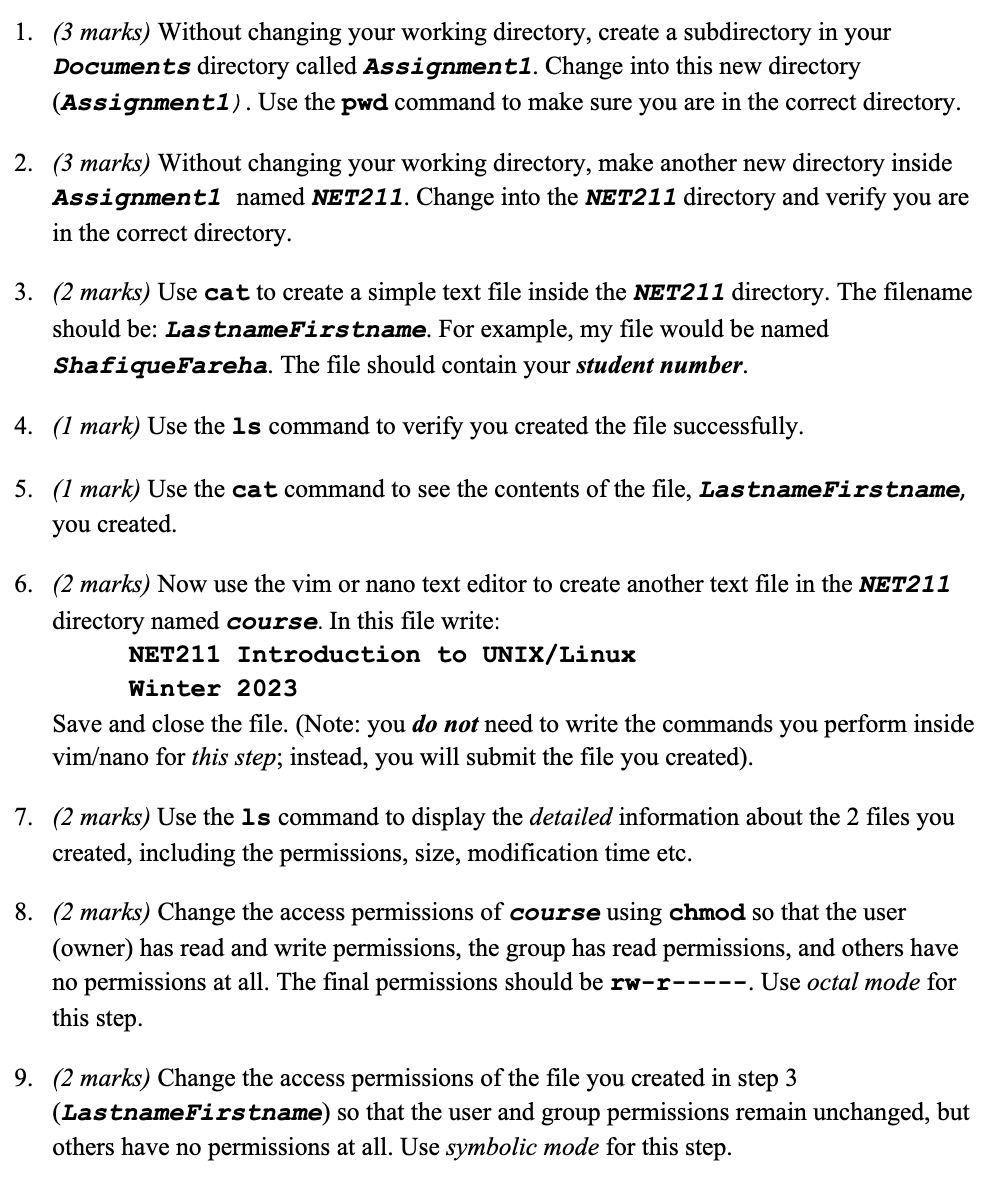
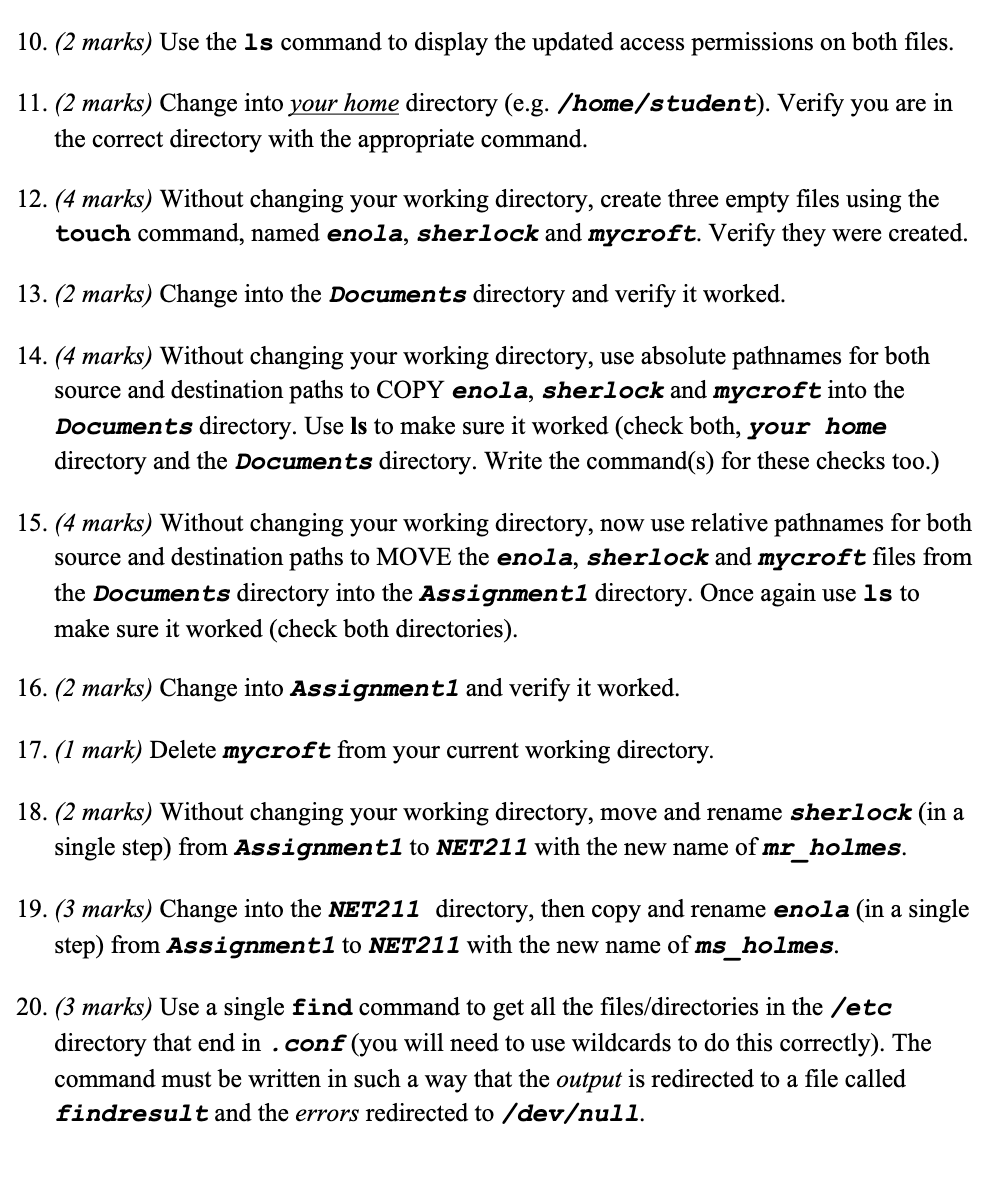
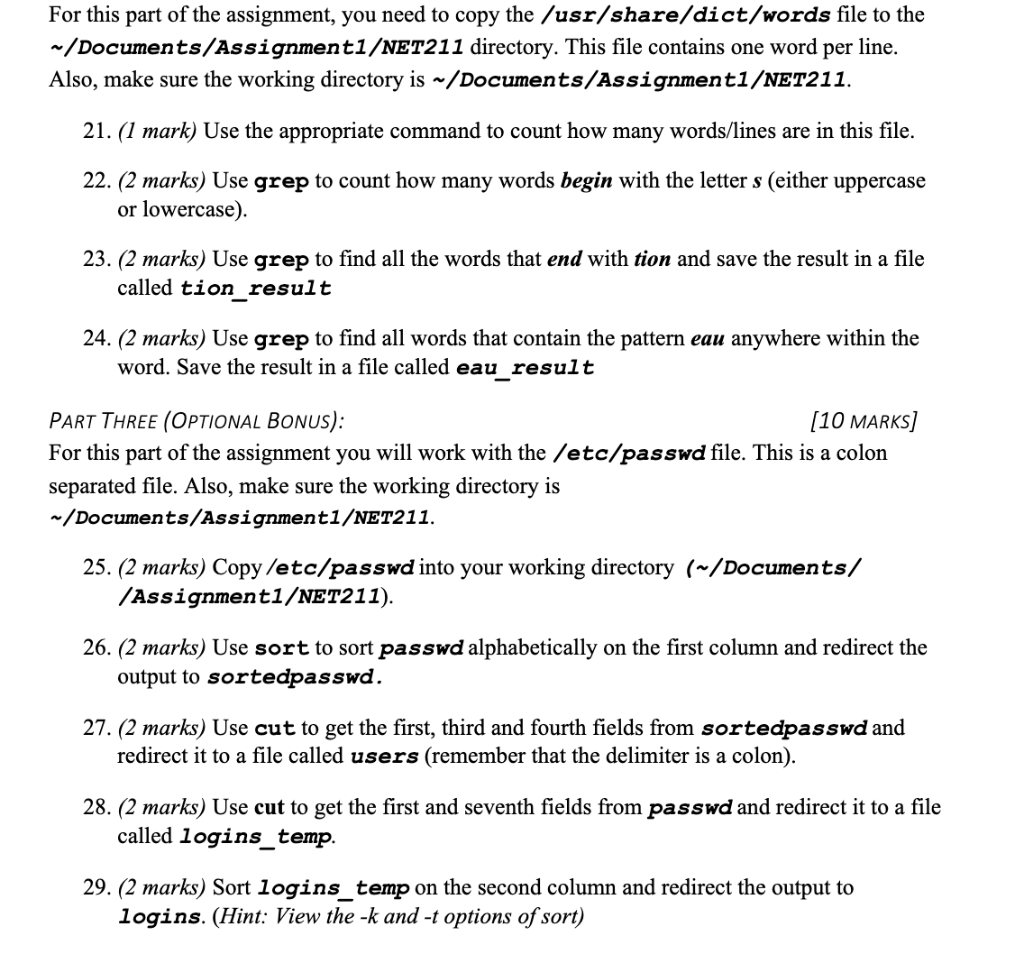
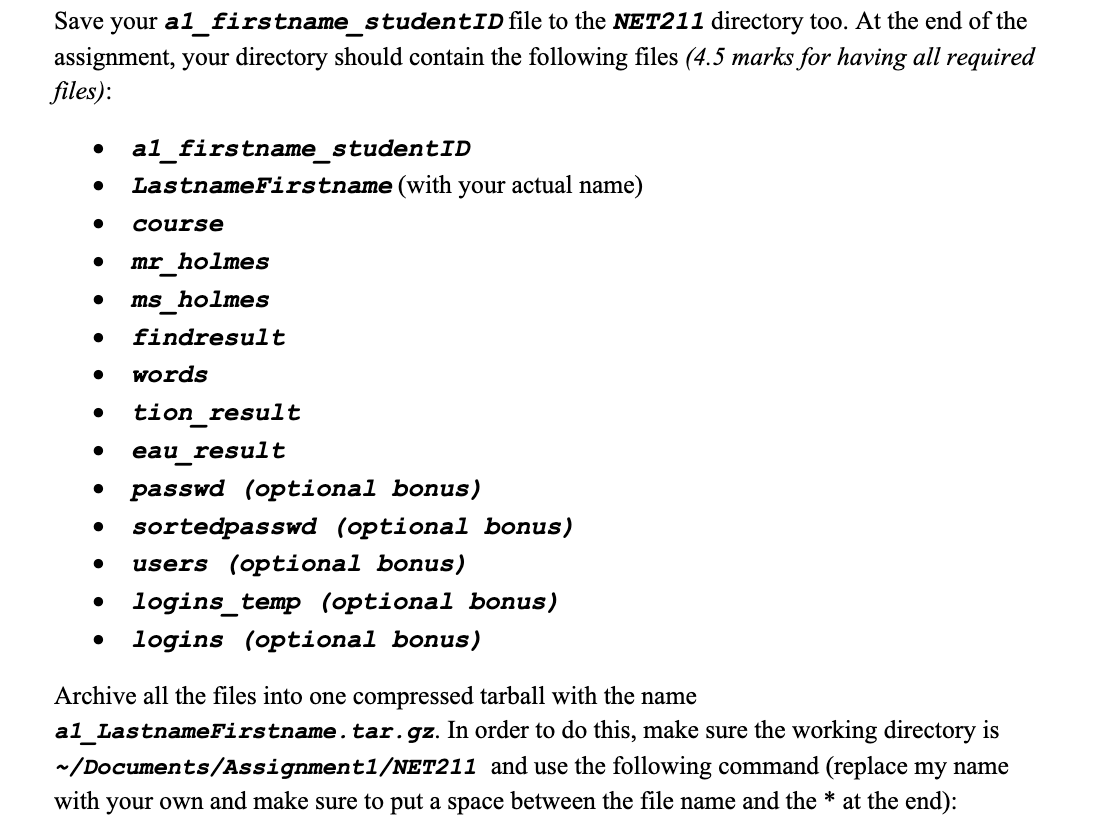
1. (3 marks) Without changing your working directory, create a subdirectory in your Documents directory called Assignment1. Change into this new directory (Assignment1). Use the pwd command to make sure you are in the correct directory. 2. (3 marks) Without changing your working directory, make another new directory inside Assignment1 named NET211. Change into the NET211 directory and verify you are in the correct directory. 3. (2 marks) Use cat to create a simple text file inside the NET211 directory. The filename should be: LastnameFirstname. For example, my file would be named ShafiqueFareha. The file should contain your student number. 4. (1 mark) Use the Is command to verify you created the file successfully. 5. (1 mark) Use the cat command to see the contents of the file, LastnameFirstname, you created. 6. (2 marks) Now use the vim or nano text editor to create another text file in the NET211 directory named course. In this file write: NET211 Introduction to UNIX/Linux winter 2023 Save and close the file. (Note: you do not need to write the commands you perform inside vimano for this step; instead, you will submit the file you created). 7. (2 marks) Use the 1 s command to display the detailed information about the 2 files you created, including the permissions, size, modification time etc. 8. (2 marks) Change the access permissions of course using chmod so that the user (owner) has read and write permissions, the group has read permissions, and others have no permissions at all. The final permissions should be rw-r-----. Use octal mode for this step. 9. (2 marks) Change the access permissions of the file you created in step 3 (LastnameFirstname) so that the user and group permissions remain unchanged, but others have no permissions at all. Use symbolic mode for this step. 10. (2 marks) Use the ls command to display the updated access permissions on both files. 11. (2 marks) Change into your home directory (e.g. /home/student). Verify you are in the correct directory with the appropriate command. 12. (4 marks) Without changing your working directory, create three empty files using the touch command, named enola, sherlock and mycroft. Verify they were created. 13. (2 marks) Change into the Documents directory and verify it worked. 14. (4 marks) Without changing your working directory, use absolute pathnames for both source and destination paths to COPY enola, sherlock and mycroft into the Documents directory. Use Is to make sure it worked (check both, your home directory and the Documents directory. Write the command(s) for these checks too.) 15. (4 marks) Without changing your working directory, now use relative pathnames for both source and destination paths to MOVE the enola, sherlock and mycroft files from the Documents directory into the Assignment 1 directory. Once again use ls to make sure it worked (check both directories). 16. (2 marks) Change into Assignment1 and verify it worked. 17. (1 mark) Delete mycroft from your current working directory. 18. (2 marks) Without changing your working directory, move and rename sherlock (in a single step) from Assignment 1 to NET211 with the new name of mr_holmes. 19. (3 marks) Change into the NET211 directory, then copy and rename enola (in a single step) from Assignment1 to NET211 with the new name of ms_holmes. 20. (3 marks) Use a single find command to get all the files/directories in the /etc directory that end in . conf (you will need to use wildcards to do this correctly). The command must be written in such a way that the output is redirected to a file called findresult and the errors redirected to /devull. For this part of the assignment, you need to copy the /usr/share/dict/words file to the /Documents/Assignment1/NET211 directory. This file contains one word per line. Also, make sure the working directory is /Documents/Assignment1/NET211. 21. (1 mark) Use the appropriate command to count how many words/lines are in this file. 22. (2 marks) Use grep to count how many words begin with the letter s (either uppercase or lowercase). 23. (2 marks) Use grep to find all the words that end with tion and save the result in a file called tion_result 24. (2 marks) Use grep to find all words that contain the pattern eau anywhere within the word. Save the result in a file called eau_result PART THREE (OPTIONAL BONUS): [10 MARKS] For this part of the assignment you will work with the /etc/passwd file. This is a colon separated file. Also, make sure the working directory is /Documents/Assignment1/NET211. 25. (2 marks) Copy /etc/passwd into your working directory ( /Documents/ /Assignment1/NET211). 26. (2 marks) Use sort to sort passwd alphabetically on the first column and redirect the output to sortedpasswd. 27. (2 marks) Use cut to get the first, third and fourth fields from sortedpasswd and redirect it to a file called users (remember that the delimiter is a colon). 28. (2 marks) Use cut to get the first and seventh fields from passwd and redirect it to a file called logins_temp. 29. (2 marks) Sort logins_temp on the second column and redirect the output to logins. (Hint: View the k and -t options of sort) Save youra1_firstname_studentID file to the NET211 directory too. At the end of the assignment, your directory should contain the following files 4.5 marks for having all required files): - a1_firstname_studentID - LastnameFirstname (with your actual name) - course - mr holmes - ms_holmes - findresult - words - tion_result - eau_result - passwd (optional bonus) - sortedpasswd (optional bonus) - users (optional bonus) - logins_temp (optional bonus) - logins (optional bonus) Archive all the files into one compressed tarball with the name a1_LastnameFirstname.tar.gz. In order to do this, make sure the working directory is / Documents/Assignment1/NET211 and use the following command (replace my name with your own and make sure to put a space between the file name and the at the end)
Step by Step Solution
There are 3 Steps involved in it

Get step-by-step solutions from verified subject matter experts
 Study Help