







Question: PLEASE DO def write_elevation_maps(maps_file: TextIO, maps_list: list[list[list[int]]] ) -> None: Heres get_elevation_maps for reference and the restrictions LAB RESTRICTIONS, PLEASE READ: Do not add any
PLEASE DO
def write_elevation_maps(maps_file: TextIO, maps_list: list[list[list[int]]] ) -> None:
![PLEASE DO def write_elevation_maps(maps_file: TextIO, maps_list: list[list[list[int]]] ) -> None: Heres get_elevation_maps](https://dsd5zvtm8ll6.cloudfront.net/si.experts.images/questions/2024/10/66fba43c9f704_61266fba43c24f16.jpg)
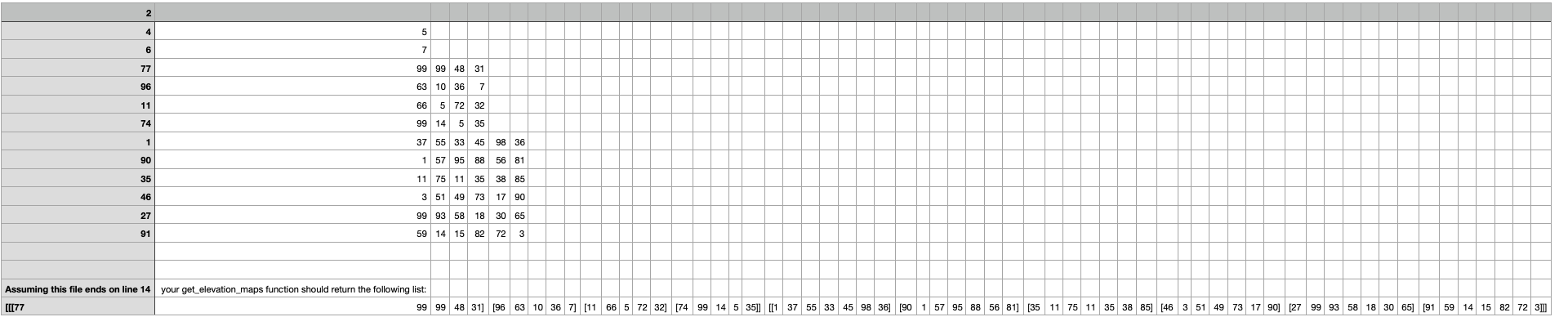 Heres get_elevation_maps for reference and the restrictions
LAB RESTRICTIONS, PLEASE READ: Do not add any imports, the ones that you need will be given to you. You may not use any dictionaries or dictionary methods. Do not use try-except statements, you should be able to anticipate or prevent any errors from happening at all! """ import csv from typing import TextIO def get_elevation_maps(maps_file: TextIO) -> list[list[list[int]]]: """ Given an open csv file, read the file according to the specification and return all the elevation maps stored within the file. IMPORTANT: the given argument to the function is an OPEN file , you will not need to open it again, and can begin performing standard file operations on it. The file will be structured as follows: - The first line will contain one number, which will denote the number of elevation maps stored within this file. - The next n lines will contain two numbers each, "r" and "c", which are the number of rows and columns of each elevation map. - The rest of the data will then be comprised of the elevation map data, which will follow one another in sequence, with no spaces in between. For an example, see "sample_data.csv". """ n = int(maps_file.readline()) RowCoulmnList = [] for i in range(n): string = maps_file.readline() stringList = string.split(' ') row = int(stringList[0]) column = int(stringList[1]) RowCoulmnList.append([row, column]) result = [] for i in range(n): row = RowCoulmnList[i][0] column = RowCoulmnList[i][1] elevation_data = [] for j in range(row): string = maps_file.readline() stringList = string.split(' ') for k in range(column): stringList[k] = int(stringList[k]) elevation_data.append(stringList) result.append(elevation_data)
def write_elevation_maps (maps_file: Textio, maps_list: list[list[list[int]]] ) -> None: II III ] Given an open csv file
Step by Step Solution
There are 3 Steps involved in it

Get step-by-step solutions from verified subject matter experts
 Study Help