





Question: Please do lab on linux terminal and use gedit as editor and zoom in for better vision CpSe 1111 Lab 9 Functions Overview This week,
Please do lab on linux terminal and use gedit as editor and zoom in for better vision
Please do lab on linux terminal and use gedit as editor and
zoom in for better vision CpSe 1111 Lab 9 Functions Overview This
week, you will gain some experience with functions by creating two functions
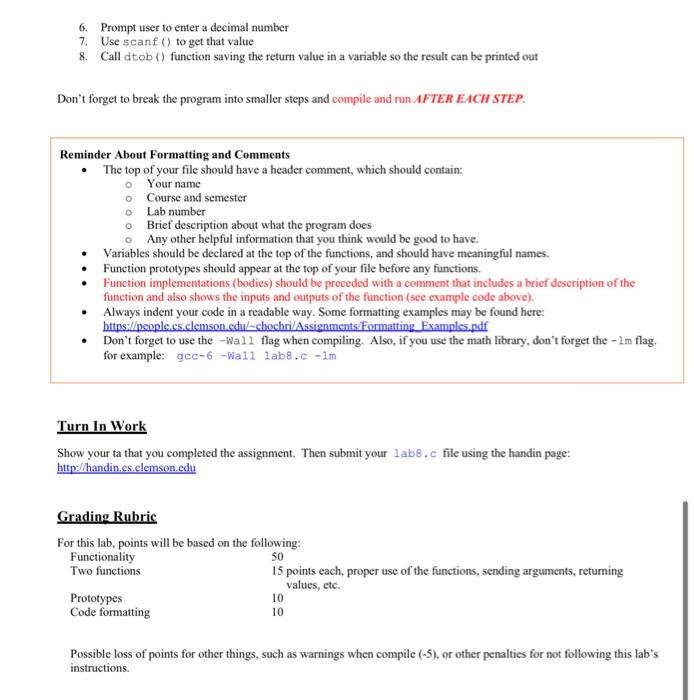
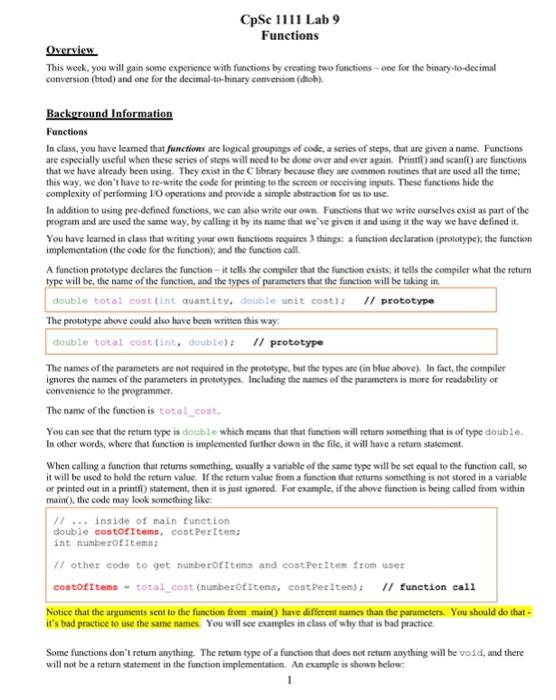
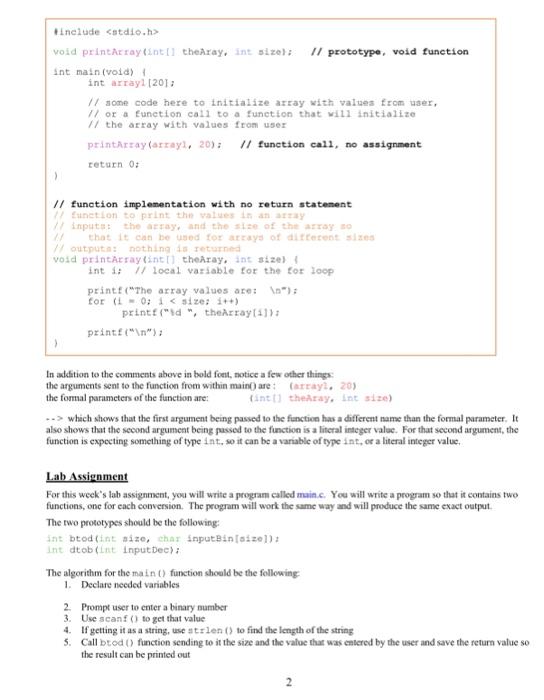
CpSe 1111 Lab 9 Functions Overview This week, you will gain some experience with functions by creating two functions one for the binary-to-decimal conversion (btod) and one for the decimal-to-binary conversion (dob). Background Information Functions In class, you have leamed that functions are logical groupings of code, a series of steps, that are given a name. Functions are especially useful when these series of steps will need to be done over and over again. Print and scanf are functions that we have already been using. They exist in the library because they are common routines that are used all the time; this way, we don't have to re-write the code for printing to the screen or receiving inputs. These functions hide the complexity of performing 10 operations and provide a simple abstraction for us to use. In addition to using pee-defined functions, we can also write our own. Functions that we write ourselves exist as part of the program and are used the same way, by calling it by its name that we've given it and using it the way we have defined it You have learned in class that writing your own functions toquites 3 things a function declaration (prototype the function implementation (the code for the function, and the function call A function prototype declares the function - it tells the compiler that the function exists it tells the compiler what the return type will be the name of the function, and the types of parameters that the function will be taking in double total contint quantity, diable unit cost); // prototype The prototype ahuwe could also have been written this way: double total cost fint, double); // prototype The names of the parameters are not required in the prototype, but the types are in blue above). In fact, the compiler ignores the names of the parameters in prototypes. Including the names of the parameters is more for readability or convenience to the programmer The name of the function is total_cont You can see that the return type is double which means that that function will return something that is of type double In other words, where that function is implemented further down in the file, it will have a return statement When calling a function that returns something, usually a variable of the same type will be set equal to the function call, so it will be used to hold the return value. If the return value from a function that retums something is not stored in a variable or printed out in a printft) statement, then it is just ignored. For example, if the above function is being called from within main(). the code may look something like: // ... inside of main function double costoItems, costPerItem: int numberOf Items Il other code to get number of items and costPeriten from user costofItems - total_cost (numberofitens, contperitem); // function call Notice that the arguments sent to the function from main() have different names than the parameters. You should do that it's bad practice to use the same names. You will see examples in class of sely that is bad practice. Some functions don't return anything. The retum type of a function that does not return anything will be vold, and there will not be a return statement in the function implementation. An example is shown below. #include void printArray into theAray, int size): Il prototype, void function int main(void) int array (2011 11 some code here to initialize atray with values from user, // or a function call to a function that will initialize // the array with values from user printarray(array, 20); // function call, no assignment return 0; // function implementation with no return statement function to print the values in any 17 inputs the array, and the size of the arroyo that it can be used for arrays of different sizes outputa: nothing returned void printarray into the ray. int size) int 1: 1 local variable for the tor loop print("The array values are: for ( L0; I which shows that the first argument being passed to the function has a different name than the formal parameter. It also shows that the second argument being passed to the function is a literal integer value. For that second argument, the function is expecting something of type int. so it can be a variable of type int, or a literal integer value Lab Assignment For this week's lab assignment, you will write a program called maine. You will write a program so that it contains two functions, one for each conversion. The program will work the same way and will produce the same exact output The two prototypes should be the following: ant btodint size, char input Bin[size] Int otob(int Input Dec): The algorithm for the main () function should be the following 1. Declare needed variables 2. Prompt user to enter a binary number 3. Use scanf() to get that value 4. If getting it as a string, useatrlen() to find the length of the string 5. Call buod function sending to it the size and the value that was entered by the user and save the return value so the result can be printed out 6. Prompt user to enter a decimal number 7. Use scanf() to get that value 8. Call dtob() function saving the return value in a variable so the result can be printed out Don't forget to break the program into smaller steps and compile and run AFTER EACH STEP. Reminder About Formatting and Comments The top of your file should have a header comment, which should contain: o Your name o Course and semester o Lab number o Brief description about what the program does Any other helpful information that you think would be good to have. Variables should be declared at the top of the functions, and should have meaningful names. Function prototypes should appear at the top of your file before any functions. Function implementations (bodies) should be preceded with a comment that includes a brief description of the function and also shows the inputs and outputs of the function (see example code above). Always indent your code in a readable way. Some formatting examples may be found here: https://people.cs.clemson.edu/-chochri/Assignments/Formatting Examples.pdf Don't forget to use the wall flag when compiling. Also, if you use the math library, don't forget the - Im flag, for example: gcc-6-Wall labs.c-1m Turn In Work Show your ta that you completed the assignment. Then submit your labs.c file using the handin page: http://handin.cs.elemson.edu Grading Rubric For this lab, points will be based on the following: Functionality 50 Two functions 15 points each, proper use of the functions, sending arguments, returning values, etc. Prototypes 10 Code formatting 10 Possible loss of points for other things, such as warnings when compile (-5), or other penalties for not following this lab's instructions

Step by Step Solution

There are 3 Steps involved in it

1 Expert Approved Answer
Step: 1 Unlock blur-text-image
Question Has Been Solved by an Expert!

Get step-by-step solutions from verified subject matter experts

Step: 2 Unlock
Step: 3 Unlock

Students Have Also Explored These Related Databases Questions!