







Question: Please do not change code that I have already written, and please do not write code in places other than where I indicate, unless you
Please do not change code that I have already written, and please do not write code in places other than where I indicate, unless you discuss it with me first. If you feel unable to complete an assignment in the way I have instructed, then that is probably a good sign that there is a concept or topic where you need to improve your understanding.
Copy/paste the following code into a file and save as AssignmentsAndCasts.java. Note that it will not compile in its present state because there are symbols that you still need to replace with correct code. See the program output later on this page to know what the variables should equal at the time that they print.
public class AssignmentsAndCasts { public static void main (String[] args){ int a = 2; int b = 4; int c = 6; int d = 7; // Replace the ? with +, -, *, /, or % // and replace N with an appropriate // int literal to produce the correct result // in the subsequent println statement a ?= N; System.out.println("a is now " + a); b ?= N; System.out.println("b is now " + b); c ?= N; System.out.println("c is now " + c); d ?= N; System.out.println("d is now " + d); a ?= N; System.out.println("a is now " + a); b ?= N; System.out.println("b is now " + b); System.out.println(); // Add decrement or increment operators (prefix or postfix) // to the variables to produce the correct results System.out.println("c is now " + c); System.out.println("d is now " + d); System.out.println("d is now " + d); System.out.println("a is now " + a); System.out.println("a is now " + a); System.out.println(); // Add casts (and sometimes parentheses) // to produce the correct results. Do not change // the operators or numbers themselves. System.out.println( 9.5 / 3 ); System.out.println( 50 / 2.5 ); System.out.println( 27.0 / 3.3 ); System.out.println( 5.5 * 3.5 ); System.out.println(); // Replace the ??? with the appropriate expression // (NOT a literal) to produce the correct results // // Each expression will likely involve some char // arithmetic and casting char ch = 'd'; System.out.println("ch is now " + ch); ch = ???; System.out.println("ch is now " + ch); ch = ???; System.out.println("ch is now " + ch); ch = ???; System.out.println("ch is now " + ch); } } Your task, then, is to follow the directions in the comments in order to make changes to the code that will result in the desired output being printed to the screen. You will use such things as :
- Assignment operators (+=, -=, *=, /=, %=)
- Increment and decrement operators (++ and --)
- Casts: Where you place a type inside of parentheses in front of a value to convert it to a value of a different type
- Parentheses - besides the ones you use for casts, also for forcing the order of operations.
- Character arithmetic (if you need a refresher, please see the corresponding lecture slides)
Program output, when the program is run, should look like this:
a is now 0 b is now 13 c is now 4 d is now 35 a is now -1 b is now 4 c is now 4 d is now 34 d is now 35 a is now -1 a is now -1 3.0 20 9.0 15 ch is now d ch is now x ch is now m ch is now h
Files to upload:
- AssignmentsAndCasts.java
image version

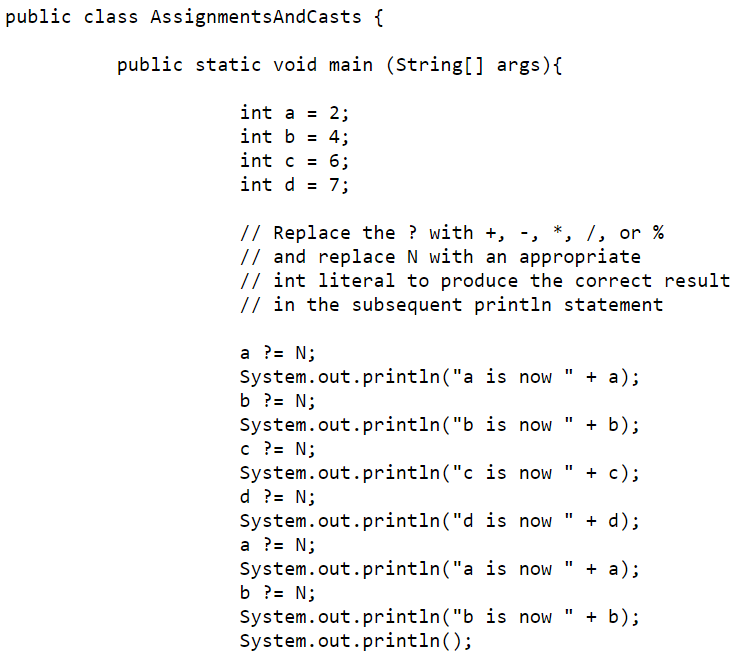
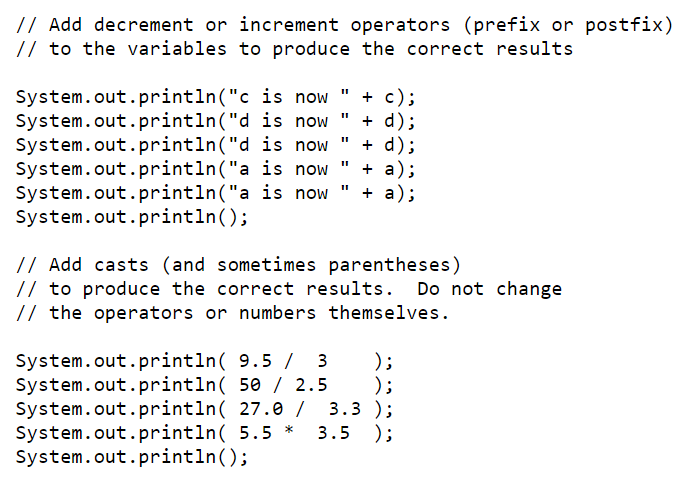
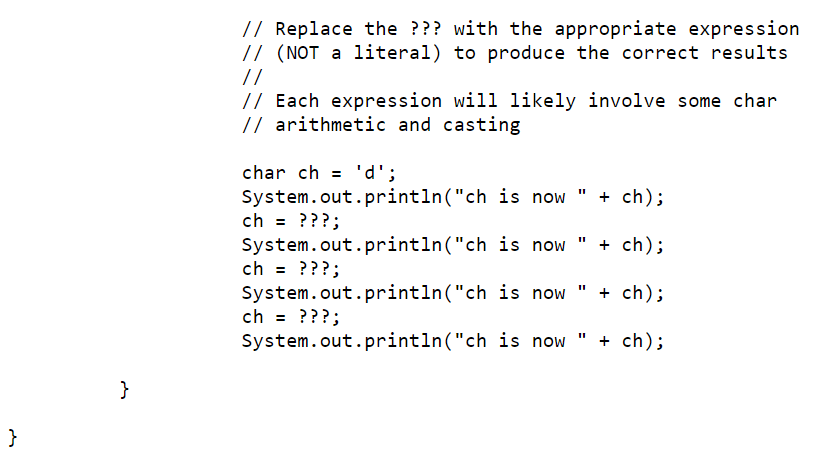

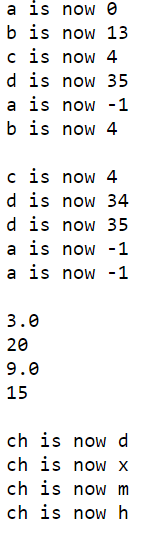
Please do not change code that I have already written, and please do not write code in places other than where I indicate, unless you discuss it with me first. If you feel unable to complete an assignment in the way I have instructed, then that is probably a good sign that there is a concept or topic where you need to improve your understanding. If you are still having trouble getting set up with the JDK and an IDE vou can test your code out here or here, for the time-being. However, if you do this, you are still responsible for turning in your code in a manner that is complete, correct, and easy to read Copy/paste the following code into a file and save as AssignmentsAndCasts.java. Note that it will not compile in its present state because there are symbols that you still need to replace with correct code. See the program output later on this page to know what the variables should equal at the time that they print. public class AssignmentsAndCasts { public static void main (String[] args) { int a = 2; int b = 4; int c = 6; int d = 7; // Replace the ? with +, -, *, I, or % // and replace N with an appropriate // int literal to produce the correct result // in the subsequent printin statement a ?= N; System.out.println("a is now + a); b ?= N; System.out.println("b is now + b); c ?= N; System.out.println("c is now " + c); d ?= N; System.out.println("d is now + d); a ?= N; System.out.println("a is now " + a); b ?= N; System.out.println("b is now " + b); System.out.println(); // Add decrement or increment operators (prefix or postfix) // to the variables to produce the correct results II System.out.println("c is now System.out.println("d is now System.out.println("d is now System.out.println("a is now System.out.println("a is now" System.out.println(); + c); + d); + d); + a); + a); - // Add casts (and sometimes parentheses) // to produce the correct results. Do not change // the operators or numbers themselves. System.out.println( 9.5 / 3 ); System.out.println( 50 / 2.5 ); System.out.println( 27.0 / 3.3 ); System.out.println( 5.5 3.5); System.out.println(); // Replace the ??? with the appropriate expression // (NOT a literal) to produce the correct results // // Each expression will likely involve some char // arithmetic and casting char ch = 'd'; System.out.println("ch is now " + ch); ch = ???; System.out.println("ch is now " + ch); ch = ???; System.out.println("ch is now " + ch); ; ch = ???; System.out.println("ch is now " + ch); } } Your task, then, is to follow the directions in the comments in order to make changes to the code that will result in the desired output being printed to the screen. You will use such things as : 1. Assignment operators 2. Increment and decrement operators (++ and 3. Casts: Where you place a type inside of parentheses in front of a value to convert it to a value of a different type 4. Parentheses - besides the ones you use for casts, also for forcing the order of operations. 5. Character arithmetic (if you need a refresher, please see the corresponding lecture slides) Program output, when the program is run, should look like this: a is now o bis now 13 cis now 4 d is now 35 a is now -1 bis now 4 cis now 4 d is now 34 d is now 35 a is now -1 a is now -1 3.0 20 9.0 15 ch is now d ch is now x ch is now m ch is now h
Step by Step Solution
There are 3 Steps involved in it

Get step-by-step solutions from verified subject matter experts
 Study Help