







Question: Please do not use any built-in functions in Matlab that automatically convert a bit string (or any binary representation) to an integer. Also, do not
Please do not use any built-in functions in Matlab that automatically convert a bit string (or any binary representation) to an integer. Also, do not use the flip function in Matlab.
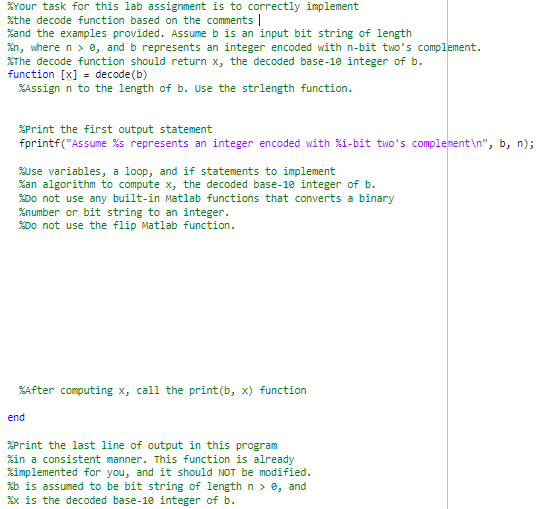

\%rour task for this lab assignment is to correctly implement \%the decode function based on the comments \%and the examples provided. Assume b is an input bit string of length \%n, where n>, and b represents an integer encoded with n-bit two's complement. \%The decode function should return x, the decoded base-10 integer of b. function [x]=decode(b) \%Assign n to the length of b. Use the strlength function. \%Print the first output statement fprintf("Assume \%s represents an integer encoded with \%i-bit two's complement ,b,n); \%use variables, a loop, and if statements to implement \%an algorithm to compute x, the decoded base-10 integer of b. % oo not use any built-in Matlab functions that converts a binary \%number or bit string to an integer. \%Do not use the flip Matlab function. \%After computing x, call the print (b,x) function end \%Print the last line of output in this program Zin a consistent manner. This function is already Kimplemented for you, and it should not be modified. \%b is assumed to be bit string of length n>, and %x is the decoded base-10 integer of b. function []=print(b,x) n= strlength (b); fprintf("\%s decoded as a base-10 integer is \%i ",b,x); end
Step by Step Solution
There are 3 Steps involved in it

Get step-by-step solutions from verified subject matter experts
 Study Help