







Question: please do this question very carefully. and send me the answer please... Assignment2 (21.pdf Wondershare PDFelement File Home Help Comment Edit Convert Tool View Form
please do this question very carefully. and send me the answer please...
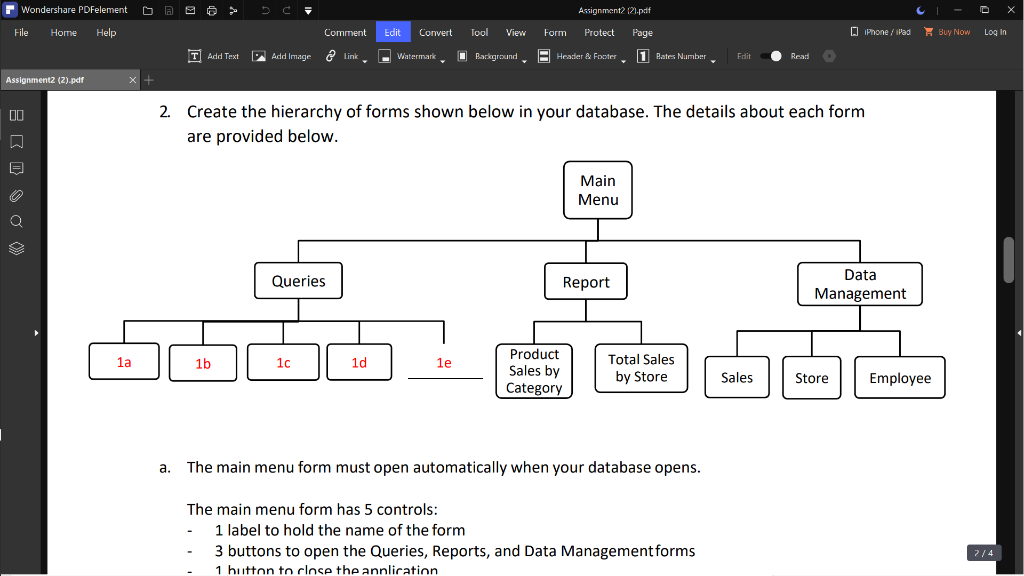
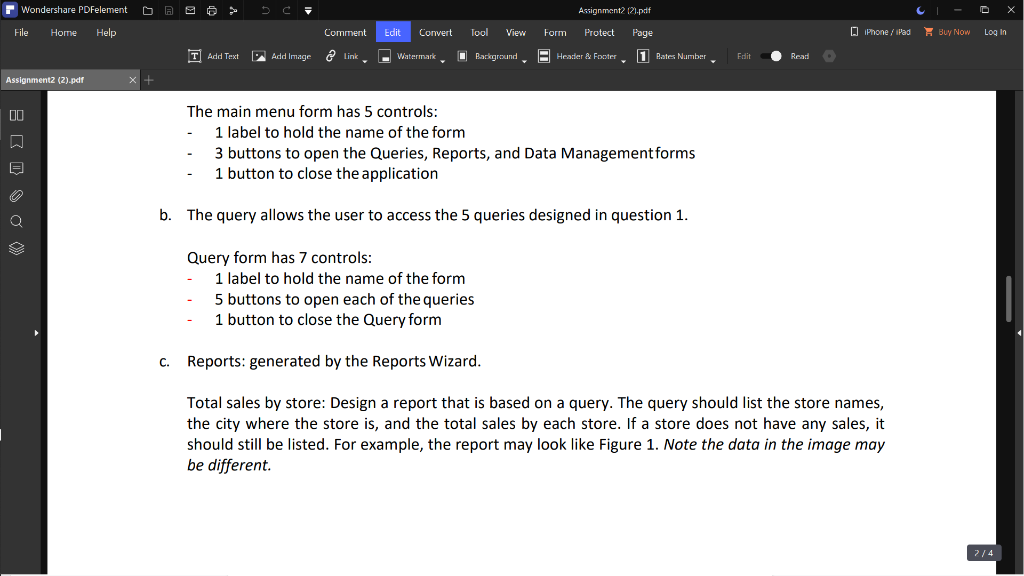
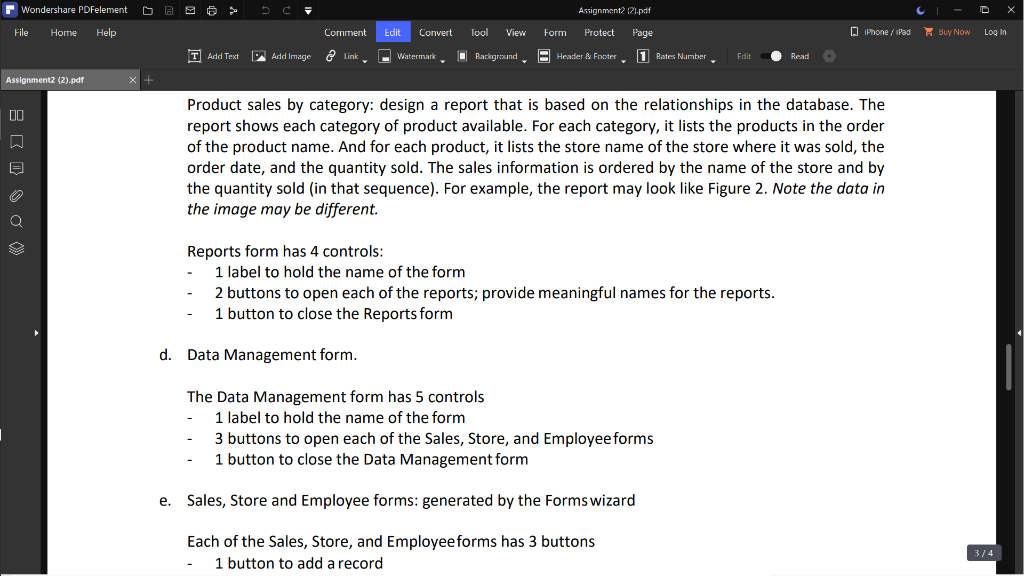
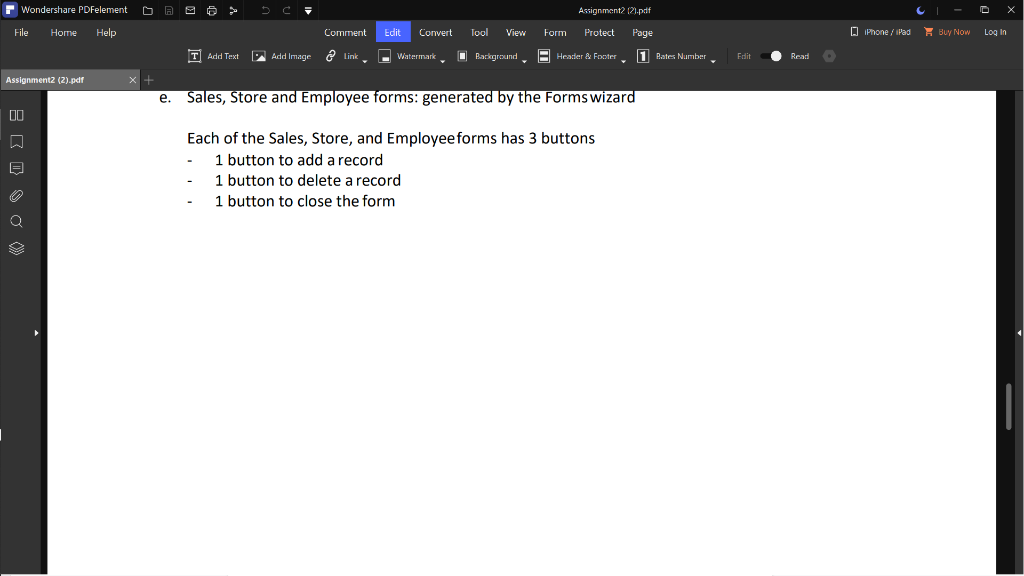
Assignment2 (21.pdf Wondershare PDFelement File Home Help Comment Edit Convert Tool View Form Protect Page Phone/iPad X Buy Now Log In T Add Text Add Image Add Image link Watermark Background Header & Footer 1 Rates Number Edit Read Assignment2 (2).pdf 00 2. Create the hierarchy of forms shown below in your database. The details about each form are provided below. Main Menu Queries Report Data Management la 1b 1c 1d le Product Sales by Category Total Sales by Store Sales Store Employee a. The main menu form must open automatically when your database opens. The main menu form has 5 controls: 1 label to hold the name of the form 3 buttons to open the Queries, Reports, and Data Management forms 1 button to close the annlication 2/4 Assignment 121.pdf Wondershare PDFelement File Home Help Edit Convert Tool View Form Protect Page 0 iPhone / iPad Buy Now Log In Comment T Add Text Add Image Add Image link Watermark Barground Heatter & Fracter, 1 Bates Number Edit Read Assignment2 (2).pdf + 00 a The main menu form has 5 controls: : 1 label to hold the name of the form 3 buttons to open the Queries, Reports, and Data Management forms 1 button to close the application b. The query allows the user to access the 5 queries designed in question 1. Query form has 7 controls: 1 label to hold the name of the form 5 buttons to open each of the queries 1 button to close the Query form C. Reports: generated by the Reports Wizard. Total sales by store: Design a report that is based on a query. The query should list the store names, the city where the store is, and the total sales by each store. If a store does not have any sales, it should still be listed. For example, the report may look like Figure 1. Note the data in the image may be different 2/4 Wondershare PDFelement A Assignment2 121.pdf Protect Page File Help Comment Edit Convert Tool View Form iPhone / iPad Buy Now Log In T Add Text Add Image 2 link Watermark Background Header & Footer 1 Bates Number Edit Read Assignment2 (2).pdf + 00 Product sales by category: design a report that is based on the relationships in the database. The report shows each category of product available. For each category, it lists the products in the order of the product name. And for each product, it lists the store name of the store where it was sold, the order date, and the quantity sold. The sales information is ordered by the name of the store and by the quantity sold (in that sequence). For example, the report may look like Figure 2. Note the data in the image may be different Reports form has 4 controls: 1 label to hold the name of the form 2 buttons to open each of the reports; provide meaningful names for the reports. 1 button to close the Reports form d. Data Management form. The Data Management form has 5 controls 1 label to hold the name of the form 3 buttons to open each of the Sales, Store, and Employee forms 1 button to close the Data Management form e. Sales, Store and Employee forms: generated by the Forms wizard Each of the Sales, Store, and Employee forms has 3 buttons 1 button to add a record 3/4 Wondershare PDFelement A Assignment 121.pdf File Help Comment Edit Convert Tool View Form Protect 0 Phone / iPad Buy Now Log In Page 1 Rates Number T Add Text Add Image a link Watermark Background Header & Footer Edit Read Assignment2 (2).pdf e. Sales, Store and Employee forms: generated by the Forms wizard 00 F Each of the Sales, Store, and Employee forms has 3 buttons 1 button to add a record 1 button to delete a record 1 button to close the form Assignment2 (21.pdf Wondershare PDFelement File Home Help Comment Edit Convert Tool View Form Protect Page Phone/iPad X Buy Now Log In T Add Text Add Image Add Image link Watermark Background Header & Footer 1 Rates Number Edit Read Assignment2 (2).pdf 00 2. Create the hierarchy of forms shown below in your database. The details about each form are provided below. Main Menu Queries Report Data Management la 1b 1c 1d le Product Sales by Category Total Sales by Store Sales Store Employee a. The main menu form must open automatically when your database opens. The main menu form has 5 controls: 1 label to hold the name of the form 3 buttons to open the Queries, Reports, and Data Management forms 1 button to close the annlication 2/4 Assignment 121.pdf Wondershare PDFelement File Home Help Edit Convert Tool View Form Protect Page 0 iPhone / iPad Buy Now Log In Comment T Add Text Add Image Add Image link Watermark Barground Heatter & Fracter, 1 Bates Number Edit Read Assignment2 (2).pdf + 00 a The main menu form has 5 controls: : 1 label to hold the name of the form 3 buttons to open the Queries, Reports, and Data Management forms 1 button to close the application b. The query allows the user to access the 5 queries designed in question 1. Query form has 7 controls: 1 label to hold the name of the form 5 buttons to open each of the queries 1 button to close the Query form C. Reports: generated by the Reports Wizard. Total sales by store: Design a report that is based on a query. The query should list the store names, the city where the store is, and the total sales by each store. If a store does not have any sales, it should still be listed. For example, the report may look like Figure 1. Note the data in the image may be different 2/4 Wondershare PDFelement A Assignment2 121.pdf Protect Page File Help Comment Edit Convert Tool View Form iPhone / iPad Buy Now Log In T Add Text Add Image 2 link Watermark Background Header & Footer 1 Bates Number Edit Read Assignment2 (2).pdf + 00 Product sales by category: design a report that is based on the relationships in the database. The report shows each category of product available. For each category, it lists the products in the order of the product name. And for each product, it lists the store name of the store where it was sold, the order date, and the quantity sold. The sales information is ordered by the name of the store and by the quantity sold (in that sequence). For example, the report may look like Figure 2. Note the data in the image may be different Reports form has 4 controls: 1 label to hold the name of the form 2 buttons to open each of the reports; provide meaningful names for the reports. 1 button to close the Reports form d. Data Management form. The Data Management form has 5 controls 1 label to hold the name of the form 3 buttons to open each of the Sales, Store, and Employee forms 1 button to close the Data Management form e. Sales, Store and Employee forms: generated by the Forms wizard Each of the Sales, Store, and Employee forms has 3 buttons 1 button to add a record 3/4 Wondershare PDFelement A Assignment 121.pdf File Help Comment Edit Convert Tool View Form Protect 0 Phone / iPad Buy Now Log In Page 1 Rates Number T Add Text Add Image a link Watermark Background Header & Footer Edit Read Assignment2 (2).pdf e. Sales, Store and Employee forms: generated by the Forms wizard 00 F Each of the Sales, Store, and Employee forms has 3 buttons 1 button to add a record 1 button to delete a record 1 button to close the formStep by Step Solution
There are 3 Steps involved in it
1 Expert Approved Answer
Step: 1 Unlock

Question Has Been Solved by an Expert!
Get step-by-step solutions from verified subject matter experts
Step: 2 Unlock
Step: 3 Unlock
 Study Help