







Question: Please explain every line of the SQL and Trigger statements of your answer about what it does, so i can learn from the SQL statements
Please explain every line of the SQL and Trigger statements of your answer about what it does, so i can learn from the SQL statements and Trigger statements.
I would suggest your answer will include the line number and explaination of each line with the line number.
Please write or type your answer for the solution1.sql and forget about answering for the solution1.lst.
Please follow the description, hint, and requirements below.
The following is an exercise:
Description:
(1) Implement and comprehensively test a statement trigger that verifies the following consistency constraint.
An applicant cannot apply more than three positions in one day.
Hint and Requirements:
To avoid "mutating table" error, insert a line
PRAGMA AUTONOMOUS_TRANSACTION
At the beginning of DECLARE block.
When ready save your CREATE TRIGGER statement and all SQL statements that comprehensively test a trigger in a script solution1.sql. Comprehensive testing means that the trigger must reject SQL statements that violate the consistency constraint and accept SQL statements that do not violate the consistency constraint. It is a part of your task to find what SQL statements should be tested. Whenever SQL statement violates the consistency constraint a trigger must return ORA- error message. Use a procedure RAISE_APPLICATION_ERROR to return ORA- error message. If SQL statement does not violate the consistency constraint then a trigger must return no messages.
Process SQL script file solution1.sql and save a report from processing in a file solution1.lst.
Your report must include listing of all SQL statement processed. To achieve that put the following SQL*Plus commands:
SET ECHO ON
SET FEEDBACK ON
at the beginning of SQL script solution1.sql.
These are the statements will be run before running the solution1.sql:
if the image is hard to read, you can right click and select open image in new tab.
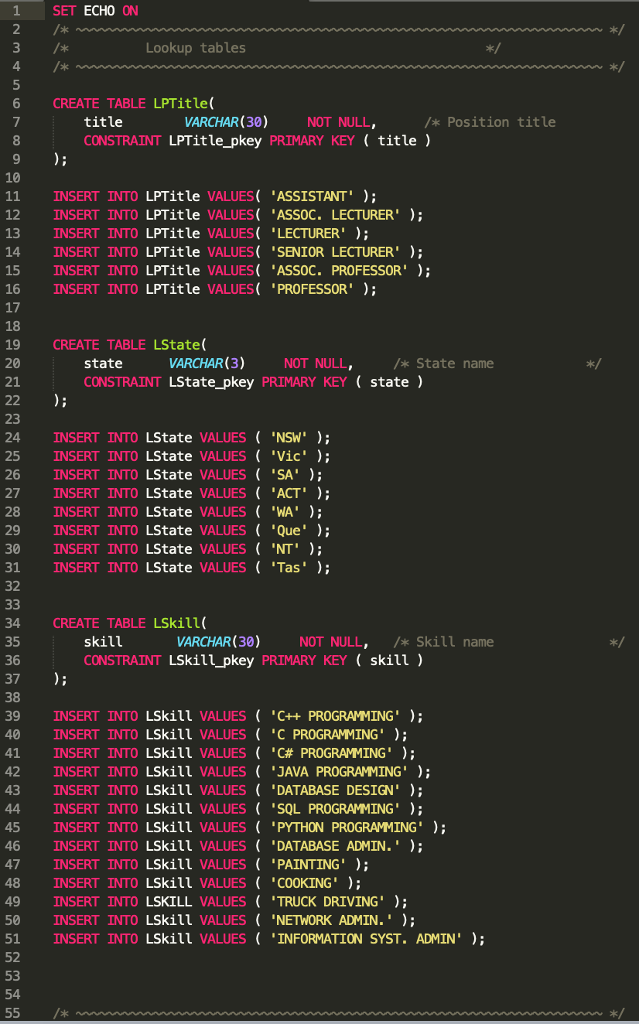
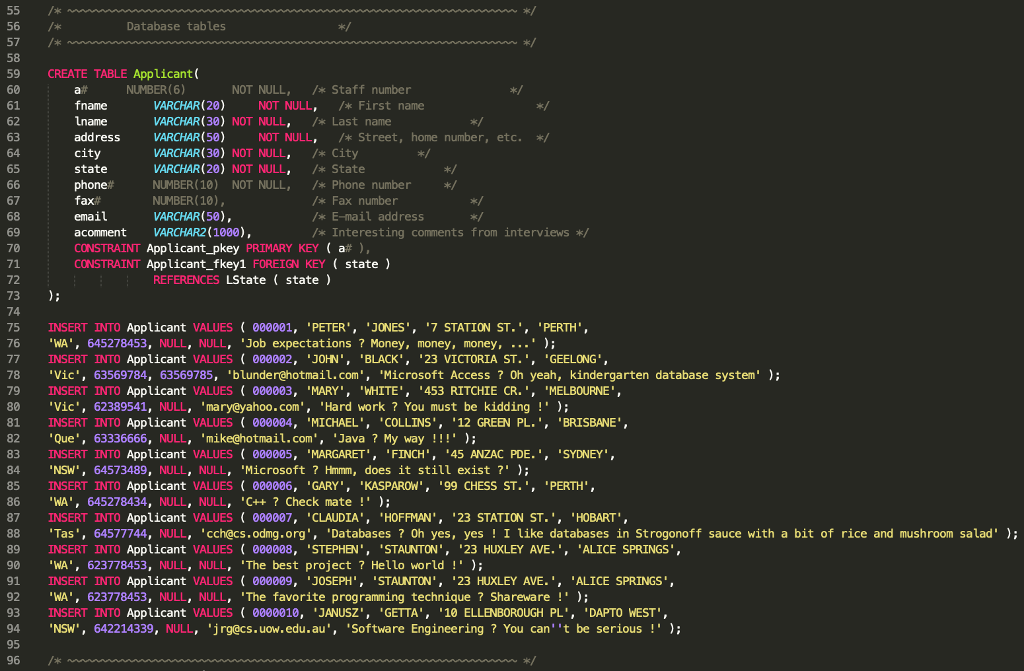
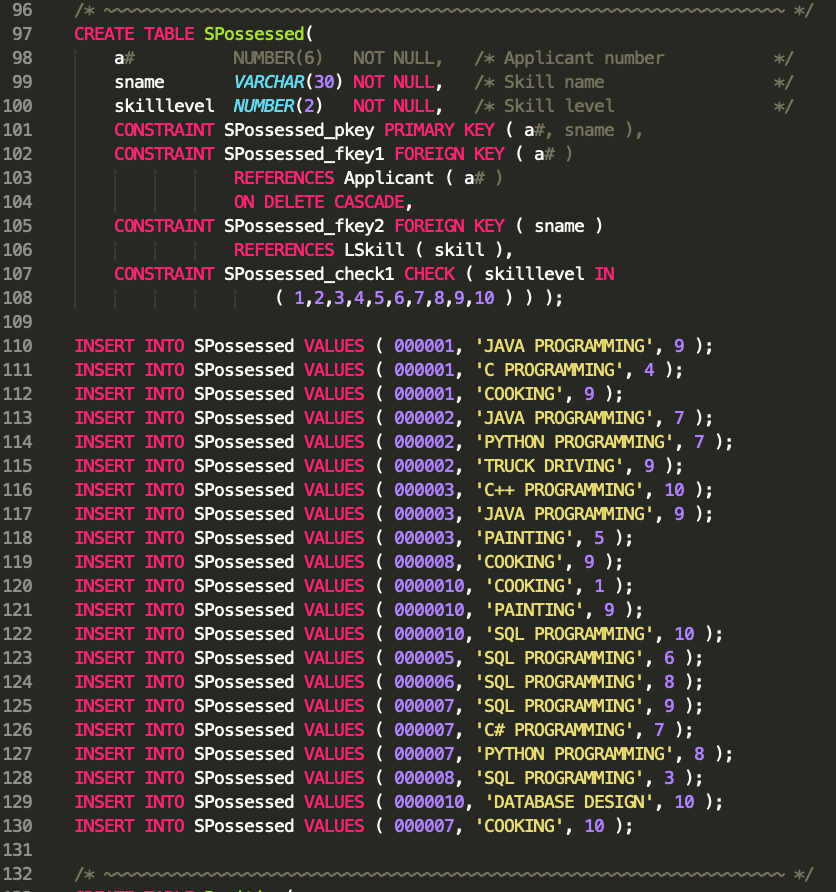
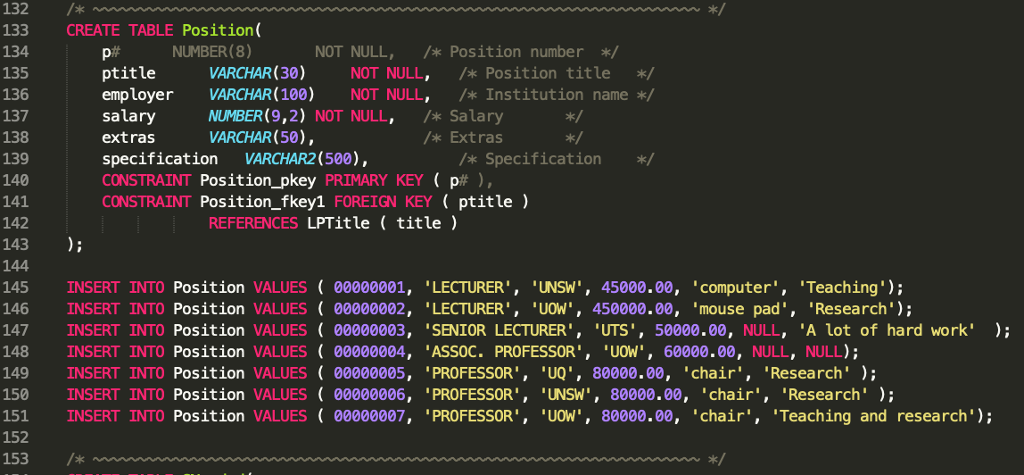
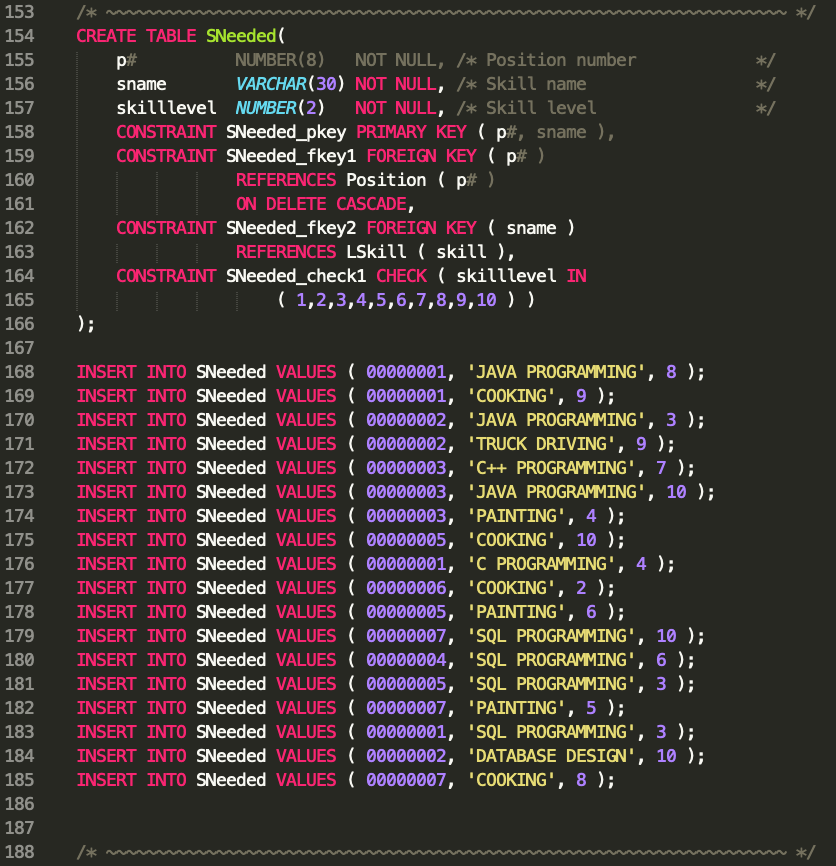
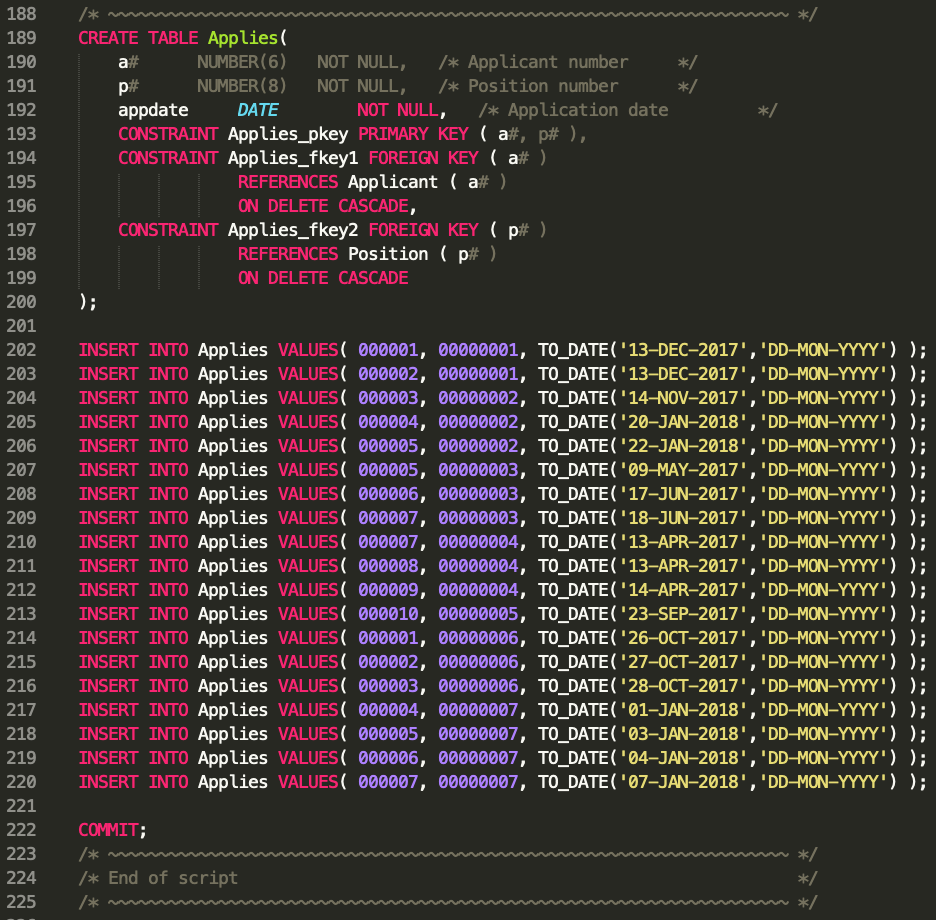
1 2 SET ECHO ON Lookup tables 4 6 CREATE TABLE LPTitle( VARCHAR (30) title CONSTRAINT LPTitle_pkey PRIMARY KEY(title) NOT NULL, /* Position title 9 10 11 INSERT INTO LPTitle VALUES ASSISTANT'); 12 INSERT INTO LPTitle VALUES 'ASSOC. LECTURER' 13 INSERT INTO LPTitle VALUES LECTURER'; 14 INSERT INTO LPTitle VALUES SENIOR LECTURER' 15 INSERT INTO LPTitle VALUES 'ASSOC. PROFESSOR' 16 INSERT INTO LPTitle VALUES PROFESSOR'; 17 18 19 CREATE TABLE LState( 20 21 VARCHAR (3 NOT NULL state CONSTRAINT LState_pkey PRIMARY KEY (state) /* State name ok:/ 23 24 INSERT INTO LState VALUES 'NSW' ); 25 INSERT INTO LState VALUES 'Vic' ); 26 INSERT INTO LState VALUES 'SA'); 27 INSERT INTO LState VALUES 'ACT' 28 INSERT INTO LState VALUES "WA'); 29 INSERT INTO LState VALUES 'Que'); 30 INSERT INTO LState VALUES 'NT'); 31 INSERT INTO LState VALUES 'Tas'); 32 34 CREATE TABLE LSkil1 35 36 37 38 39 INSERT INTO LSkill VALUES"C++ PROGRAMMING' 0 INSERT INTO LSkill VALUES "C PROGRAMMING' 41 INSERT NTO LSkill VALUES ( . C# PROGRAMMING' ); 2 INSERT INTO LSkill VALUES 'JAVA PROGRAMMING'; 43 INSERT INTO LSkill VALUES 'DATABASE DESIGN 4 INSERT INTO LSkill VALUES 'SQL PROGRAMMING' 5 INSERT INTO LSkill VALUES 'PYTHON PROGRAMMING') 46 INSERT INTO LSkill VALUES'DATABASE ADMIN.' 47 INSERT INTO LSkill VALUES 'PAINTING' 48 INSERT INTO LSkill VALUESCOOKING' 49 INSERT INTO LSKILL VALUES ( TRUCK DRIVING" ); 50 INSERT INTO LSkill VALUES 'NETWORK ADMIN. 51 INSERT INTO LSkill VALUES INFORMATION SYST. ADMIN' 52 53 54 VARCHAR(30) skill CONSTRAINT LSkill_pkey PRIMARY KEY ( skill) NOT NULL, Skill name
Step by Step Solution
There are 3 Steps involved in it

Get step-by-step solutions from verified subject matter experts
 Study Help