







Question: Please explain every step and in python code. Please and thank you! Overview In this assignment, you will gain more practice with designirlg a program.
Please explain every step and in python code. Please and thank you!
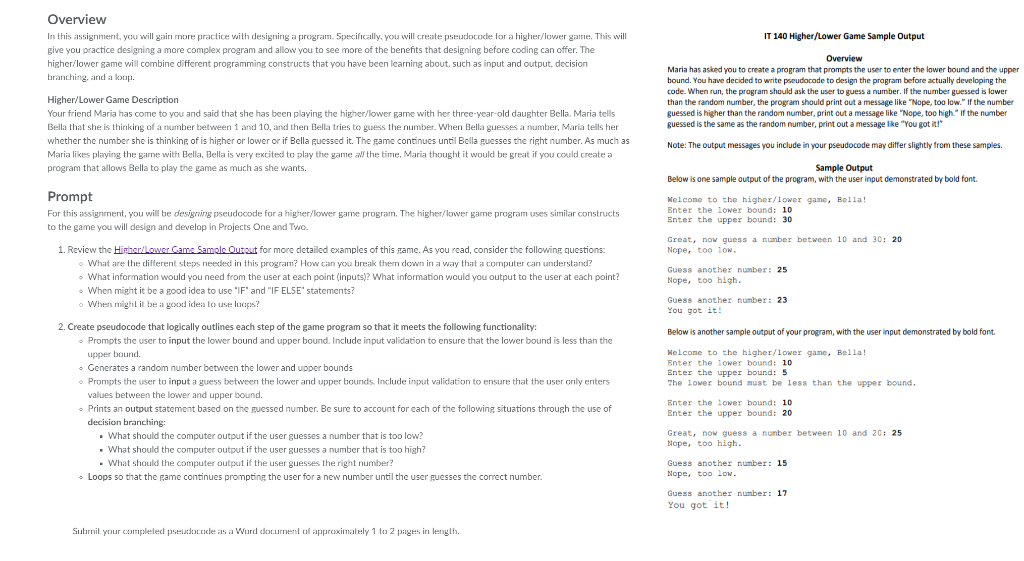
Overview In this assignment, you will gain more practice with designirlg a program. Specifically, you will create pseudocode for a higher/lower game. This will IT 140 Higher/Lower Game Sample Output give you practice designing a more complex program and allow you to see more of the benefits that designing before coding can offer. The higher/lower game will combine different programming constructs that you have been learning about, such as input and output, decision branching, and a loop. Overview Maria has asked you to create a program that prompts the user to enter the lower bound and the upper Higher/Lower Game Description bound. You have decided to write poeudocode to design the program before actually developing the Your friend Maria has come to you and said that she has been playing the higher/lower game with her three-year-old daughter Bella. Maria tells code. When run, the program should ask the user to guess a number. If the number guessed is lawer Bella that she is thinking of a number between 1 and 10 , and then Bella tries to guess the number. When Bella guesses a number, Maria tells her than the random number, the program should print out a message like "Nope, too low." If the number whether the number she is thinking of is higher or lower or if Bella guessed it. The game continues until Bella guesses the right number. As much as guessed is higher than the random number, print out a message like "Nope, too high." If the number Maria likes playing the garne with Bella, Bella is very excited to play the game all the time, Maria thought it would be great if you could create a guessed is the same as the random number, print out a message lke "You got it!" program that allows Bella to play the game as much as she wants. Note: The output messages you include in your pseudocode may differ slightly from these samples. Prompt Sample Output Below is one sample output of the program, with the user input demonstrated by bold font. For this assignment, you will be designing pseudocode for a higher/lower game program. The higher/lower game program uses similar constructs Welcone to the higher/lower gane, Bella! to the game you will design and develop in Projects One and Two. Enter the lower bound: 10 2. Create pseudocode that logically outlines each step of the game program so that it meets the following functionality: Below is another sample output of your program, with the user input demonstrated by bold font. - Prompts the user to input the lower bound and upper bound. Include input validation to ensure that the lower bound is less than the upper bound. Welcone to the higher/lower gane, Bella! - Generates a random number between the lower and upper bounds Bnter the lower bound: 10 - Prompts the user to input a guess between the lower and upper bounds. Include input validation to ensure that the user crily enters Enter the upper bound: 5 values between the lower and upper bound. - Prints an output statement based on the guessed number. Be sure to account for each of the following situations through the use of 7he lower bound must be less than the upper bound. decision branching: Bnter the lower bound: 10 - What should the computer output if the user guesses a number that is too low? Great, now guess a number between 10 and 20;25 - What should the computer output if the user zuesses a number that is too high? Nope, too high. - What should the computer output if the user guesses the right number? Guess another number: 15 - Loops so that the game continues prompting the user for a new number until the user guesses the correct number. Nope, too low. Guess another number: 17 You got it
Step by Step Solution
There are 3 Steps involved in it

Get step-by-step solutions from verified subject matter experts
 Study Help