







Question: Please explain, thanks! Consider a 9-bit floating-point representation based on the IEEE floating-point format, with one sign bit, four exponent bits (k = 4), and
Please explain, thanks!
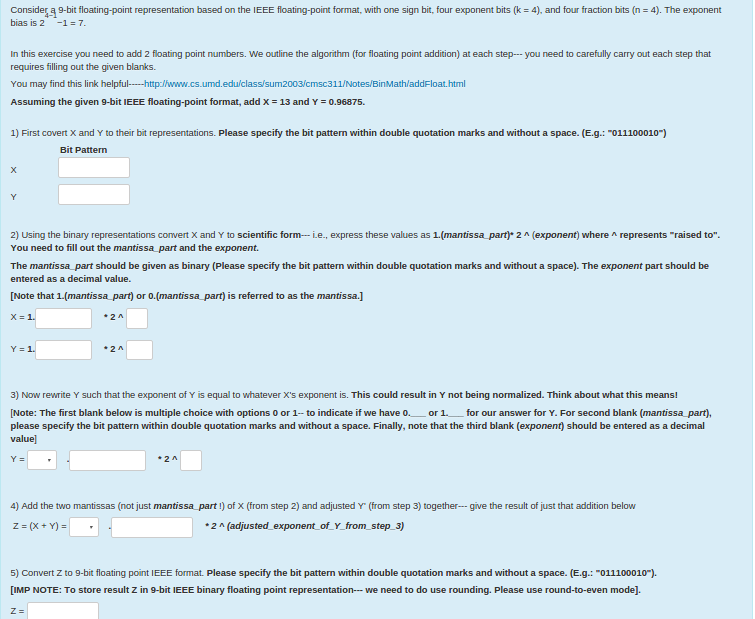
Consider a 9-bit floating-point representation based on the IEEE floating-point format, with one sign bit, four exponent bits (k = 4), and four fraction bits (n = 4). The exponent bias is 2 -1 = 7. in this exercise you need to add 2 floating point numbers. We outline the algorithm (for floating point addition) at each step- you need to carefully carry out each step that requires filling out the given blanks. You may find this link helpful---http:/www.cs.umd.edu/class/sum2003/cmsc311/Notes/BinMath/addFloat.html Assuming the given 9-bit IEEE floating-point format, add X = 13 and Y = 0.96875. 1) First covert X and Y to their bit representations. Please specify the bit pattern within double quotation marks and without a space. (E.g.: "011100010") Bit Pattern X Y 2) Using the binary representations convert X and Y to scientific form- i.e., express these values as 1.(mantissa_part)* 2^(exponent) where^represents "raised to" You need to fill out the mantissa_nd the exponent. The mantissa_part should be given as binary (Please specify the bit pattern within double quotation marks and without a space). The exponent part should be entered as a decimal value. [Note that 1.(maritissa_part) or 0.(mantissa_part) is referred to as the mantissa.] X = 1. * 2^Y = 1. * 2^3) Now rewrite Y such that the exponent of Y is equal to whatever X's exponent is. This could result in Y not being normalized. Think about what this means! Y = * 2^4) Add the two mantissas (not just mantissa part!) of X (from step 2) and adjusted Y' (from step 3) together give the result of just that addition below z = (x + Y)= * 2^(adjusted_exponent_of_Y_from_step_3) 5) Convert Z to 9-bit floating point IEEE format. Please specify the bit pattern within double quotation marks and without a space. (E.g.: "011100010")
Step by Step Solution
There are 3 Steps involved in it

Get step-by-step solutions from verified subject matter experts
 Study Help