







Question: Please fill out the code using C. #include #include char toUpperCase(char ch){ /*Convert ch to upper case, assuming it is in lower case currently*/ if(ch
Please fill out the code using C.
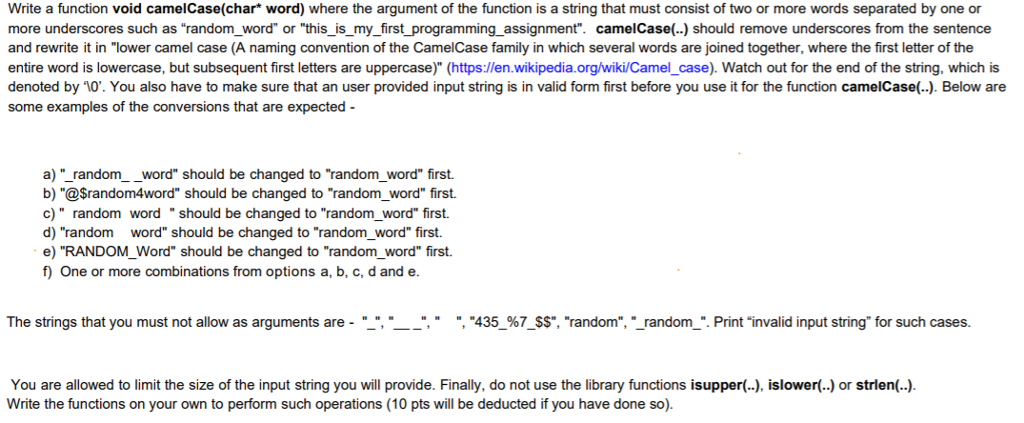
#include#include char toUpperCase(char ch){ /*Convert ch to upper case, assuming it is in lower case currently*/ if(ch >= 'a' && ch = 'A' && ch Write a function void camelCase(char* word) where the argument of the function is a string that must consist of two or more words separated by one or more underscores such as "random_word" or "this_ is_my_first_programming assignment". camelCase(.) should remove underscores from the sentence and rewrite it in "lower camel case (A naming convention of the CamelCase family in which several words are joined together, where the first letter of the entire word is lowercase, but subsequent first letters are uppercase)" (https://en wikipedia.org/wiki/Camel_case). Watch out for the end of the string, which is denoted by 10". You also have to make sure that an user provided input string is in valid form first before you use it for the function camelCase(.). Below are some examples of the conversions that are expected a)" random-word" should be changed to "random word" first. b) "@Srandom4word" should be changed to "random_word" first. c) " random word should be changed to "random_word" first. d) "random word" should be changed to "random_word" first. e) "RANDOM_Word" should be changed to "random_word" first. f One or more combinations from options a, b, c, d and e. The strings that you must not allow as arguments are- " " " " " ", "435 %7 SS", "random", " random ". Print "invalid input string" for such cases. You are allowed to limit the size of the input string you will provide. Finally, do not use the library functions isupper(), islower(..) or strlen(.) Write the functions on your own to perform such operations (10 pts will be deducted if you have done so)
Step by Step Solution
There are 3 Steps involved in it
1 Expert Approved Answer
Step: 1 Unlock

Question Has Been Solved by an Expert!
Get step-by-step solutions from verified subject matter experts
Step: 2 Unlock
Step: 3 Unlock
 Study Help