







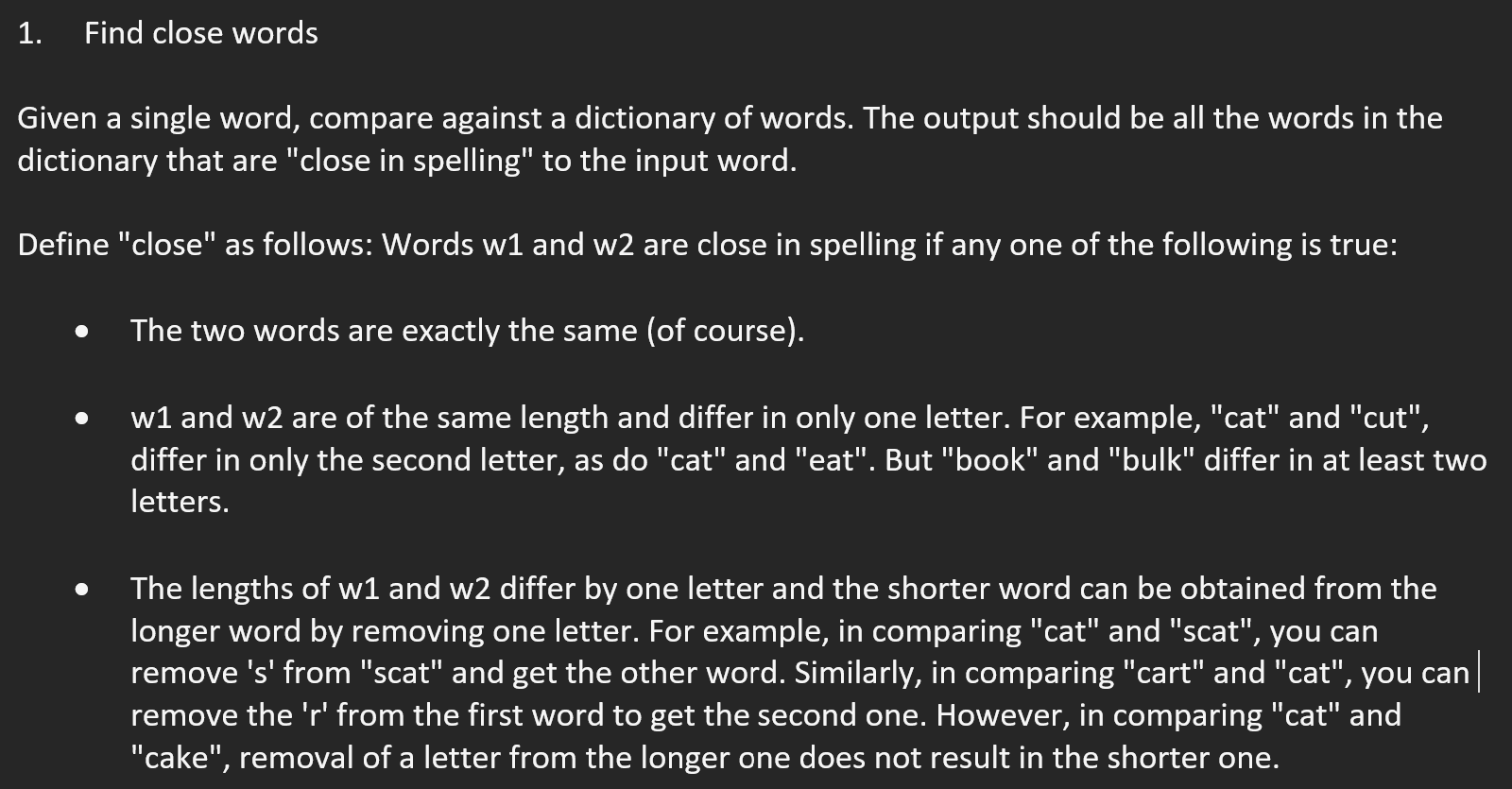
Question: Please finish the findClosestWords method inside SpellChecker.java (in Java)! nothing else besides findClosestWords and the test method need to be changed to work with any
Please finish the findClosestWords method inside SpellChecker.java (in Java)! nothing else besides findClosestWords and the test method need to be changed to work with any text file applied. The two files below are all thats provided besides a text file called "words.txt" which is a list of every dictionary word.
Instructions:
-----------------------------------------------------------------------------------------------------------------------
SpellChecker.java import java.util.*; import java.awt.*; import java.awt.event.*; import javax.swing.*; import javax.swing.event.*;
public class SpellChecker extends JFrame {
JTextArea textArea; JTextField stringField; JScrollPane scrollPane;
String[] words;
public SpellChecker () { // Set some parameters of the frame (window) that's brought up. this.setSize (600, 600); this.setTitle ("Spell checker"); this.setResizable (true);
// This is how stuff is put into a frame. Container cPane = this.getContentPane(); textArea = new JTextArea (); scrollPane = new JScrollPane (textArea, JScrollPane.VERTICAL_SCROLLBAR_ALWAYS, JScrollPane.HORIZONTAL_SCROLLBAR_ALWAYS); cPane.add (scrollPane, BorderLayout.CENTER); // Make the controls. JPanel panel = new JPanel (); JLabel label = new JLabel ("Enter string: "); panel.add (label); stringField = new JTextField (30); panel.add (stringField); JButton button = new JButton ("Go"); button.addActionListener ( new ActionListener () { public void actionPerformed (ActionEvent a) { handleButtonClick(); } } ); panel.add (button); cPane.add (panel, BorderLayout.SOUTH);
// Read in dictionary. words = WordTool.getDictionary (); this.setVisible (true); }
String inputStr;
// When the user clicks the button, this method gets called. // It's where we need to respond.
void handleButtonClick () { // Extract the string from the textfield where the user typed the strings. inputStr = stringField.getText ();
String[] matchedWords = findClosestWords (inputStr, words);
String outputStr = "";
if (matchedWords == null) { outputStr = "No matches found"; } else { for (int i=0; i // Put the output string in the text box. String text = textArea.getText (); text += outputStr + " "; textArea.setText (text); } static String[] findClosestWords (String inputWord, String[] words){ // Complete this method // Feel free to change return type and parameters } static void test (){ String inputStr = "asdf"; String[] words = {"asdf", "aadf", "bsdf", "asdd", "aadd", "asdff", "aasdf", "asd", "assdf"}; String[] matched = findClosestWords (inputStr, words); print (inputStr, matched); } static void print (String word, String[] matchedWords){ System.out.println ("Words that matched: " + word); for (int i=0; i public static void main (String[] argv){ test (); //SpellChecker checker = new SpellChecker (); } } ------------------------------------------------------------------------------------------------------------------------------ WordTool.java import java.io.*; import java.util.*; public class WordTool { public static String[] getDictionary () { return getDictionary ("words.txt"); } public static String[] getDictionary (String fileName) { String[] words = readDictionary (fileName); String[] scrubbedWords = scrub (words); return scrubbedWords; } static String[] readDictionary (String fileName) { String[] words = null; try { // Since we don't know in advance how many words there // are, we'll use a list instead of an array. LinkedList // Scanner knows how to skip whitespace. Scanner scanner = new Scanner (new FileReader (fileName)); while (scanner.hasNext()) { // At each step, get the next word and place in list. String s = scanner.next(); stringList.addLast (s); } // Now that we know the size, we'll make an array. words = new String [stringList.size()]; Iterator // Done. return words; } catch (IOException e) { System.out.println (e); System.exit (0); return null; } } static String[] scrub (String[] words) { // Remove words with caps, and single-letter words int badWords = 0; for (int i=0; i // Make space for the good words. String[] realWords = new String [words.length - badWords]; int j = 0; for (int i=0; i return realWords; } }
Step by Step Solution
There are 3 Steps involved in it

Get step-by-step solutions from verified subject matter experts
 Study Help