







Question: Please follow instructions, ONLY enter CELL REFERENCES and FORMULAS in the provided yellow cells. (no numbers as final answers are allowed). Thanks Cell Reference: Allows
Please follow instructions, ONLY enter CELL REFERENCES and FORMULAS in the provided yellow cells. (no numbers as final answers are allowed). Thanks
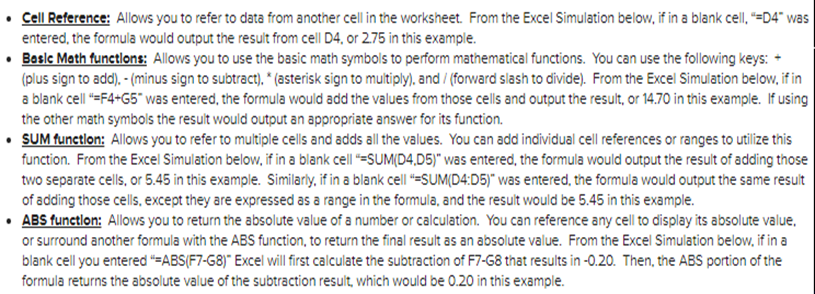
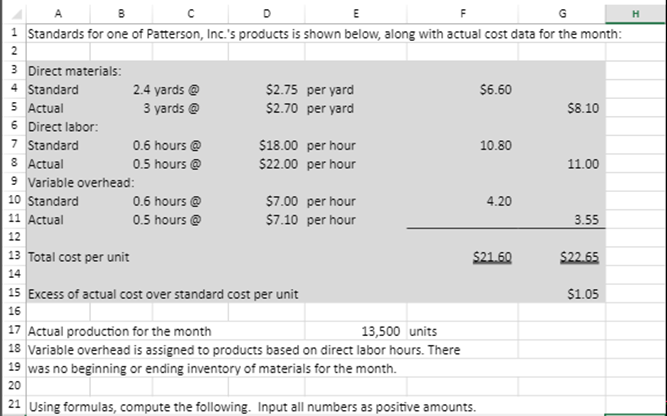
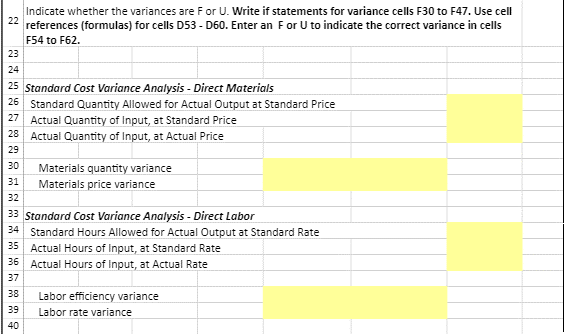
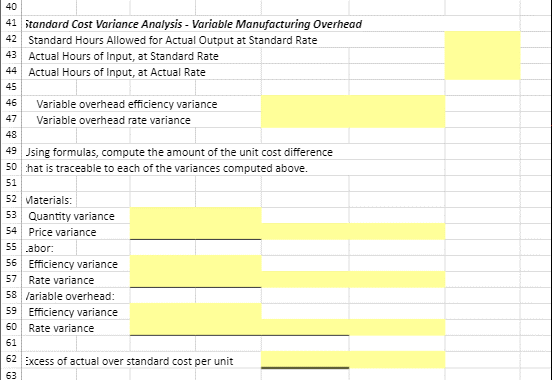
Cell Reference: Allows you to refer to data from another cell in the worksheet. From the Excel Simulation below, if in a blank cell, "=D4" was entered the formula would output the result from cell 04. or 2.75 in this example. Basic Math functions: Allows you to use the basic math symbols to perform mathematical functions. You can use the following keys: - (plus sign to add).- (minus sign to subtract). * (asterisk sign to multiply), and / (forward slash to divide). From the Excel Simulation below, if in a blank cell *=F4+G5" was entered the formula would add the values from those cells and output the result, or 14.70 in this example. If using the other math symbols the result would output an appropriate answer for its function. SUM function: Allows you to refer to multiple cells and adds all the values. You can add individual cell references or ranges to utilize this function. From the Excel Simulation below, if in a blank cell SUM(D4,D5)" was entered, the formula would output the result of adding those two separate cells, or 5.45 in this example. Similarly, if in a blank cell =SUM(D4:05)" was entered the formula would output the same result of adding those cells, except they are expressed as a range in the formula, and the result would be 5.45 in this example. ABS function: Allows you to return the absolute value of a number or calculation. You can reference any cell to display its absolute value, or surround another formula with the ABS function, to return the final result as an absolute value. From the Excel Simulation below, if in a blank cell you entered "=ABS(F7-G8)" Excel will first calculate the subtraction of F7-G8 that results in -0.20. Then, the ABS portion of the formula returns the absolute value of the subtraction result, which would be 0.20 in this example. A B D F H B C E 1 Standards for one of Patterson, Inc.'s products is shown below, along with actual cost data for the month: 2 3 Direct materials: 4 Standard 2.4 yards @ $2.75 per yard 56.60 5 Actual 3 yards @ $2.70 per yard 58.10 6 Direct labor: 7 Standard 0.6 hours @ $18.00 per hour 10.80 8 Actual 0.5 hours $22.00 per hour 11.00 9 Variable overhead: 10 Standard 0.6 hours @ $7.00 per hour 4.20 11 Actual 0.5 hours @ $7.10 per hour 3.55 12 13 Total cost per unit $21.60 $22.65 14 15 Excess of actual cost over standard cost per unit $1.05 16 17 Actual production for the month 13,500 units 18 Variable overhead is assigned to products based on direct labor hours. There 19 was no beginning or ending inventory of materials for the month. 20 21 Using formulas, compute the following. Input all numbers as positive amounts. Indicate whether the variances are For U. Write if statements for variance cells F30 to F47. Use cell 22 references (formulas) for cells D53 - D60. Enter an For U to indicate the correct variance in cells F54 to F62. 23 24 25 Standard Cost Variance Analysis - Direct Materials 26 Standard Quantity Allowed for Actual Output at Standard Price 27 Actual Quantity of Input, at Standard Price 28 Actual Quantity of Input, at Actual Price 29 30 Materials quantity variance 31 Materials price variance 32 33 Standard Cost Variance Analysis - Direct Labor 34 Standard Hours Allowed for Actual Output at Standard Rate 35 Actual Hours of Input, at Standard Rate 36 Actual Hours of Input, at Actual Rate 37 38 39 40 Labor efficiency variance Labor rate variance 40 41 itandard Cost Variance Analysis - Variable Manufacturing Overhead 42 Standard Hours Allowed for Actual Output at Standard Rate 43 Actual Hours of Input, at Standard Rate 44 Actual Hours of Input, at Actual Rate 45 46 Variable overhead efficiency variance 47 Variable overhead rate variance 48 49 Jsing formulas, compute the amount of the unit cost difference 50 hat is traceable to each of the variances computed above. 51 52 Materials: 53 Quantity variance 54 Price variance 55 abor: 56 Efficiency variance 57 Rate variance 58 /ariable overhead: 59 Efficiency variance 60 Rate variance 61 62 Excess of actual over standard cost per unit 63
Step by Step Solution
There are 3 Steps involved in it

Get step-by-step solutions from verified subject matter experts
 Study Help