







Question: PLEASE FOLLOW THE INSTRUCTION FOR THE FIRST SLIDE!! In Assignment 5, we will do exactly the same thing using PHP. [1] Submit the Form to
PLEASE FOLLOW THE INSTRUCTION FOR THE FIRST SLIDE!!
In Assignment 5, we will do exactly the same thing using PHP.
[1] Submit the Form to a PHP page (call it generate_table.php)
[2] PHP processes the form inputs
[3] PHP produces the table
[4] PHP serves the page back to the client.
HERE IS THE CODE:
INDEX:
Program Increment (PI) Summary Table
| Base URL: | |
| Program Increment ID: | |
| Agile Release Train (ART): | |
| Names of the Teams: | |
-------------------------------------------------------------------------------------------------------------------------------------------
CSS:
* { font-family: sans-serif; }
input.userInput{ width: 250px; border-radius: 5px; padding: 5px; border-color: darkblue; border-style: solid; border-width: thin; }
#btnGenerate{ font-size: 25px; width: 230px; border-radius: 8px; border-color: blue; background-color: cyan; }
#teamNames{ width: 400px; }
#dataTable th{ background-color: #98cc20; }
#dataTable a{ color: red; text-decoration: none; font-weight: bold; }
#dataTable tr{ padding: 5px; }
#dataTable tr:nth-child(even){ background-color: #e7e77e; }
#dataTable tr:nth-child(odd){ background-color: #f3f3be; }
----------------------------------------------------------------------------------------------------------------------
Javascript:
$(document).ready(function (){ $("#btnGenerate").click(function(){ clearTable(); // Clear table before adding a new one var dataset = []; // dataset stores input values var dataset = {}; dataset.baseURL = $("#baseURL").val(); dataset.programIID = $("#programIID").val(); dataset.agileRT = $("#agileRT").val(); dataset.teamNames = $("#teamNames").val(); generateTable(dataset); }); });
// Generates table and displays it on the page function generateTable(dataset){ var steps = 6; // Number of steps the program will go through generateTHead(dataset, steps); var teamNames = dataset.teamNames.split(","); var rowNum = 1; // To track the row number for (var teamName in teamNames){ var row = generateTRow(dataset.baseURL, rowNum, teamNames[teamName].trim(), dataset.programIID, steps); $("#dataTable").append(row); rowNum += 1; } }
function clearTable(){ $("#dataTable").html(""); }
// Add table head to generated table function generateTHead(dataset, steps){ var tableHead = $("
"); tableHead.append($("
").text("No.")); // Add No. header tableHead.append($("
").text("Team Name")); // Add Team Name header // Add headers for each step for (var step = 0; step ").text(dataset.programIID + "-" + (step + 1))); } tableHead.append($("
").text(dataset.programIID + "-IP")); $("#dataTable").append(tableHead); }
// Add row to table function generateTRow(baseURL, number, teamName, iterationID, steps){ var row = $("
"); row.append($("
")); row.append($("
")); for (var step = 0; step ").append(generateLink(baseURL, iterationID, teamName, step + 1))); } row.append($("
").append(generateLink(baseURL, iterationID, teamName, "IP"))); return row; }
// Method to generate links // function generateLink(baseURL, iterationID, teamName, step){ var url = baseURL + "?id=" + iterationID + "-" + step + "_" + teamName; var link = $(""); link.attr("href", url); // Set link href link.attr("target", "_blank"); // Open in new tab link.attr("title", url); // Open in new tab link.html((iterationID + "-" + step)); // Set link text return link; }
-----------------------------------------------------------------------------------------------------------------------------------------
![will do exactly the same thing using PHP. [1] Submit the Form](https://s3.amazonaws.com/si.experts.images/answers/2024/09/66d5f6c4edc84_37266d5f6c458f63.jpg)
![to a PHP page (call it generate_table.php) [2] PHP processes the form](https://s3.amazonaws.com/si.experts.images/answers/2024/09/66d5f6c5d59b9_37366d5f6c53d155.jpg)
![inputs [3] PHP produces the table [4] PHP serves the page back](https://s3.amazonaws.com/si.experts.images/answers/2024/09/66d5f6c6b6fd2_37466d5f6c61d0fa.jpg)
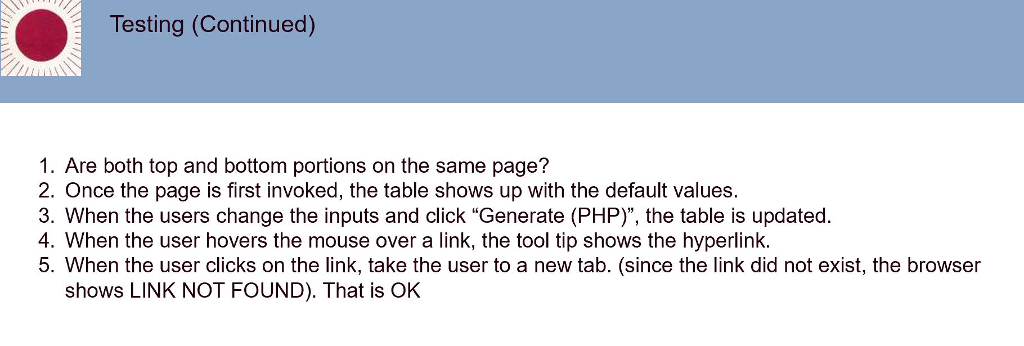
Testing (Continued) 1. Are both top and bottom portions on the same page? 2. Once the page is first invoked, the table shows up with the default values. 3. When the users change the inputs and click "Generate (PHP)", the table is updated. 4. When the user hovers the mouse over a link, the tool tip shows the hyperlink. 5. When the user clicks on the link, take the user to a new tab. (since the link did not exist, the browser shows LINK NOT FOUND). That is OK Here is an example of the top portion of "assignment3.html" page The values shown are DEFAULTS. User can update any of these values. Program Increment (PI) Summary Table Base URL https:/lmetro Program Increment ID 201901 Agile Release Train (ART) ics325 Names of the Teams: FRONT_END, SERVER, DATABASE, DEPLOYMENT Generate (JS) Generate (PHP) Add this button for Assignment 5. 3 Here is an example of the bottom portion of "assignment3.html" page The number of rows, column headers, row values and the hyperlinks behind the values these all depend on the inputs provided by the user given in the top portion No Team Name 1 FRONT_END 2 SERVER 3 DATABASE 4 DEPLOYMENT 201901-1 201901-1 201901-1 201901-1 201901-1 201901-2 201901-2 201901-2 201901-3 201901-2 201901-2 201901-5 201901-6 201901-IP 201901-5 201901-6 201901-IP 201901-5 201901-6 201901-1 201901-5 201901-3 201901-4 201901-4 201901-4 201901-4 201901-3 201901-3 201901-6 201901-1 201901-3 201901-4 201901-5 201901-6 201901-1 NOTE: Each red number will have the HYPER-LINK populated as follows. base url +"?id="+ iteration id+" + team name For example, for the inputs provided in earlier slide, the first hyperlink will be as follows. https://metro?id-201901-1 FRONT END Testing No Team Name 1 FRONT END 2 SERVER 3 DATABASE 4 DEPLOYMENT 201901-1 201901-1 20190%! 201601-1 901-1 201901-2 201901-3 201901-4 201901-5 201901-6 201901-1 201901-2 201901-2 201901-2 201901-3 201901-4 201901-5 201901-6 201901-IP 201901-2 201901-3 201901-4 201901-5 201901-6 201901-1 201901-3 201901-4 201901-5 201901-6 201901-IP 01 201901-3 201901-4 201901-5 201901-6 201901-IP NOTE: Eah red number will have the HYPER-LINK populated as follows. base u"?id-" + iteration id + " " + team name For example, for the inputs provided in earlier slide, the firs and last hyperlink will be as follows. https://metro?id-201901-1 FRONT END https://metro?id-201901-IP DEPLOYMENT
Step by Step Solution
There are 3 Steps involved in it

Get step-by-step solutions from verified subject matter experts
 Study Help