







Question: Please help!!! 1. Create 2 Integer Arrays: ( 15pts) - First Array: LastnameUnsorted - where you will have 10 integers between 0 to 100 in
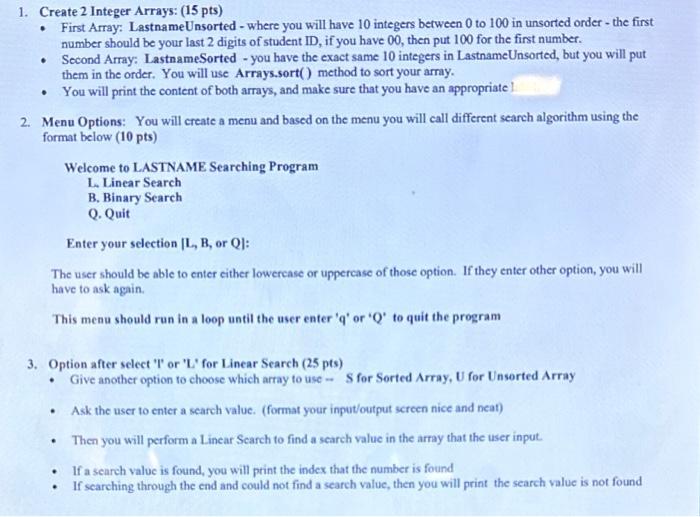
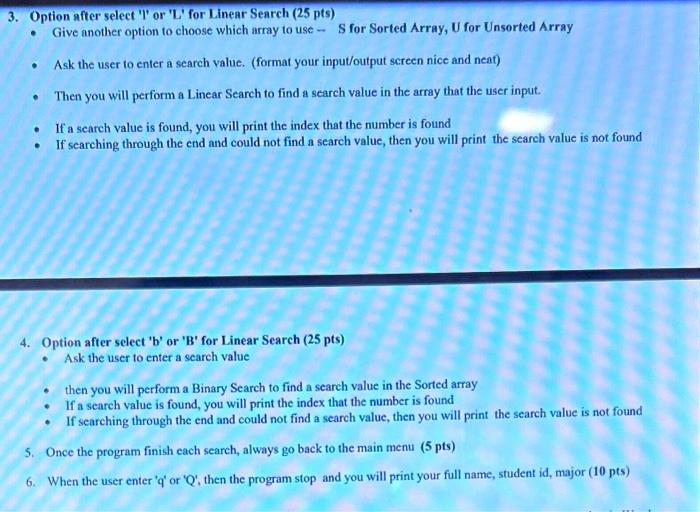
1. Create 2 Integer Arrays: ( 15pts) - First Array: LastnameUnsorted - where you will have 10 integers between 0 to 100 in unsorted order - the first number should be your last 2 digits of student ID, if you have 00 , then put 100 for the first number. - Second Array: LastnameSorted - you have the exact same 10 integers in LastnameUnsorted, but you will put them in the order. You will use Arrays.sort() method to sort your array. - You will print the content of both arrays, and make sure that you have an appropriate 2. Menu Options: You will create a menu and based on the menu you will call different seareh algorithm using the format below (10 pts) Welcome to LASTNAME Searching Program L. Linear Search B. Binary Search Q. Quit Enter your selection [L, B, or Q]: The user should be able to enter either lowerease or upperease of those option. If they enter other option, you will have to ask again. This menu should run in a loop until the user enter ' q ' or ' Q ' to quit the program 3. Option after select 'l' or ' L' for Linear Search (25 pts) - Give another option to choose which array to use - S for Sorted Array, U for Unsorted Array - Ask the user to enter a search value. (format your input/output screen nice and neat) - Then you will perform a Linear Scarch to find a search value in the array that the user input. - If a search value is found, you will print the index that the number is found - If searching through the end and could not find a search value, then you will print the search value is not found 3. Option after select 'l' or 'L' for Linear Search ( 25pts) - Give another option to choose which array to use - S for Sorted Array, U for Unsorted Array - Ask the user to enter a search value. (format your input/output screen nice and neat) - Then you will perform a Linear Search to find a search value in the array that the user input. - If a search value is found, you will print the index that the number is found - If searching through the end and could not find a search value, then you will print the seareh value is not found 4. Option after select ' b ' or ' B ' for Linear Search (25 pts) - Ask the user to enter a search value - then you will perform a Binary Search to find a search value in the Sorted array - If a search value is found, you will print the index that the number is found - If searching through the end and could not find a search value, then you will print the search value is not found 5. Once the program finish each search, always go back to the main menu ( 5pts) 6. When the user enter ' q ' or ' Q ', then the program stop and you will print your full name, student id, major (10 pts)
Step by Step Solution
There are 3 Steps involved in it

Get step-by-step solutions from verified subject matter experts
 Study Help